
The Local Business Website Audit Checklist: The 10 Checks Generic SEO Audits Skip
Search "website audit checklist" and you'll find a dozen guides covering Core Web Vitals, backlink profiles, and content quality, all written as if every website belongs to the same kind of business. None of them ask the one question that matters most for a local business: does your website actually agree with your Google Business Profile about who you are and where you are?
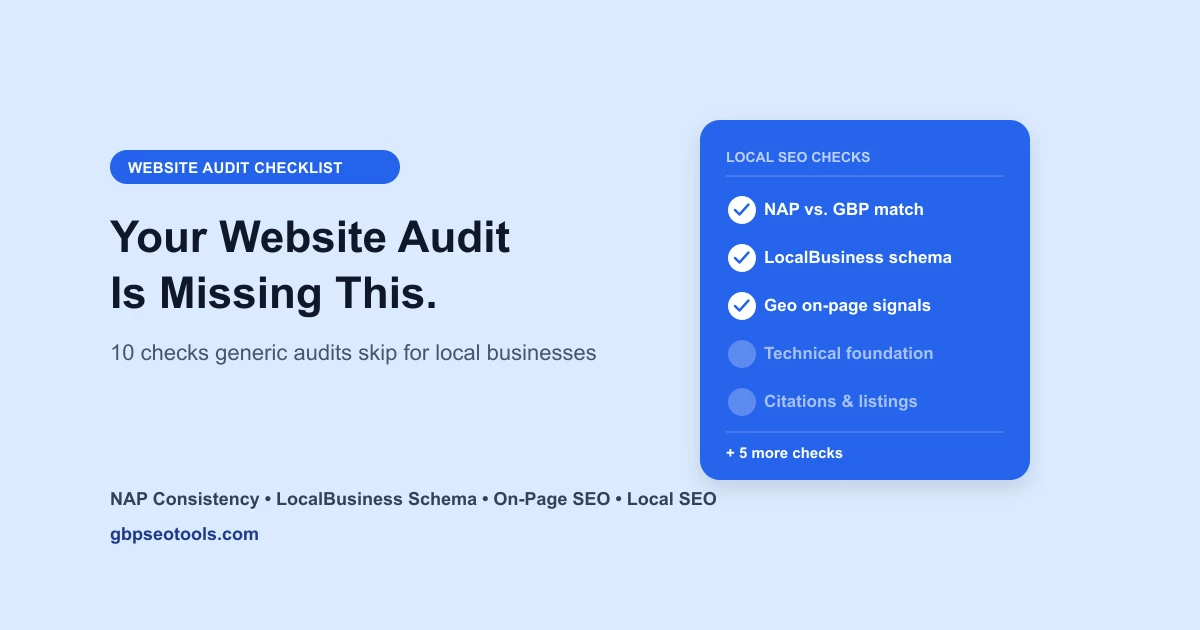
That's not a small gap. A local service business's website has one job a generic e-commerce or SaaS site doesn't: proving it's the real business it claims to be, in the place it claims to be. A website audit checklist for a local business needs to check name, address, and phone consistency against the Google Business Profile, whether LocalBusiness structured data is valid, and whether title tags and headings actually carry location relevance, on top of the technical basics every guide already covers.
This checklist walks through all 10 of those areas, the generic ones and the local-specific ones most guides skip entirely. Think of it as a local SEO audit checklist wearing a website audit's clothes: we built our own local SEO website audit tool around exactly this list, so every check below is something you can verify by hand or run automatically in under a minute.
Want the short version first? Run the website audit and see where your own site lands on all 10 before reading further, then come back to this checklist to understand what each finding actually means.
Profile & Identity: Does Your Website Match Your Google Business Profile?
Your Google Business Profile lists a name, address, and phone number. Your website should list the exact same ones, visibly, on more than one page. This is the check almost no generic website audit runs, because it requires knowing the business has a Google listing to compare against in the first place.
What to Check on Your Own Site
Pull up your homepage and your contact page side by side with your Google Business Profile:
- Phone number appears somewhere a visitor doesn't have to search for it, ideally the header or footer of every page
- Address or service area matches what's listed on your Google Business Profile, not an old location or a PO box
- Email address is visible if you list one on your profile
- All three read identically across your homepage, contact page, and any location-specific pages
Why This Check Gets Skipped Everywhere Else
A generic website audit checks whether your site is fast and whether your headings are structured correctly. It has no reason to check whether your phone number matches a listing on an entirely different platform. Take a plumbing business that moved offices eighteen months ago. Their Google Business Profile got updated the week of the move, an employee remembered to do it during onboarding for the new space.
Their website's footer, hardcoded into a template nobody had touched since 2022, still showed the old address. Every generic audit checklist would have called that site healthy. Our tool's profile and identity check flags it in the first ten seconds, because it's built to cross-reference the two sources against each other, not just check that a phone number exists.
Run the check yourself first: run the website audit and it'll pull your Google Business Profile automatically to compare, no manual copy-pasting required, though the manual check above works fine if you'd rather do it by hand.
Schema & Structured Data
Structured data is the part of your website Google reads but visitors never see, code embedded in the page that explicitly tells Google what kind of business you are, where you're located, and what your hours are. Most website audits check whether schema exists at all. A local business audit needs to check whether the right kind exists.
LocalBusiness Schema, Not Generic Organization Schema
Many site builders default to generic Organization schema, or skip structured data entirely. What actually helps a local business is LocalBusiness structured data, the correct subtype (a bakery and a law firm shouldn't use the same one), with address, phone, and hours fields formatted so Google can actually parse them, not just displayed as plain text nearby.
Why BreadcrumbList Schema Still Matters in 2026
BreadcrumbList schema, the structured data that produces the little "Home > Services > Plumbing" trail under a search result, is still fully supported and used by Google. That's worth stating plainly because FAQ schema, a type many sites also implement, lost its rich-result eligibility in 2026, and it's easy to assume structured data broadly is losing value. It isn't. Breadcrumb and LocalBusiness schema are both still active ranking and display signals, FAQ schema specifically is the one that changed.
A bakery's website audit might show valid FAQ schema on every page and nothing else, technically "using schema," but missing the two types that actually help a local listing show up correctly. That's a completeness illusion the schema check is built to catch.
Local On-Page Signals
Title tags, meta descriptions, and headings carry ranking weight everywhere. For a local business, they carry an extra job: telling Google, and a scanning visitor, where the business actually operates.
Title Tags, Meta Descriptions, and H1s
Check each of these for length and location relevance:
- Title tag under roughly 60 characters, includes the service and the city or service area, not just the business name
- Meta description under roughly 160 characters, written for a human deciding whether to click, not stuffed with keywords
- H1 matches the page's actual topic and includes the location where it reads naturally, never forced
The Homepage Visibility Test
Beyond the tags themselves, check whether your phone number and address actually appear on the homepage itself, not buried three clicks deep on a standalone contact page. A visitor deciding whether to call shouldn't have to hunt, and neither should Google's crawler trying to confirm your location matches your listing.
A dentist's office might have a perfectly optimized title tag ("Family Dentist in Austin, TX | Smile Care Dental") and still fail this check if the homepage itself never mentions Austin anywhere in the visible text, only in the meta tag a visitor never sees. Search engines weigh visible on-page content more heavily than metadata alone, so the two need to agree.
This is usually a fast fix. Most website platforms let you edit a title tag and add a sentence of visible location text to a homepage in the same afternoon you find the gap, with no developer required.




Technical Foundation
This is the section every generic website audit checklist already covers thoroughly, and for good reason, it's foundational. It's worth running quickly, then moving on to the sections above and below that most other guides skip.
The Fast Checks
- HTTPS enforced site-wide, with HSTS enabled so browsers never fall back to an insecure connection
- Canonical tag present on every page, pointing to the correct URL
- XML sitemap exists and is submitted to Google Search Console
- Open Graph and Twitter Card meta set, so pages look right when shared on social media
Why This Section Stays Short Here
Semrush, Wordstream, and most other website audit guides devote thousands of words to technical SEO, Core Web Vitals, crawlability, indexation depth. That coverage is genuinely good and worth reading elsewhere if your site has deeper technical issues. This checklist keeps its technical section brief on purpose, since duplicating that depth here wouldn't add anything a local business owner can't already find, and the checks above catch the most common gaps for a small business site running on a template platform.



Performance & Mobile
Most visitors checking a local business, whether it's open, what it charges, how to get there, are doing it from a phone standing outside, in a car, or on a lunch break. A slow or broken mobile experience costs a phone call before the business ever gets a chance to answer one.
What This Check Actually Measures
- Mobile viewport meta tag present, the setting that tells a phone's browser to render the page at phone width instead of shrinking a desktop layout
- Image and script count, used as fast proxies for how heavy a page is, since a page loaded down with unoptimized images and scripts tends to load slowly regardless of server speed
An Honest Limit Worth Naming
This check runs instantly and gives a useful signal, but it isn't a full Lighthouse audit. It won't measure exact load time under real network conditions or break down every render-blocking resource. If your site shows a lot of images and scripts here, that's a real flag worth investigating further with a dedicated performance tool, not a final verdict. Same principle as any honest audit: say what a check actually measures, not more.

Content Quality
A one-page website with a logo and a phone number might look clean, but it's missing the content shape both Google and customers expect from a real, established local business.
The Pages a Local Business Site Should Have
- Dedicated service pages, one per major service, not a single paragraph listing everything you do
- A location or service-area page, especially if you cover more than one city or neighborhood (a multi-location SEO setup gives each branch its own)
- A real about page, not a placeholder, since it's one of the first pages a skeptical new customer checks
- A working contact page with the same NAP details checked in the first section
Why Thin Content Reads as a Red Flag
Take a landscaping company with a single homepage, no service pages, no about page, just a hero image and a phone number. To a first-time visitor comparing three landscapers, that site reads as either brand new or not serious about the business, even if the company has been operating for a decade. A competitor with four dedicated service pages, real photos of completed jobs, and a short team bio wins that comparison before a phone call ever happens, and Google's own quality signals lean the same direction a skeptical customer would.
Ready to see where your own content stands? Run the audit above, the content quality check flags exactly which of these page types are missing from your own site.
Trust & Reviews
Trust signals on a website work alongside your Google reviews, they don't replace them, but a site that ignores them entirely is leaving an easy win on the table.
What Gets Checked
- Linked social profiles, so a visitor curious about recent work can find your Facebook or Instagram from your own site
- A clickable
tel:link on your phone number, so a visitor on mobile can call with one tap instead of copying a number - Live Google rating and review volume, pulled and displayed directly when a Business Profile match is found
The Easiest Fix on This Entire Checklist
A clickable phone number is a two-minute fix on almost every website platform, and it's one of the highest-leverage items here precisely because it's so easy to miss. A roofing company might have a beautifully designed site with its phone number rendered as plain text in the header, unclickable. Every mobile visitor who wanted to call had to manually copy the number first. Fixing that single link is faster than almost anything else on this checklist and removes a real point of friction between a ready customer and a phone call.
Backlinks & Authority
This is where a website audit starts pulling in outside data instead of just examining the site itself, referring domains, an estimated authority score, and what share of your backlink profile looks low-quality or spammy.
What the Numbers Mean
- Referring domains count how many distinct external sites link to yours, a rough proxy for how much of the wider web trusts and references your business
- Authority score, typically estimated on a 0-100 scale, summarizes that trust into a single comparable number
- Spam share, the percentage of your backlink profile that looks low-quality, since a pile of spammy links can hurt more than a smaller, cleaner profile helps
An Honest Limit on This Section Too
Backlink and authority data comes from live search index data pulled at the time of the check, not a cached snapshot from months ago. If a lookup returns nothing for your site, whether because it's genuinely new or because of a data gap, the honest answer is to show that check as skipped rather than displaying a fabricated zero. A number this important is worth getting right or not showing at all.
Search Visibility
Backlinks measure trust from other sites. Search visibility measures whether that trust, plus everything else on this checklist, is actually translating into rankings right now.
What This Section Covers
- Ranking keyword count, how many search terms your site currently ranks for anywhere in Google's results
- Page 1 keyword count, the subset of those rankings a searcher would actually see without clicking to page two
- Estimated monthly organic traffic, a rough projection based on those rankings and typical click-through rates at each position
Reading This Section Correctly
A locksmith's site might rank for two hundred keywords, but if all two hundred sit on page four or five of Google's results, none of them are producing calls. The page 1 count matters more than the raw ranking count for judging whether the technical, on-page, and local work covered earlier in this checklist is actually paying off. Treat a jump in page 1 keywords after fixing schema or NAP consistency as real evidence the fix worked, not just a coincidence. To watch that page 1 count move week by week for the keywords you care about, use a SERP tracker for your website.
Citations & Listings
This is the last of the local-specific checks, and it's the one most connected to your Google Business Profile itself, whether your business shows up consistently on the other directories that matter.
Directories Worth Checking
- Yelp
- Bing Places
A Presence Check, Not a Verified Match
Worth being precise here: this checks whether a listing for your business appears to exist on each platform under a findable name, address, and phone, not whether every field matches exactly across all four. Confirming an exact NAP match on every directory requires checking each one directly. A presence gap is still real and worth knowing about on its own. A café that moved locations two years ago might have a perfectly updated Google Business Profile and website, and a Yelp listing still pointing customers to the old address, quietly costing walk-in traffic every week nobody notices.
The Local Business Website Audit Checklist: Quick Reference
| Section | What It Catches | Manual Check Time |
|---|---|---|
| Profile & Identity | NAP mismatch between your website and Google Business Profile | ~3 min |
| Schema & Structured Data | Missing or wrong LocalBusiness/BreadcrumbList schema | ~5 min, needs page source access |
| Local On-Page Signals | Title tags, headings, and homepage copy missing location relevance | ~5 min |
| Technical Foundation | Missing HTTPS/HSTS, canonical tags, sitemap, social share meta | ~5 min |
| Performance & Mobile | Missing viewport meta, heavy image/script count | ~2 min, not a full Lighthouse audit |
| Content Quality | Missing service, location, or about pages | ~3 min |
| Trust & Reviews | Missing social links, unclickable phone number | ~2 min |
| Backlinks & Authority | Low referring domains, high spam share | Hard to check by hand, needs live search data |
| Search Visibility | Low page 1 keyword count despite many total rankings | Hard to check by hand, needs live search data |
| Citations & Listings | Missing or stale listings on Yelp, Facebook, Instagram, Bing Places | ~15 min, four separate sites |
The audit covers the first seven rows automatically against your live site and Google Business Profile. It also covers backlinks, search visibility, and citations, the three rows that need live search index data instead of just your own site, all for a one-time $4.99.
Website Audit Checklist: Common Questions
What is a website audit?
A website audit is a systematic review of a website's technical health, content, and search signals, checking things like site speed, structured data, on-page SEO, and backlink profile to find what's helping or hurting its performance in search results. For a local business, that review needs to go further than a generic technical check. The site also has to prove it's consistent with the business's real-world identity, its name, address, phone number, and location, not just that it loads quickly and has clean code.
What should be included in a website audit checklist?
A complete website audit checklist for a local business covers ten areas: profile and identity, schema and structured data, local on-page signals, technical foundation, performance and mobile, content quality, trust and reviews, backlinks and authority, search visibility, and citations and listings. Most published checklists stop at the middle five, technical foundation through trust and reviews. They skip the ones that actually depend on knowing the site belongs to a specific local business in a specific place.
How is a website audit different from a Google Business Profile audit?
A website audit checks what lives on your own domain, your site's code, content, and structured data. A profile audit checks your actual Google listing, its category, reviews, photos, and local pack ranking. The two overlap at exactly one point, NAP consistency, since your website and your Google Business Profile both need to agree on your name, address, and phone number. Running both is the core of a full local SEO audit, and it gives a complete picture instead of only half of it.
What happens if my business isn't on Google Maps yet?
When there is no Google Business Profile to match, the checks that rely on one, NAP cross-referencing and the citations check among them, are marked not run instead of guessing at data that isn't there. The rest of the list, technical foundation, content quality, schema, and performance, is unaffected and still produces a full, meaningful result.
Is there a free way to check my website's local SEO?
Yes. Everything in the profile and identity, local on-page signals, and technical foundation sections above can be checked manually with your browser's page source and a side-by-side look at your Google Business Profile. Running the website audit ($4.99, one-time) checks all ten categories at once and pulls the Google Business Profile comparison automatically, instead of doing it by hand.
Turning This Website Audit Checklist Into Two Minutes Instead of an Hour
Working through all ten sections above by hand takes real time, and three of them need data sources most business owners don't have direct access to at all.
What's Worth Doing by Hand
The first seven sections, profile and identity, schema, local on-page signals, technical foundation, performance, content quality, and trust signals, are all checkable with nothing more than your browser's page source and your Google Business Profile open side by side. There's real value in seeing your own site directly, and none of these seven need paid data access to check.
What to Run Automatically Instead
The last three, backlinks and authority, search visibility, and citations, are where a tool genuinely saves time, since they need live search index data a manual check can't reach without paying for separate access. Run the website audit to get all ten checked in about a minute for a one-time $4.99, then come back to the relevant section above to understand exactly what each result means and why it matters. If you haven't already, pairing it with a Google Business Profile audit covers the half of local SEO that lives on Google's side instead of your own website, so between the two, nothing about your local presence is left unchecked.
The full audit doesn't just flag what's wrong, either. Every check marked fix or improve comes with its own plain-language "how to fix this" explanation, not just a red X.

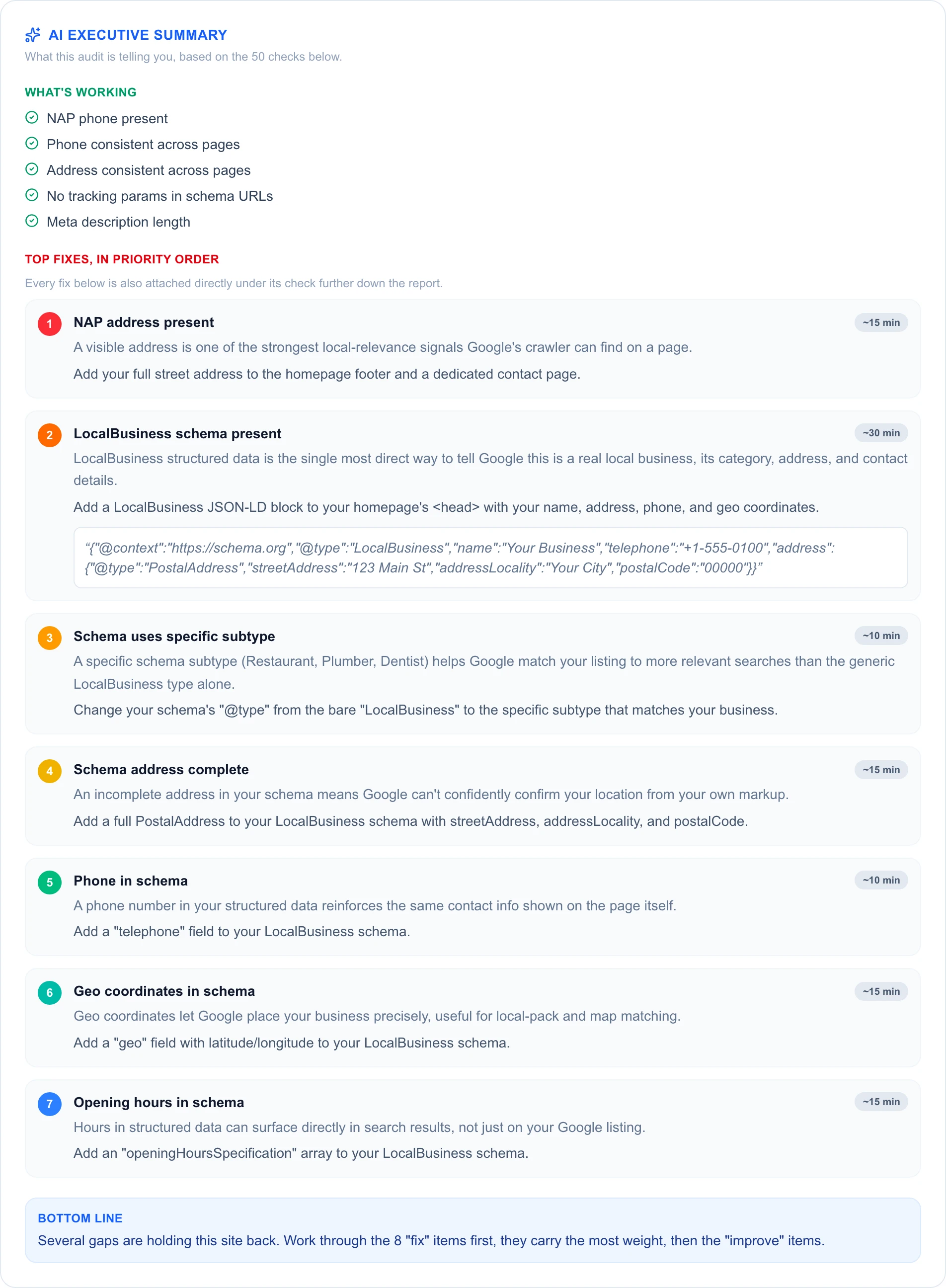
The full audit also rolls every fix into one prioritized executive summary, so you're not digging through 50 checks to find the handful that actually matter.
A website that looks finished and a website that's actually saying the right things to Google aren't the same, but working through this website audit checklist now shows you exactly where the gap usually is.