Local Keyword Research Tool & Keyword Finder
Map-pack position included
This Local SEO Keyword Finder takes your business and returns phrases that pair your service or product with your city, neighbourhood, or service area, the long-tail, location-led searches your best customers really type into Google. Call it keyword research, a keyword planner, keyword discovery, a keyword analyzer, or simply a keyword tool, the job is the same: turning your real category and city into the phrases that are worth going after.
What a local SEO keyword finder does
The kind of phrases it returns
A local SEO keyword finder surfaces the searches your best customers genuinely run on Google: your service alongside your city or neighbourhood, the particular problems you fix, and the wider terms attached to your trade. A local business has a real shot at these long-tail, location-led queries, where broad national terms are already owned by far larger players.
Drawn from your listing, not a template
Every phrase here starts from your listing's real category and city, read from the same live Google data our GBP check relies on, so the ideas reflect what your listing actually is rather than a stock template. This kind of tool goes by many names, keyword insights, a keyword builder, a keyword generator, a keyword explorer among them, but the need behind it stays constant: workable local keyword ideas rather than a generic list.
The process, step by step
Nothing new to learn, no separate keyword tool, builder, or explorer, just 3 steps from a lookup to a complete local keyword list.
Look up your business
Start typing the name and select it from Google's own autocomplete, the feed behind Google Maps. No account, no login.
Receive 5 keyword buckets
Service, location, problem, industry, and long-tail phrases, each scored for relevance and tagged with competition, trend, and search intent.
Copy or save it
Send the full set to your clipboard or save it as a CSV to plan content, service pages, and GBP posts.
A look at the output
Each keyword arrives with a relevance score, a competition level, a trend read, and a search-intent tag, not just a plain word list.
The results view
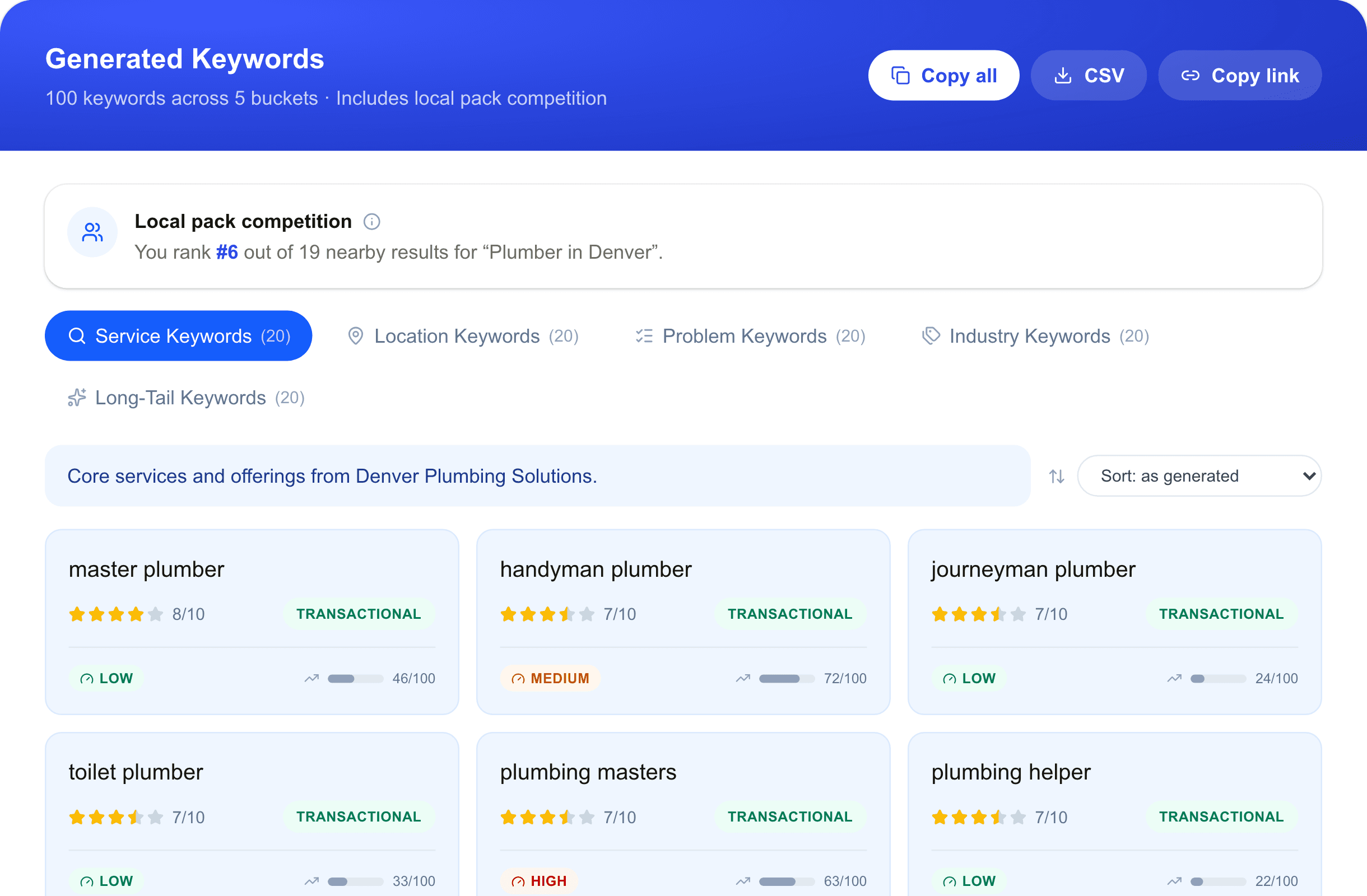
What each field tells you
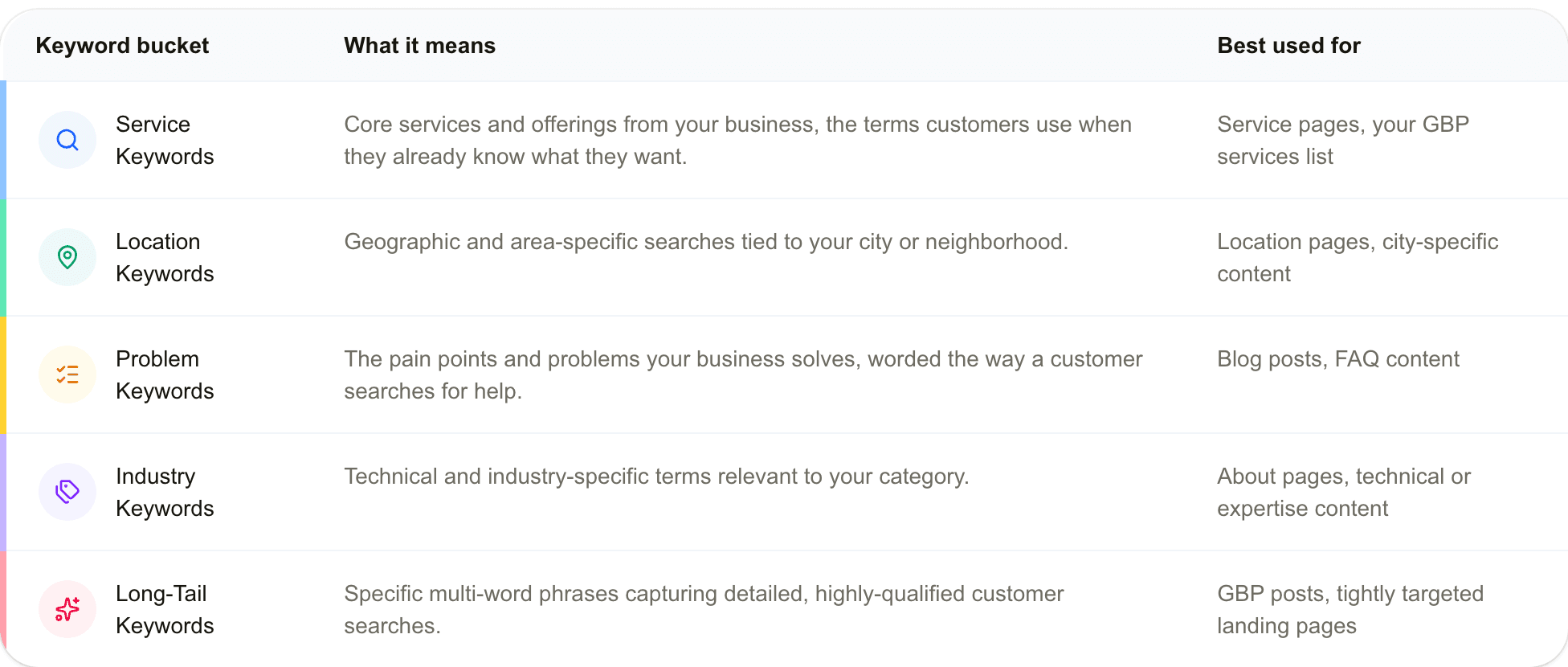
What sits in each keyword bucket
Service keywords
Your main services and offerings, the words a customer reaches for once they know what they need.
Location keywords
Area-specific and geographic searches anchored to your city or neighbourhood.
Problem keywords
The troubles and pain points you resolve, phrased the way someone would search when they need help.
Industry keywords
Trade and technical terms that belong to your category.
Long-tail keywords
Longer, precise phrases that capture detailed, well-qualified customer searches.
A summary for each bucket
ExtraEach bucket closes with a quick tile: the average score, the transactional/informational/navigational split, and how many phrases are low-competition, so there is no tallying cards yourself.
A reference for the keyword buckets
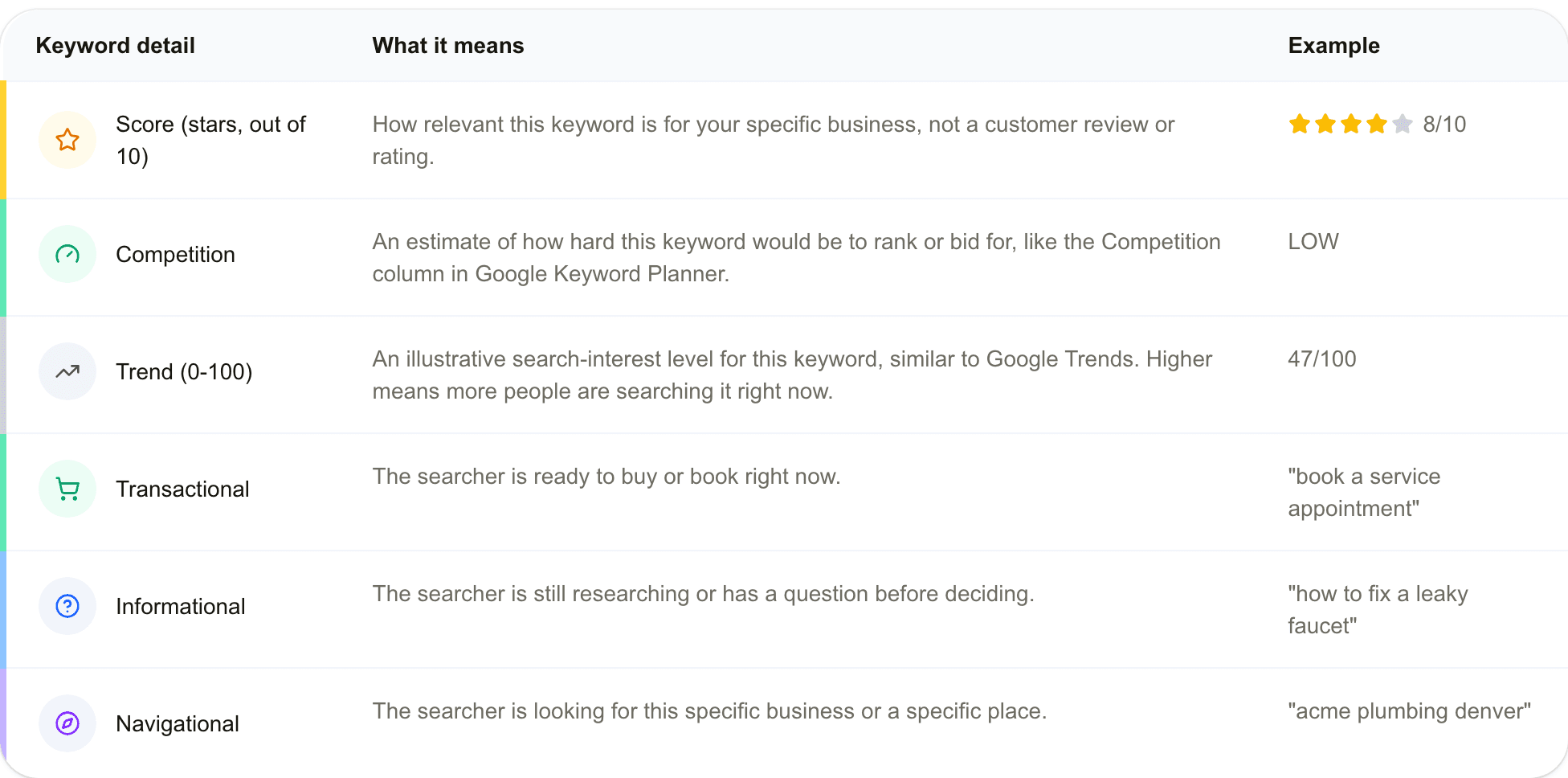
A reference for score, competition, trend, and intent
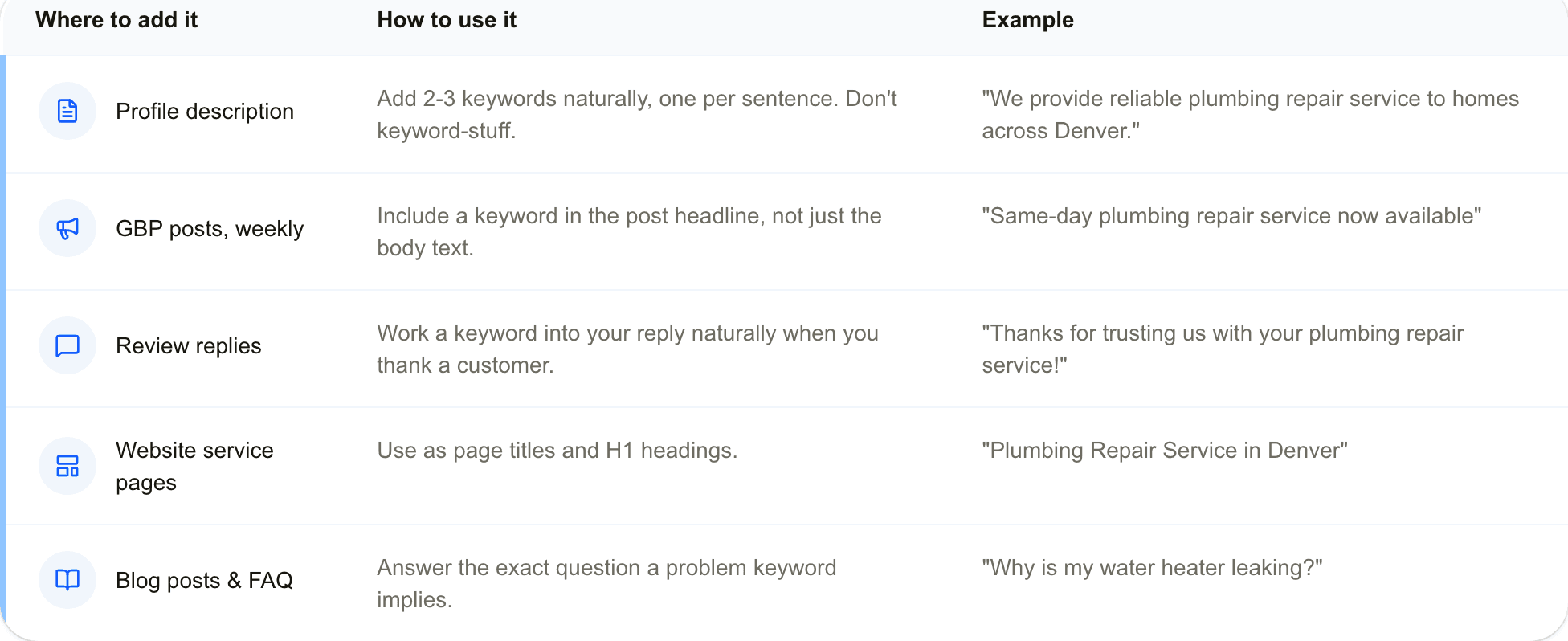
Turning these keywords into higher rankings
Who this keyword finder is for
The same list of local keywords answers a different question depending on who opens it. One set of 100 phrases, put to work three ways.
Business owners
A plain list of what to go after, with no SEO software to learn. Look up your business, open the full list, and move the top-scored phrases straight into your GBP description, service pages, and posts.
SEO consultants and freelancers
Run it ahead of a pitch or discovery call and arrive with a real, business-specific list instead of stock talking points. No account, no per-client plan to keep track of.
Content writers and agencies
Treat the Problem and Long-Tail buckets as headline prompts for blog posts and FAQs. The intent tag on each phrase signals whether it calls for a service page or an explainer.
How this stacks up against other tools
Free keyword tools usually take one of a few shapes. Some just paste your service and city together into rote combinations. Some take a single seed word and pad it out with no regard for whether the search is local. Others are trial views of paid platforms that ask you to register before you can download anything. This one is built on a different premise.
Tied to your actual business
Here
Reads your live Google Business Profile for the real category, city, and reviews.
Typical free keyword tools
Most simply expand a seed word you type, with no notion of what your business does.
Intent buckets already tagged
Here
100 phrases sorted into 5 buckets, each scored for competition, trend, and intent.
Typical free keyword tools
Usually one flat list, leaving you to work out relevance and intent.
Local pack competition read
Here
Shows how many nearby businesses appear for your category, and where you sit among them.
Typical free keyword tools
Seldom included, that tends to live in a separate paid rank tracker.
Signup or account
Here
None. Look up your business, pay once, and the phrases appear.
Typical free keyword tools
Many keep results behind an email signup or an account.
Price to open everything
Here
A single $4.99 for all 100 phrases, nothing recurring.
Typical free keyword tools
Frequently a monthly plan.
Export and sharing
Here
Copy all, CSV export, or a link that stays live for 90 days.
Typical free keyword tools
Often limited exports, or no shareable link at all.
Set to find your local keywords?
Look up your business and get all 100 phrases for $4.99. No signup, nothing recurring.
Common questions
Do the ideas actually reflect my business, or are they generic?
+
They start from your live Google Business Profile, the real category and city on the listing, so the service, location, problem, industry, and long-tail phrases are specific to what you do and where. None of it is a fill-in-the-blank template.
What does it cost?
+
A one-time $4.99, with no signup. That opens all 100 keywords across the five buckets, plus the read on how crowded your category is nearby. Nothing renews.
Is the trend number real search volume?
+
No. It is an illustrative 0-100 demand read in the spirit of Google Trends, not an exact monthly figure. The 1-10 score is relevance to your business, and competition (low, medium, high) mirrors the difficulty column you would see in Google Keyword Planner.
Where do I actually use each type of keyword?
+
Service and industry phrases fit your GBP description and service pages. Location and long-tail phrases work as page titles and post topics. Problem phrases make strong blog and FAQ headlines. Each phrase carries an intent tag so you know which use it suits.
Can I hand the results to a client or a teammate?
+
Yes. Copy the whole list, download it as a CSV, or share a link that stays live for 90 days.
Does it need my Google login or any setup?
+
No. You search your business by name and pick it from the list. There is no account, no sign-in, and nothing to install.
More tools for your Google Business Profile and local SEO
Run this one next to the others: each tool points at the same outcome, a stronger local presence and more customers from nearby search.
Go deeper on local SEO keyword research and how to shape these ideas into finished content.