
How to Get More Google Reviews (and How Many You Actually Need)
The way to get more Google reviews is to ask every customer, right after the job is done, with a link that opens your review box in one tap. Then keep asking every week instead of in bursts. That's how to get more Google reviews without breaking Google's rules or wearing out your customers.
Most owners already know reviews matter. The harder questions are how many you need and whether chasing more of them will move you up the map.
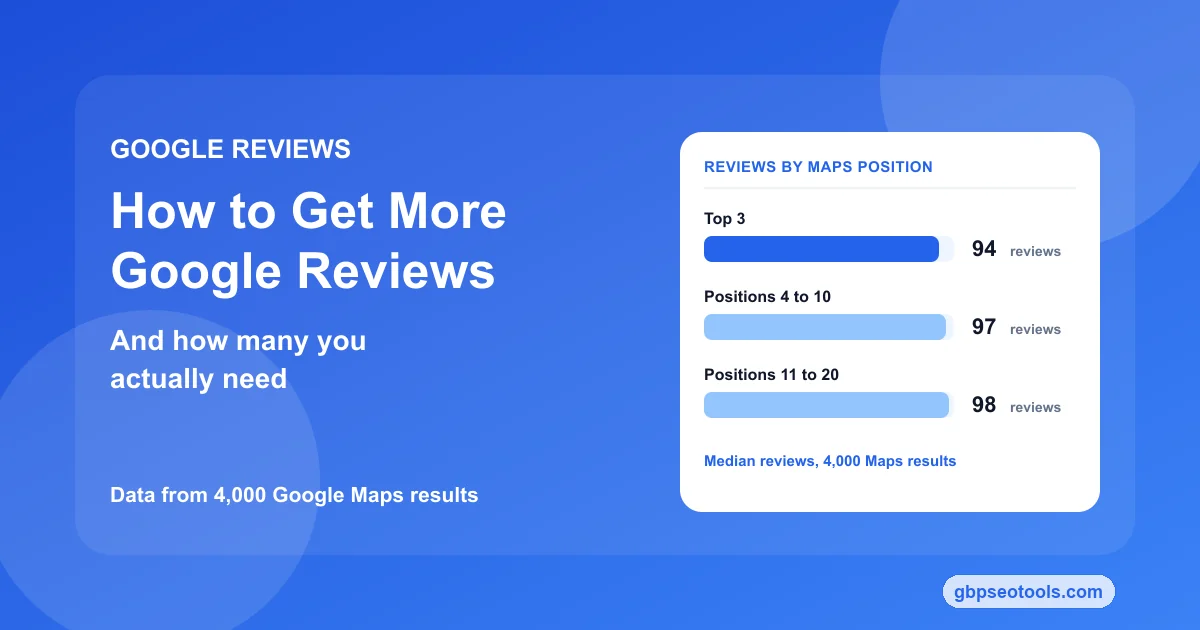
So we checked. In 4,000 Google Maps results across 20 services and 10 US cities, the businesses in the top three had a median of 94 reviews. The businesses in positions 11 to 20 had 98.
That doesn't mean reviews are wasted effort. It means they do a different job than most advice claims, and once you know that job, you know how many to aim for and what to do with them.
The steps below work the same for your own business or a client's.
In this guide:
- What 4,000 Google Maps results show
- How many Google reviews you need
- A weekly routine for asking
- Request messages that work
- Mistakes that cost you reviews
- Checking whether it moved your rank
What 4,000 Google Maps results say about review counts
On October 13, 2026, we pulled the top 20 Google Maps results for 20 common services, from plumber and dentist to florist and car wash, in 10 US cities. That's 200 searches and 4,000 listings, each with its review count and star rating. Four days later we ran a second check on review pace, described below.
The top three and page two look almost the same
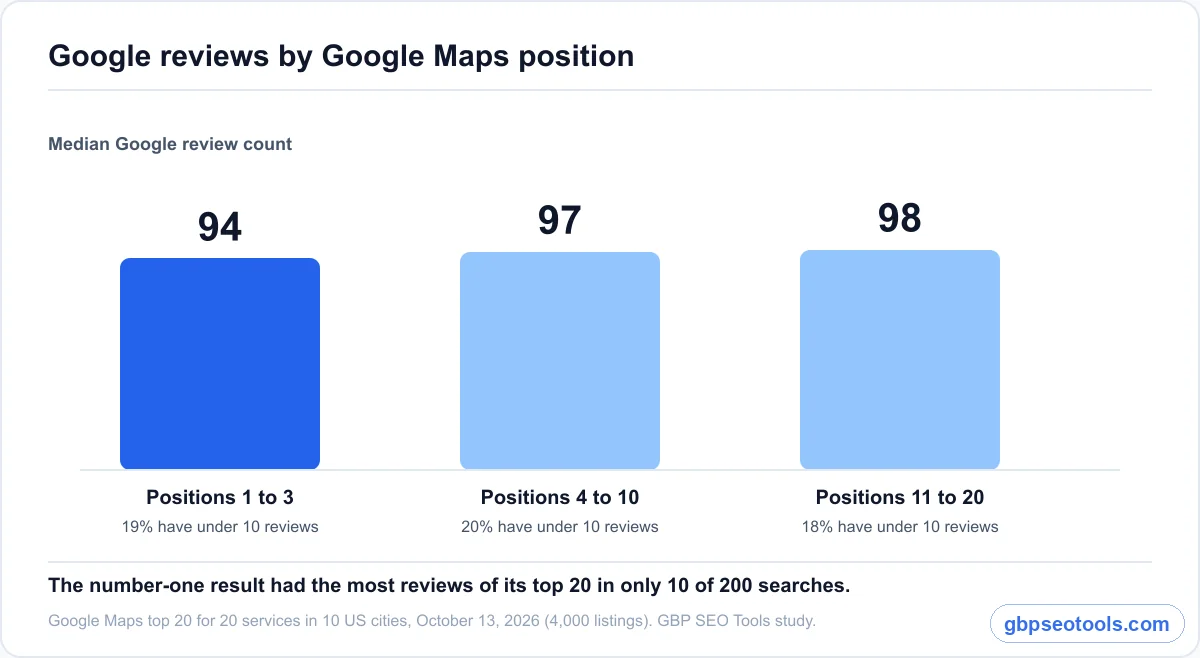
Review counts barely changed with position. The median business in the top three had 94 reviews, positions 4 to 10 had 97, and positions 11 to 20 had 98. Low counts were just as common at the top: 19% of top-three businesses had fewer than 10 reviews, and 6% had none at all.
Inside each search, the pattern held. The number-one result had the most reviews of its top 20 in only 10 of 200 searches. In 92 of the 199 searches with a full page two, it had fewer reviews than the typical business in positions 11 to 20. In one Austin search, the first-place plumber had 152 reviews and the fifth-place plumber had more than 18,000.
A faster review pace didn't sort the order either
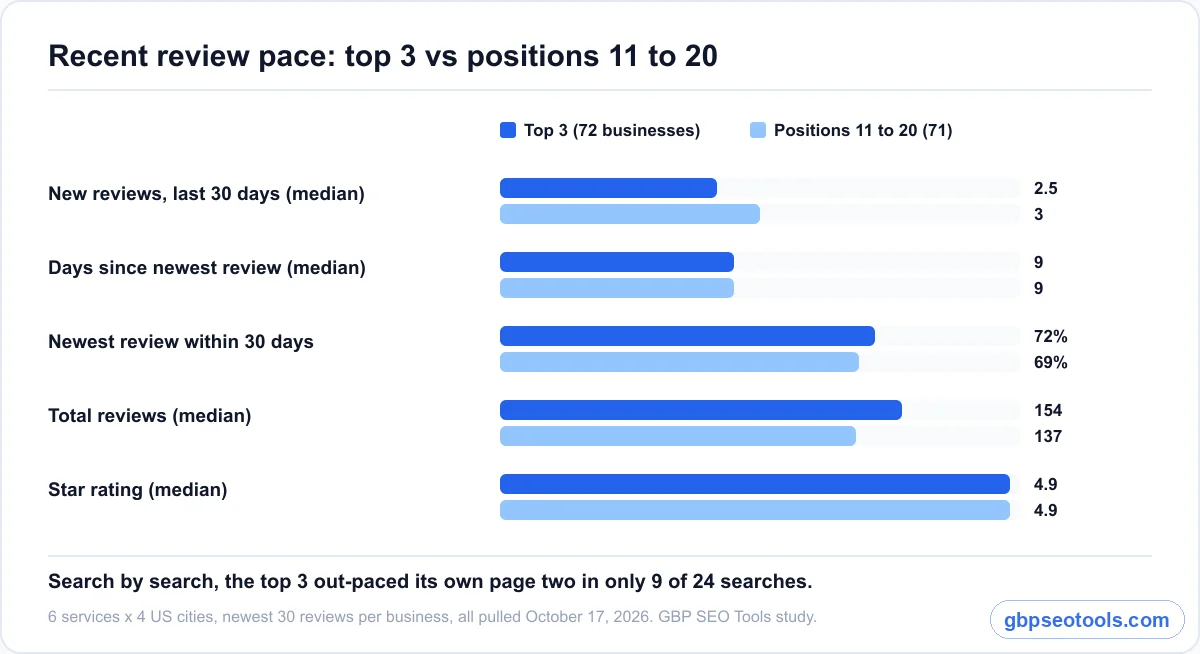
The usual follow-up claim is that review velocity, how fast new reviews arrive, matters more than the total. To test it, on October 17 we pulled the newest 30 reviews for 143 businesses: the top three and three businesses from positions 11 to 20, for six services in four cities, all on the same day.
The two groups were close to identical. The top three got a median of 2.5 new reviews in the last 30 days, page two got 3.
Both groups' newest review was a median of nine days old. Search by search, the top three out-paced its own page two in only 9 of 24 searches, and had more total reviews in 12 of 24. A coin flip would do about as well.
What reviews still do for your business
Here's the limit of our data. Every business we measured was already in the top 20, and each search ran from one point in the city. So the data says that among businesses Google already shows, more reviews didn't buy a higher spot. Order inside that group comes mostly from distance, category, and relevance. Here's why distance sets the order more than review count does.
Reviews still do three jobs. They feed prominence, Google's read on how well known a business is, which helps a new or thin profile get into the group Google considers at all. They set the star rating and count a searcher compares when three listings sit side by side, which decides who gets the call. And they give a doubtful customer recent proof that you do the work well.
Industry surveys of local SEO practitioners still rank review signals near the top of local ranking factors, and nothing in our data argues against getting reviews. It argues against expecting the 200th review to do what the 20th did.
How many Google reviews do you need?
You need roughly as many reviews as the businesses already ranking for your main search, a rating of about 4.5 or higher, and a newest review no older than a month. For most services in our data, that meant somewhere between 50 and 250 reviews, but the right number depends heavily on your industry and city.
The number for your industry
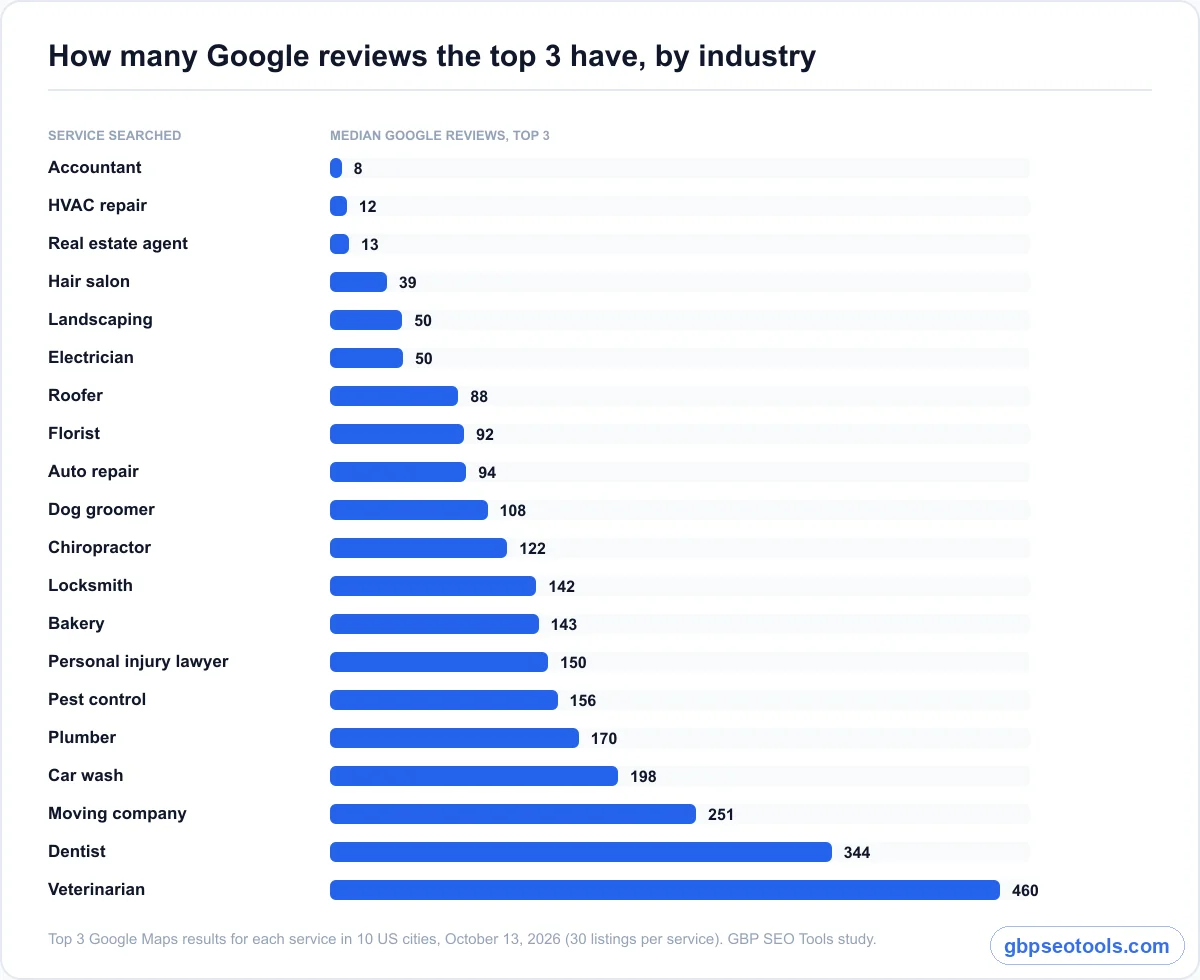
Medians for the top three swung widely by service. A top-three accountant had a median of 8 reviews. A top-three veterinarian had 460.
If you're an accountant with 30 reviews, you're already ahead of most of your local pack. If you're a vet with 30, you'll look thin next to every listing around you.
| Service | Top-3 median reviews | Positions 11-20 median |
|---|---|---|
| Accountant | 8 | 2 |
| HVAC repair | 12 | 46 |
| Real estate agent | 13 | 32 |
| Hair salon | 39 | 112 |
| Electrician | 50 | 26 |
| Landscaping | 50 | 29 |
| Roofer | 88 | 80 |
| Florist | 92 | 71 |
| Auto repair | 94 | 155 |
| Dog groomer | 108 | 113 |
| Chiropractor | 122 | 116 |
| Locksmith | 142 | 146 |
| Bakery | 143 | 260 |
| Personal injury lawyer | 150 | 58 |
| Pest control | 156 | 282 |
| Plumber | 170 | 190 |
| Car wash | 198 | 178 |
| Moving company | 251 | 175 |
| Dentist | 344 | 268 |
| Veterinarian | 460 | 296 |
Source: GBP SEO Tools Maps study, top 20 results for each service in 10 US cities, October 13, 2026.
The rating math: how many 5-star reviews move your average
Your star rating is plain arithmetic, so you can work out exactly what a review push will do. The number of five-star reviews you need is: current reviews × (target rating − current rating) ÷ (5 − target rating).
| Where you are now | Target | Five-star reviews needed |
|---|---|---|
| 20 reviews at 4.0 | 4.5 | 20 |
| 40 reviews at 4.3 | 4.5 | 16 |
| 40 reviews at 4.3 | 4.8 | 100 |
| 100 reviews at 4.6 | 4.8 | 100 |
Notice how the cost climbs near the top. Moving from 4.3 to 4.5 is a few months of steady asking. Moving from 4.3 to 4.8 takes six times as many reviews. Since the median top-three rating in our data was 4.9 and only 16% of top-three businesses sat below 4.5, the practical goal for most businesses is to clear 4.5 and keep it there.
Find your own target in ten minutes
Search your main service on Google Maps from where your customers are, not from your desk. Note the review count and rating of the top three and of a few listings around positions 10 to 20. Their median is your target count, and their lowest rating is roughly your floor.
Do the same search from two or three other parts of your service area, because the competitors change as the searcher moves. If you serve a whole metro area, the top three downtown may not be the top three in the suburbs where most of your jobs are.
How to get more Google reviews every week
The routine below works because it removes the two reasons most happy customers never leave a review: nobody asked, and the review box was too hard to find.
- Set up a direct link that opens your review box.
- Ask within a day of finishing the job.
- Send one reminder after three to five days.
- Put the same link everywhere you already contact customers.
- Check your new reviews once a week and reply to them.
Set up a one-tap link to your review box
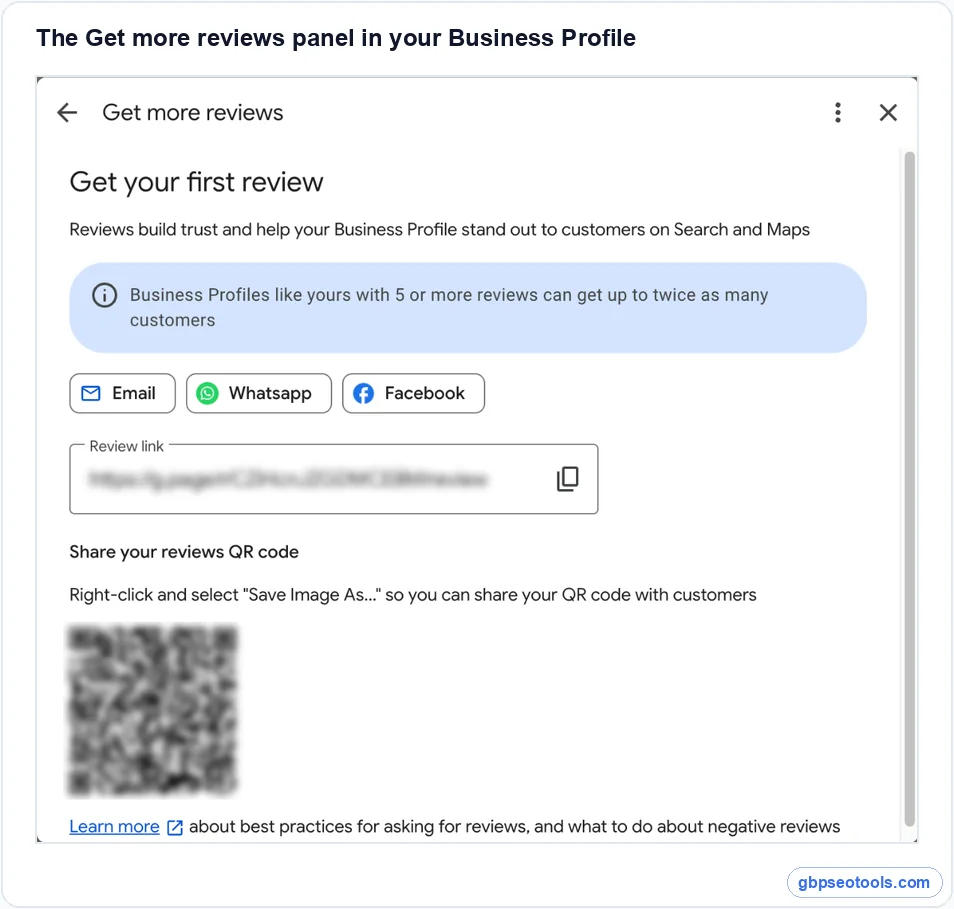
Google gives every Business Profile a short link and a QR code that open the review form directly. The quickest route: search your business name on Google while signed in as an owner, and select Ask for reviews in the panel above the results. That opens a Get more reviews window with the link, the QR code, and buttons to share by email, WhatsApp, or Facebook.
You can also reach it from business.google.com through Read reviews, then Get more reviews. Google notes that the QR code can only be generated from a computer browser, not the phone app, so set it up at a desk (Google's review request instructions cover the current steps).
Ask when the job is done, not at the counter
The best moment to ask is when the customer has just seen the result: the leak is fixed, the haircut is done, the car is back. Send the request that day or the next morning, while they still remember who did the work. A request that arrives two weeks later reads as an afterthought and gets ignored like one.
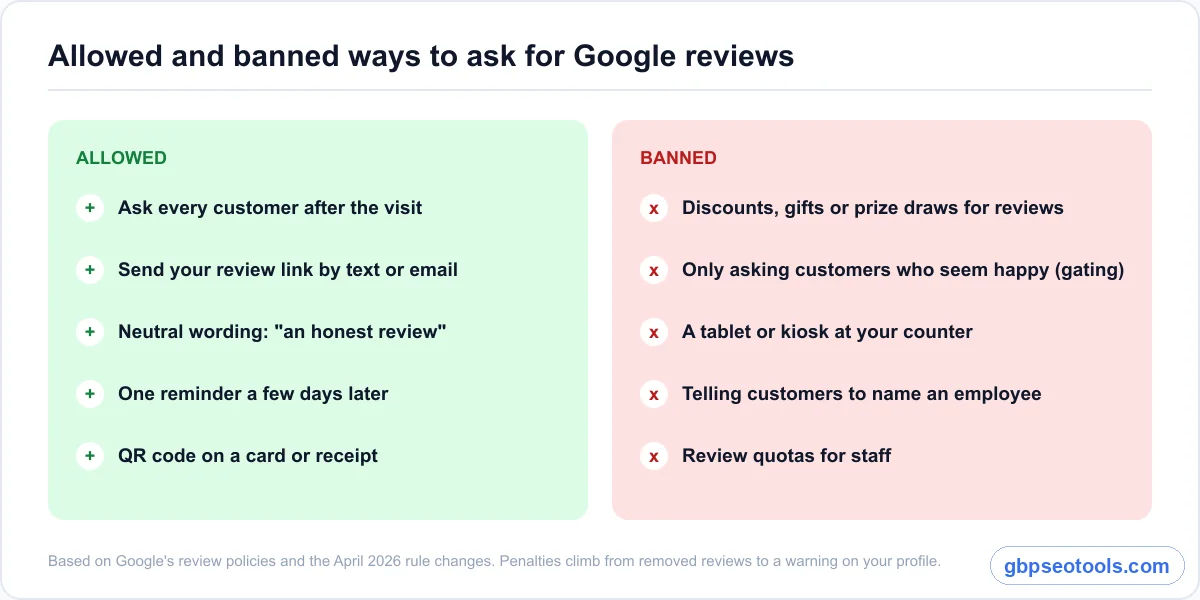
Ask every customer, not only the ones who seemed happy. Picking who gets the link is review gating, which Google treats as a violation, and it also produces a suspiciously perfect rating that buyers trust less.
Send one reminder, then stop
Most people who mean to leave a review simply forget. One reminder three to five days after the first message gives them a second chance. A second or third nudge starts to feel like pressure, and pressure is how you earn a two-star review about your follow-up instead of your work.
Keep a simple log of who you asked and when. A spreadsheet works for a single location. An agency handling several clients should use the same log for every account, so a missed week shows up at a glance.
Put the link where customers already are
You don't need new channels. Put the link in the places you already reach people: the follow-up text after an appointment, the email receipt, the invoice footer, the confirmation page after an online booking, and a small printed card with the QR code handed over with the finished work. A storefront can add the QR code to a window sign or table tent, as long as nobody is asked to post the review on your device.
Review request messages that customers answer
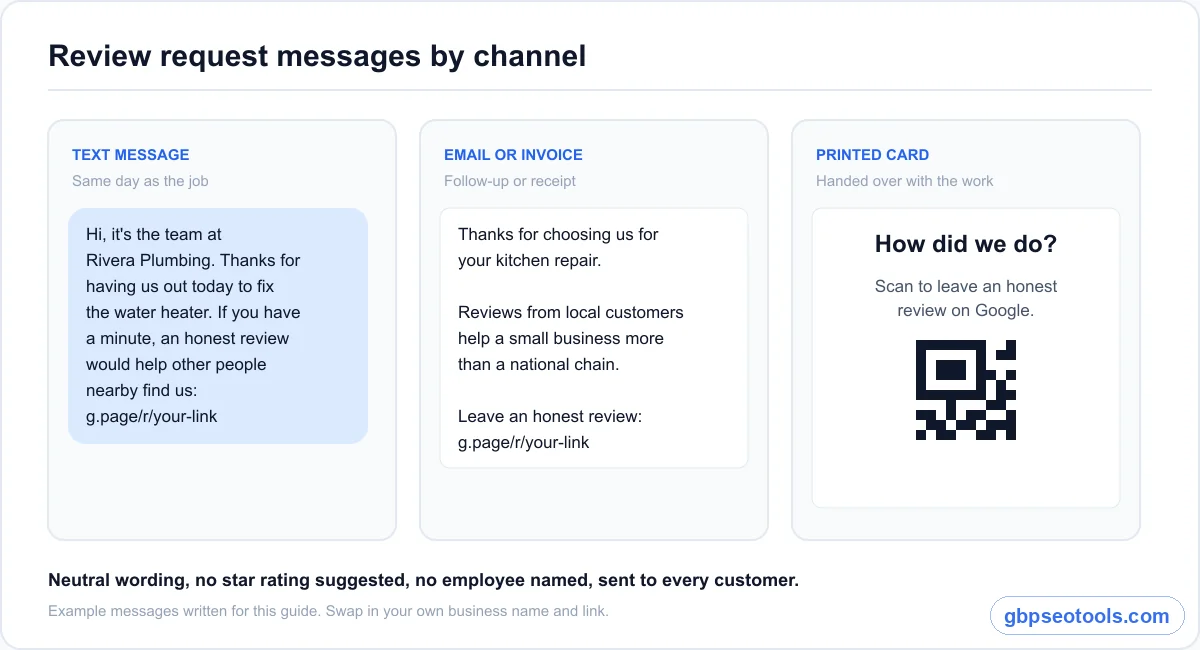
A good request is short, personal, and neutral. It names the job, includes the link, and asks for an honest review, never a five-star one. Here are three versions you can adapt.
A text message after the job
"Hi, it's the team at [Business]. Thanks again for having us out today to fix [the water heater]. If you have a minute, an honest review would help other people nearby find us: [link]"
A text reaches the customer while the job is still fresh, which suits service businesses that finish work on site. Send it from a number the customer recognizes, and keep it short enough to arrive as one message.
An email or invoice footer
An email has room for one extra line of context. Thank the customer for the specific job, say that reviews from local customers matter more to a small business than to a national chain, and put the link on its own line so it's easy to tap.
On an invoice or receipt, one sentence is enough: "Happy with the work? You can review us on Google here: [link]." It costs nothing and sits in front of every paying customer.
In person and on print
Saying it out loud still works, as long as the review happens later. "We'd really appreciate a review when you get a chance, the card has the link" is fine. Handing the customer your tablet and waiting while they type is not, because reviews left on a business's own device or at the counter are exactly what Google's 2026 rules target.
Mistakes that cost you reviews
Some ways of asking backfire. A few break Google's rules outright, and others simply waste the customers you asked.
Tactics Google now bans
Google prohibits offering anything in exchange for a review: a discount, a free item, an entry into a prize draw, or loyalty points. Rule changes reported in April 2026 also name two common habits as violations: setting review quotas for staff, and telling customers what to write, including asking them to mention an employee by name.
Add review gating and reviews collected on in-store kiosks or shared devices, and you have the list to avoid. The penalties climb from removed reviews to a public warning on your profile, so it's worth reading how Google enforces its review rules before you change your process.
Bursts that look like a campaign
Forty reviews in one week after months of silence looks like a campaign, even when every review is real. Google's automated checks look for unusual review activity, and a sudden spike is easy to spot. Reviews also vanish without notice: when we re-checked 68 local businesses over three days in October 2026, 9 of 1,857 reviews were gone.
A steady three or four a month is both safer and more useful, because it keeps your newest review fresh for every searcher who checks.
Links that open the wrong place
A surprising number of review requests send people to the business's Maps listing instead of the review form, or to a link that was copied from the wrong profile. The customer has to find the review button on their own, and most won't.
Test your link from a phone that isn't signed in to your account, and again from a customer's point of view after any change to the profile. If it doesn't open the review box with your business name at the top, fix it before you send another request.
Check whether more reviews moved your rank
Our data says more reviews won't automatically lift you once you're in the top 20. Your own profile may still be the exception, especially if you were thin on reviews to begin with. The only way to know is to measure before and after.
Scan the grid before you start
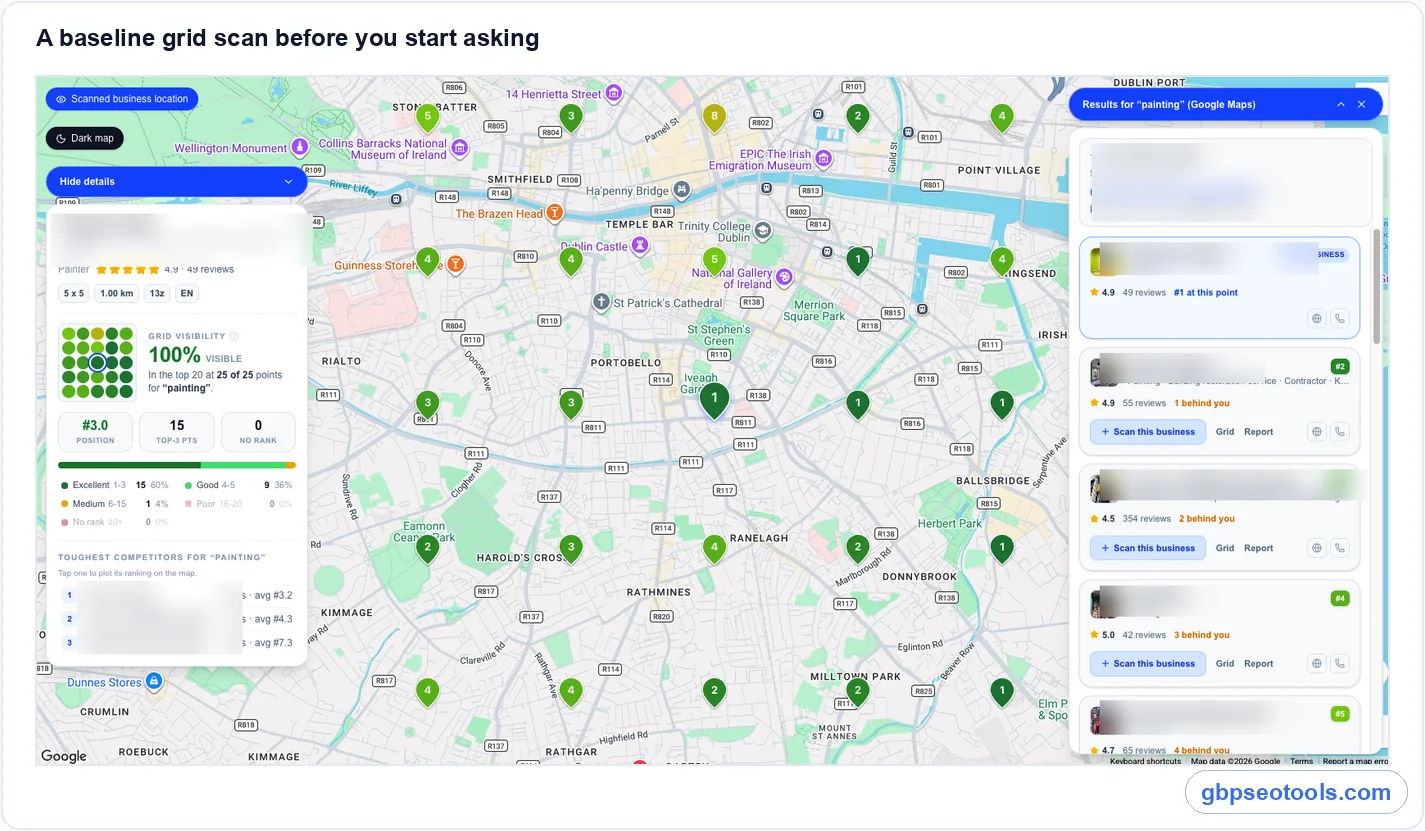
A single search shows your rank from one spot. A grid scan checks the same search from dozens of points across your service area and shows where you're in the local pack, where you rank lower, and where you don't show at all. Run one for your main service before you change how you ask, so you have a baseline to compare against.
With Google Maps rank tracking that runs grid scans, the baseline takes a few minutes and records the competitors at each point too. That second part matters, because it shows whether the businesses beating you have more reviews or are simply closer to the searcher.
Re-scan after six to eight weeks and compare the right numbers
Give the reviews time to accumulate, then scan again with the same keyword, grid size, and center point. Compare grid visibility (the share of points where you rank in the top 20) and the number of top-three points, not one position from one spot.
If both rose, the reviews likely helped you into more searches. If they held steady while your rating and count improved, the reviews are still doing their job on the click, and distance or category is what limits your map. One scan is a snapshot, so judge the trend over two or three.
Google reviews: common questions
Is 20 Google reviews good?
It depends on your industry. In our data, a top-three accountant had a median of 8 reviews and a top-three dentist had 344. Compare yourself with the businesses ranking for your main service in your area. If 20 matches or beats their median and your rating is above 4.5, you're in good shape.
How many 5-star reviews cancel out a 1-star review?
It depends on the rating you want to hold. To keep a 4.5 average, you need seven five-star reviews for every one-star review. To keep 4.8, you need 19, and to keep 4.9, you need 39. That's why a steady flow of reviews protects you better than a big total.
Do more Google reviews help you rank higher?
They help a thin profile get considered, but our data found little effect after that. Among businesses already in Google Maps' top 20, the top three had a median of 94 reviews and positions 11 to 20 had 98. Inside that group, distance, category, and relevance usually decide the order.
Can I pay someone to write Google reviews?
No. Paying for reviews, or offering customers a discount or gift in return for one, is fake engagement under Google's rules. It can get reviews removed, put a warning on your profile, or lead to a suspension. Ask real customers with a neutral request instead.
Will I lose my Google reviews if I change my business name?
Not normally. Reviews belong to the Business Profile, not the name, so they stay when you update the name on the same profile. A name change can trigger re-verification, though, and reviews can disappear if Google merges, removes, or suspends the profile while it checks.
Where to start this week
You don't need a big campaign. You need a link, a habit, and a way to see whether it worked. Here's how to get more Google reviews from this week on, depending on where you stand.
If you're below your market's number
Set up the review link today, send a request to every customer you finished a job for this week, and add one reminder. Keep going until your count reaches the median of the businesses ranking for your main service, then keep the pace at a few reviews a month. Scan your grid before you start and again in six to eight weeks.
If you're already at or above it
Stop chasing the total. Protect your rating and keep your newest review under a month old, with a steady few requests every week. Put the extra time into what usually sets the order instead: your category, the services listed on your profile, and the parts of your service area where you don't show up yet.