
Google Business Profile Categories: How to Choose the Ones That Win the Local Pack
Pick the most specific Google Business Profile category for the service that earns you the most, match it to the label the top-ranking businesses near you already use, and add only a few additional categories for services you really offer. Your Google Business Profile categories decide which searches you can appear in at all.
Most owners set a category once, when they create the profile, and never look at it again. That's understandable, since Google offers more than 4,000 of them and gives little guidance beyond "be specific."
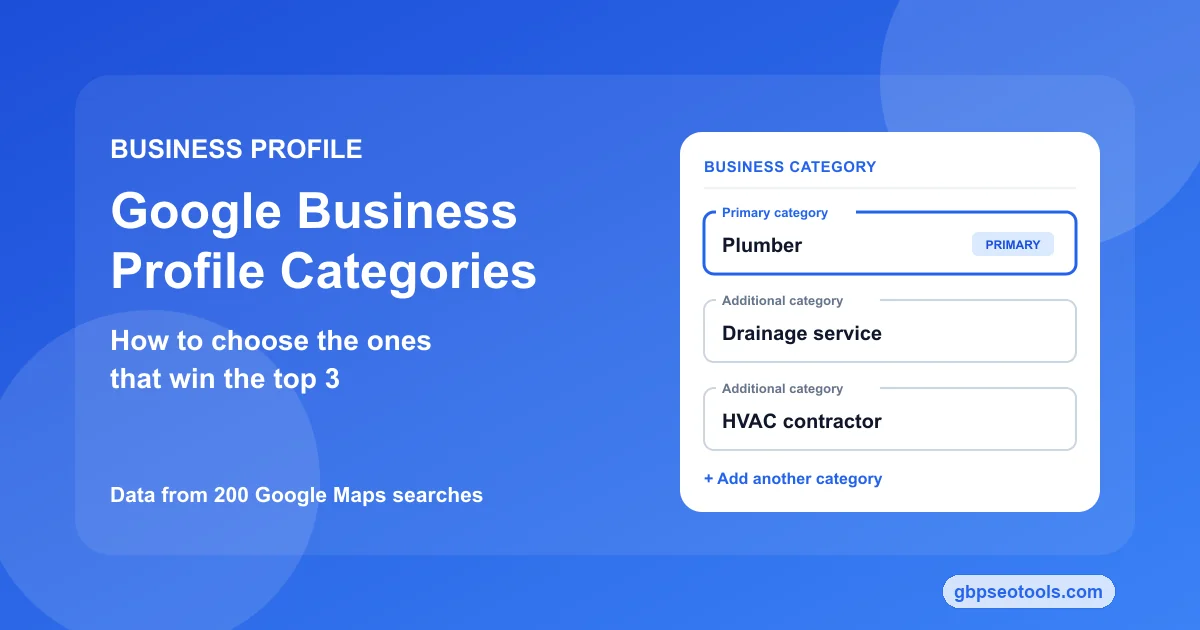
So we checked what actually ranks. On October 13, 2026, we pulled the top 20 Google Maps results for 20 common services in 10 US cities, 200 searches and 4,000 listings, and recorded every business's primary and additional categories. The results answer the questions owners ask most: which label to pick, whether more categories help, and how much a category can do on its own.
This guide walks through that data, then the five steps to choose your category, the label that wins for 20 services, what Google changed in 2026, and how to change a category without guessing at the result. It works the same for one profile or a client's.
In this guide:
- What 200 Google Maps searches show
- Primary vs additional categories
- How to choose in five steps
- The category list for 20 services
- What changed in 2026
- Changing your category safely
- Your category checklist
What 200 Google Maps searches show about categories
We searched 20 services, from plumber and dentist to car wash and accountant, in Austin, Denver, Phoenix, Charlotte, Columbus, Portland, Nashville, Tampa, Minneapolis and Sacramento. For each listing in the top 20, we noted the category Google displays as its primary and every additional category it carries.
Most top results use the obvious category
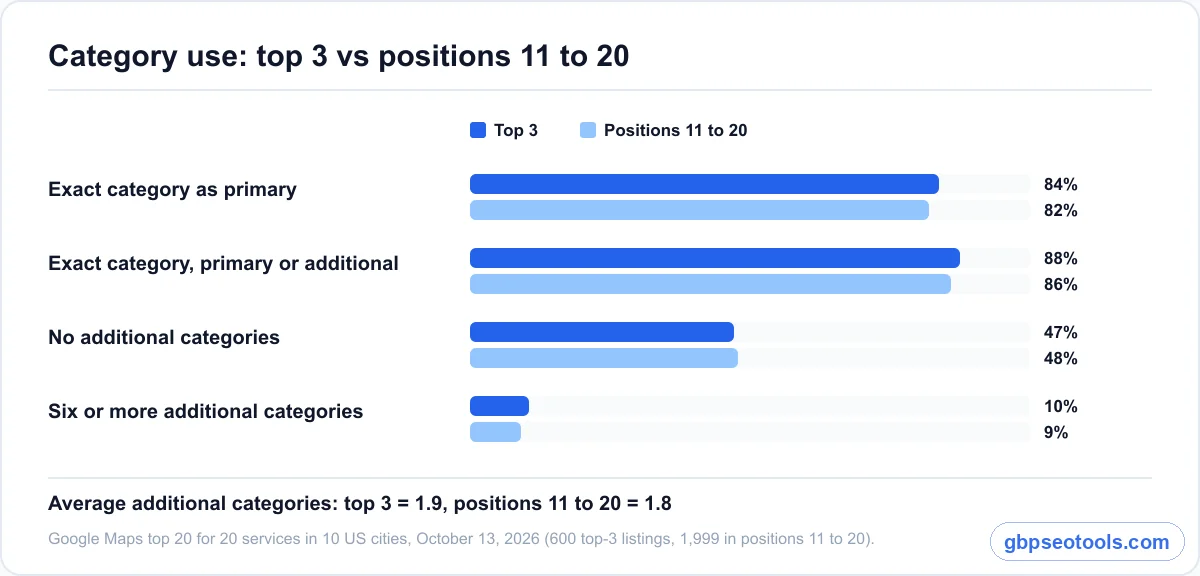
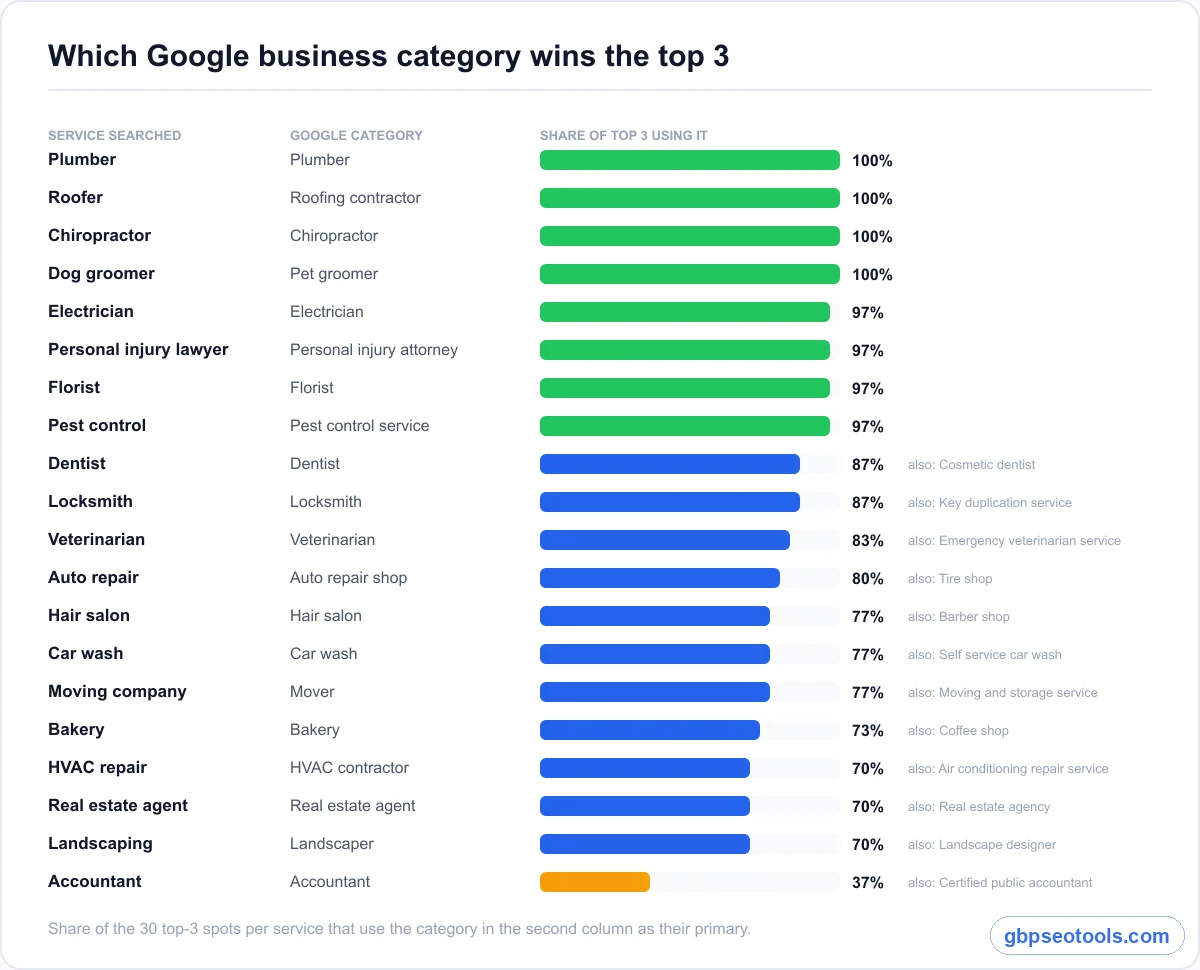
84% of the businesses in the top three used the exact matching category as their primary: "Plumber" for plumber, "Roofing contractor" for roofer, "Pet groomer" for dog groomer. Another 4% carried that category as an additional one. That leaves 12% that ranked with no matching category at all, usually through a close sibling such as "Air conditioning repair service" for an HVAC search.
In plain terms, Google matches the search to categories first and then ranks the businesses inside that group. If your category doesn't match, you're competing from outside the group.
The right category gets you in, not to the top
Here's the part most category guides skip. Businesses ranked 11 to 20 used the exact category almost as often as the top three: 82% against 84%. Once everyone in the race has the right category, it stops separating them.
What sorts the order after that is distance from the searcher and prominence, meaning reviews, links and how established the business looks. If you want the full picture of how distance and prominence work, that's covered separately. For categories, the takeaway is simple: the right one is your entry ticket, not your trophy.
Piling on categories didn't help
The top three averaged 1.9 additional categories. Positions 11 to 20 averaged 1.8. And 47% of top-three businesses had no additional categories at all, the same share as the listings further down.
That doesn't mean additional categories are useless. A plumber that adds "Drainage service" can show up for drain searches a "Plumber" label alone might miss. But stacking eight or ten loosely related categories didn't put anyone higher in our data, and Google itself asks you to use "a few."
One caveat that applies to everything in this section: it's a one-day snapshot, and it shows what ranking businesses have in common, not what caused them to rank.
Primary vs additional Google business categories
Every profile has one primary category and can carry several additional ones. They don't do the same job, and treating them the same is where most category mistakes start.
What your primary category controls
The primary category is the label Google shows under your business name, and it's the one Google leans on hardest to decide which searches you belong in. It also unlocks features. According to Google's category help page, restaurants get menu and reservation links, hotels get class ratings and amenities, and health and beauty businesses can show a booking button and a services list.
That makes the primary category the most valuable single field on the profile. It should describe what the business is, in the words a customer would search, not the broadest label that technically fits.
Your category also shapes AI answers
When someone asks ChatGPT, Gemini or Google's AI Mode for "the best plumber near me," the engines draw on business listings and directories, and your Google Business Profile category is one of the clearest statements of what you do. A vague category makes it harder for them to place you in the right answer. We haven't measured this the way we measured Maps rankings, so treat it as one more reason to get the category right, not as a ranking factor with a number attached. To see whether AI engines actually name you, check your AI visibility for the questions your customers ask.
When an additional category earns its place
Add a category when it names a real service customers search for separately, one you'd be glad to get calls about. A dentist adding "Cosmetic dentist," a florist adding "Flower delivery," a vet adding "Animal hospital": each was the most common additional category in the top three for that service, and each matches a distinct search.
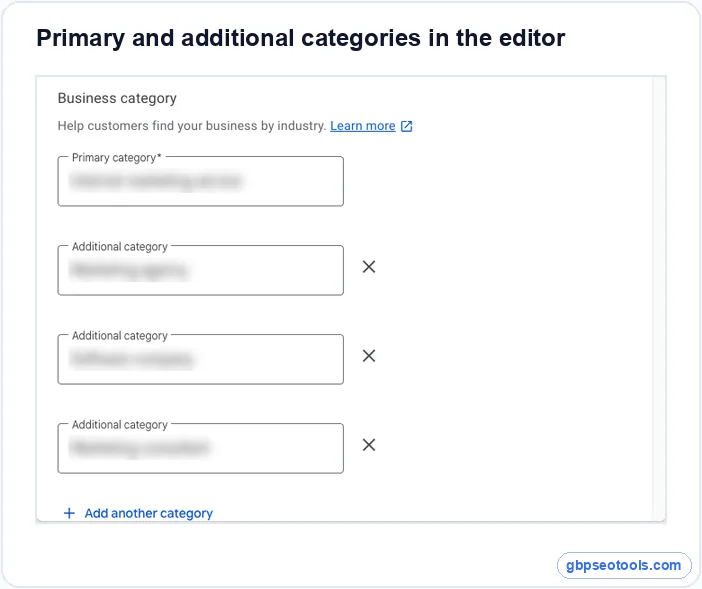
Skip categories that describe what you sell rather than what you are, or that pull you into searches you can't serve. Our own profile, for example, uses one primary and three additional categories, all describing the same core business.
When a service needs its own profile
Google draws one more line. If a department is run independently and serves the public in its own right, it should get its own profile instead of a category on yours. Google's example is a gym with an independently run cafe: the cafe gets its own listing with "Cafe" as its primary category. A service you run yourself stays a category on your profile.
How to choose your primary category in five steps
- List the services that bring in most of your revenue.
- Search your main service on Google Maps from your area and note the category under each of the top three businesses.
- Pick the most specific category Google offers that matches both.
- Check that the label Maps shows is the one you expected.
- Add a few additional categories for real, separately searched services.
Start with the service that pays the bills
A bakery that also sells coffee is a "Bakery," unless sit-down coffee is where most of the money comes from. In our data, 73% of top-three bakeries used "Bakery" as their primary and 10% used "Coffee shop." Both are legitimate. The deciding question is which search you most want to win, because the primary category tells Google which one that is.
See which label wins in your area
Open Google Maps, search your main service the way a customer would, and look at the line under each business name. That line is the primary category. It's the fastest research you can do, and it's local: the label that wins in Phoenix may not be the one that wins in your town.
Pick the most specific label Google offers
Google's own guidance is to choose "Nail salon" rather than "Salon." Specific beats broad because a broad label puts you in a bigger, more generic group. In our data, the generic "Contractor" won just two of the 60 top-three spots for electricians and landscapers.
When the obvious label isn't the winning one
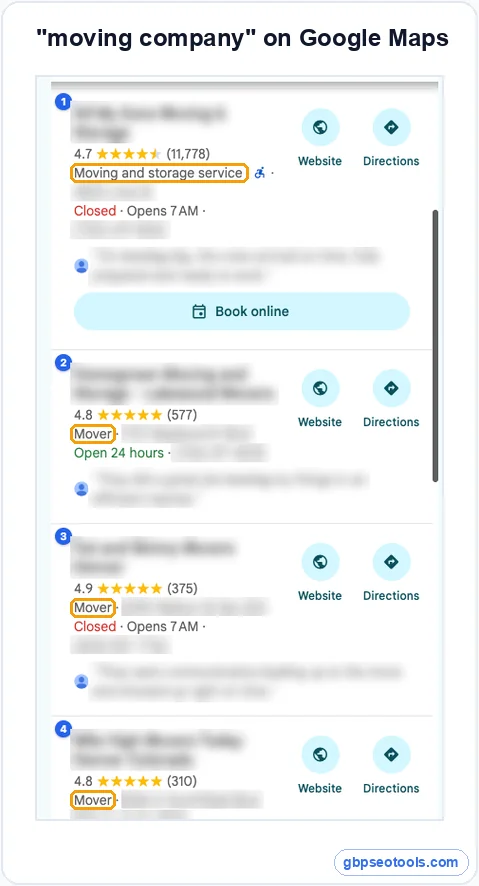
Sometimes the word you'd search isn't Google's word. For "moving company," 77% of the top three showed "Mover," and nobody showed "Moving company." For "accountant," only 37% used "Accountant." Most of the rest used "Certified public accountant," "Tax preparation service" or "Accounting firm."
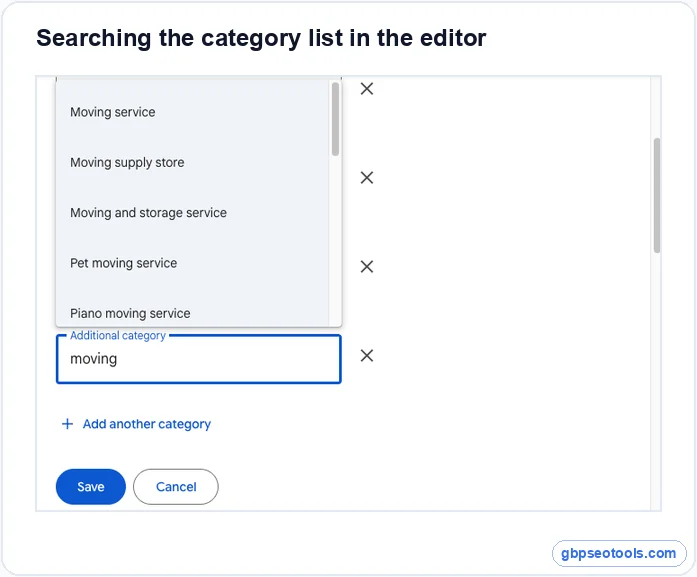
There's another wrinkle. When we typed "mover" into the category editor on October 13, 2026, there was no "Mover" option. The closest choice was "Moving service." The label customers see on Maps and the name you pick in the editor don't always match, which is why step four matters: check how your listing displays after you choose.
The Google business category list, sorted by what ranks
Full lists of all 4,000-plus categories are easy to find. What they don't tell you is which entry actually holds the top three for your service. That's what this table adds.
The winning category for 20 common services
| Service searched | Category most top-3 businesses use | Share of top 3 | Other labels that won | Common additional categories |
|---|---|---|---|---|
| Plumber | Plumber | 100% | none | Drainage service, HVAC contractor |
| Roofer | Roofing contractor | 100% | none | Siding contractor, Gutter service |
| Chiropractor | Chiropractor | 100% | none | Massage therapist |
| Dog groomer | Pet groomer | 100% | none | Pet supply store |
| Electrician | Electrician | 97% | Contractor | Electrical installation service, Lighting contractor |
| Personal injury lawyer | Personal injury attorney | 97% | Criminal justice attorney | Law firm, Attorney, Trial attorney |
| Florist | Florist | 97% | Wholesale florist | Flower delivery, Flower designer |
| Pest control | Pest control service | 97% | Bird control service | Rarely any (87% use none) |
| Dentist | Dentist | 87% | Cosmetic dentist | Cosmetic dentist, Emergency dental service |
| Locksmith | Locksmith | 87% | Key duplication service | Emergency locksmith service |
| Veterinarian | Veterinarian | 83% | Emergency veterinarian service | Animal hospital |
| Auto repair | Auto repair shop | 80% | Tire shop | Brake shop, Oil change service |
| Hair salon | Hair salon | 77% | Barber shop, Beauty salon | Beauty salon, Hairdresser |
| Car wash | Car wash | 77% | Self service car wash | Rarely any (80% use none) |
| Moving company | Mover | 77% | Moving and storage service | Piano moving service |
| Bakery | Bakery | 73% | Coffee shop | Coffee shop, Breakfast restaurant |
| HVAC repair | HVAC contractor | 70% | Air conditioning repair service | Heating contractor |
| Real estate agent | Real estate agent | 70% | Real estate agency | Real estate consultant |
| Landscaping | Landscaper | 70% | Landscape designer | Lawn care service |
| Accountant | Accountant | 37% | Certified public accountant, Tax preparation service | Bookkeeping service, Tax consultant |
Shares come from 30 top-three spots per service (10 cities, three spots each).
How to search Google's list yourself
For any service not in the table, the category editor is the most reliable list there is, because it only offers categories that exist today. Open your profile, choose Edit profile, then Business category, and start typing. Google suggests matching categories as you type, and nothing changes until you press Save.
When your service has no category
You can't create your own category. If nothing matches, Google says to pick a more general one that does fit, and then describe the specific service in your services list and business description. A business that makes custom e-bike batteries, for example, would use the closest real store or repair category and spell out the specialty in its services.
Google's category list changed every month in 2026
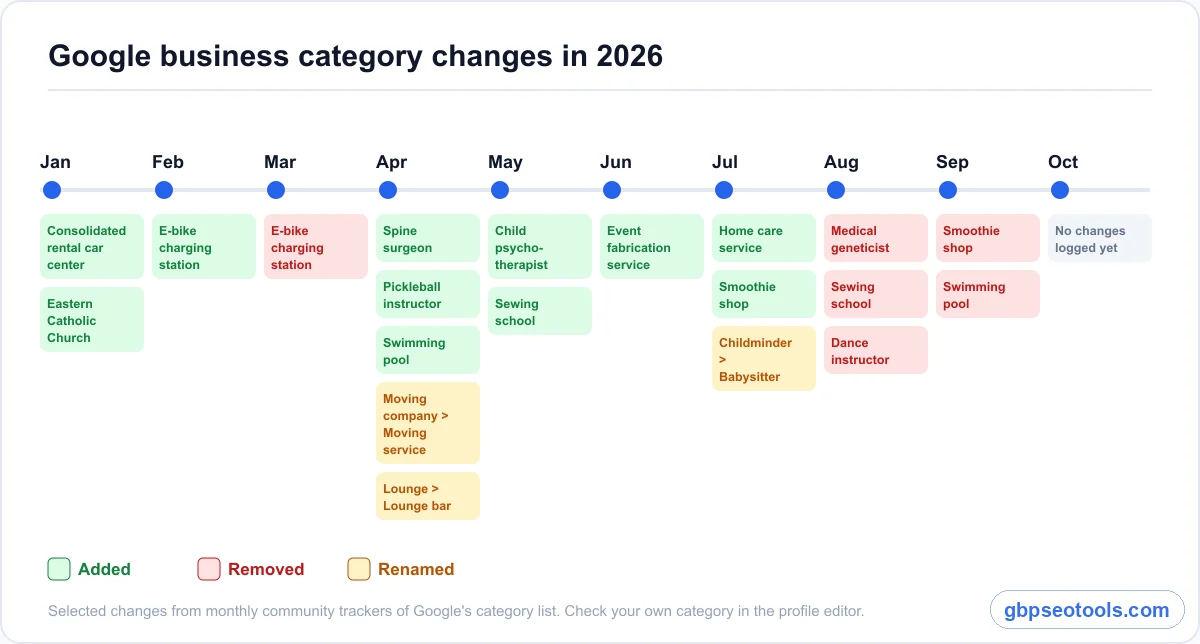
Categories aren't a fixed list. Local SEO trackers that log the list month by month recorded changes in almost every month of 2026, and Google doesn't email owners when it happens.
What was added, removed and renamed
- Added: "Spine surgeon," "Pickleball instructor," "Hydrogen station" (April), "Child psychotherapist" (May), "Event fabrication service" (June), "Home care service" (July)
- Added, then removed: "E-bike charging station" (February, gone in March), "Swimming pool" (April, gone in September), "Smoothie shop" (July, gone in September), "Medical geneticist" and "Sewing school" (added in spring, gone in August)
- Renamed: "Moving company" to "Moving service" and "Lounge" to "Lounge bar" (April), "Childminder" to "Babysitter" (July)
What to do if your category disappears
Google doesn't notify you, so the only way to know is to open the editor and look. Check your categories twice a year, and any time your calls or rankings drop without an obvious reason. If your category is gone, choose the closest specific one that's left, check how it displays on Maps, and measure your rankings before and after.
How to change your category without losing ground
Changing a primary category is a five-minute edit with real consequences, because it changes which group of searches Google puts you in. Treat it like a test you measure, not a setting you flip.
Make the change in the profile editor
Go to your Business Profile, select Edit profile, then Business category. Type your new primary category and choose it from the list. Use "Add another category" for additional ones and the remove icon to drop any that don't fit. Then select Save.
Expect a possible re-verification
Google's help page warns that adding or editing a category might trigger a request to verify the business again. Make category changes when you can respond to a verification request quickly, and don't stack them with name or address edits on the same day, so you can tell which change caused what.
Measure the change with grid scans, not one search
A single search from your office tells you almost nothing, because local rankings shift block by block. Run a grid scan before the change, from points spread across your service area, then repeat it a few weeks later and again a month after that. A local rank tracking tool does this from a grid of real search points and shows your average position and the share of points where you rank.
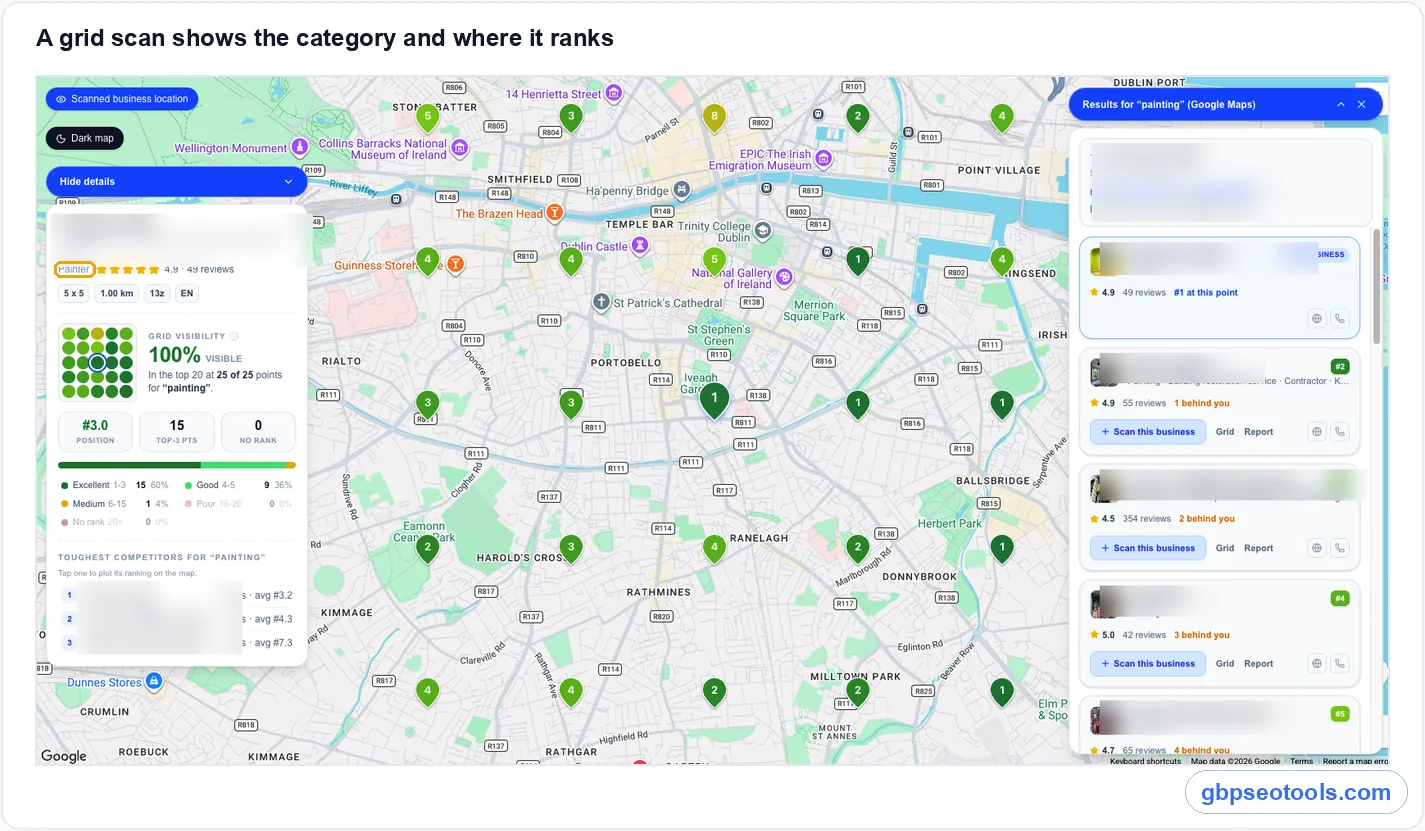
If the scans improve, keep the change. If they drop and stay down across two scans, switch back. One scan is a snapshot, and only the trend tells you whether the new category worked.
Your category checklist
Choosing Google Business Profile categories comes down to a short routine, whether you manage one listing or forty.
For a single business
- One primary category, the most specific one for your main revenue service.
- The same label most of your local top three use, unless you have a clear reason not to.
- A few additional categories, each for a service people search for separately.
- A check of how the category displays on Maps after you save.
- A look at the editor twice a year, because Google's list keeps changing.
For agencies managing many profiles
Run the Maps check per city, not once for the whole account, since the winning label can differ by market. Log each category change with its date and the scans before and after it, so you can show a client what moved and why. Then use the same routine for every new client before you touch anything else on the profile, because wrong GBP categories undercut the rest of your profile optimization.
What owners ask about Google Business Profile categories
What do I put for business category?
Use the most specific category that describes your main service, in the words customers search. Then check Google Maps for that service in your area and see which category the top three businesses use. If it matches, use it as your primary. If not, consider their label instead.
How many categories can a Google Business Profile have?
One primary category and several additional ones. Google doesn't publish a strict number here, but asks you to use a few that describe your services. In our data, top-ranking businesses averaged about two additional categories, and nearly half had none.
Does changing my category hurt my ranking?
It can move your ranking in either direction, because it changes which searches Google matches you to. It may also trigger re-verification. Scan your rankings across your area before the change and again a few weeks later, and switch back if the drop holds.
Can I create my own Google business category?
No. You can only choose from Google's list. If no category fits, pick the closest general one and describe your specialty in the services list and business description. Check the list again from time to time, since Google adds new categories most months.
Why does a competitor rank with a different category?
Google ranks by relevance, distance and prominence together, so a nearby, well-reviewed competitor can rank with a close sibling category. In our data, 12% of top-three businesses had no matching category at all. Copying their label won't help if your profile is weaker on reviews or farther away.
Are Google My Business categories the same as Business Profile categories?
Yes. Google My Business was renamed Google Business Profile, and the category list carried over. Any guide to Google My Business categories applies, but check the editor for the current names, since some categories have been renamed or removed in 2026.