
How to Respond to Google Reviews: What to Say to Every Kind of Review
To respond to a Google review, open your Business Profile, select Read reviews, choose Reply under the review, and write two to four sentences that mention something specific the customer said. That's how to respond to Google reviews in one line. The hard part is what to write when the review is angry, wrong, fake, or about a patient.
Most reply guides solve that with templates, and that's the problem. Customers have seen the same "Thanks for your feedback!" under hundreds of businesses, and a pasted line like that can do more harm than no reply at all.
Plenty of businesses skip replies entirely, even ones that rank well. In our October 2026 study of 68 businesses in Google's top three map results, 43% of their one- and two-star reviews had no reply, and 16 of the 68 hadn't answered any of their recent reviews.
So this guide doesn't give you 50 templates. It goes through the reviews a local business actually gets, shows a weak reply and a better one side by side, and explains why the second one works. That way you can write your own in a minute. It works the same whether you reply for your own business or for a client's.
In this guide:
- What happens when you post a reply
- Replies to five-star and positive reviews
- Replies to one-star, three-star, and unfair reviews
- Reviews from people who were never customers
- A reply routine that doesn't eat your week
- Seven replies to never post
How to respond to Google reviews, and what happens after you post
The mechanics take a minute to learn, and knowing them changes how you write. Your reply isn't a private message. It's a public note signed by your business, read mostly by people who haven't met you yet.
Where the Reply button is
The steps are the same on a computer or a phone:
- Sign in with an account that's an owner or manager of the verified Business Profile.
- Search your business name on Google, or open your profile in Google Maps, and select Read reviews.
- Choose Reply under the review you want to answer.
- Write your reply and select Reply again to post it.
If you manage several locations or client profiles, check you're signed in to the right one first. A reply posted under the wrong location is one of the more common, and more avoidable, mistakes.
What the reviewer and everyone else sees
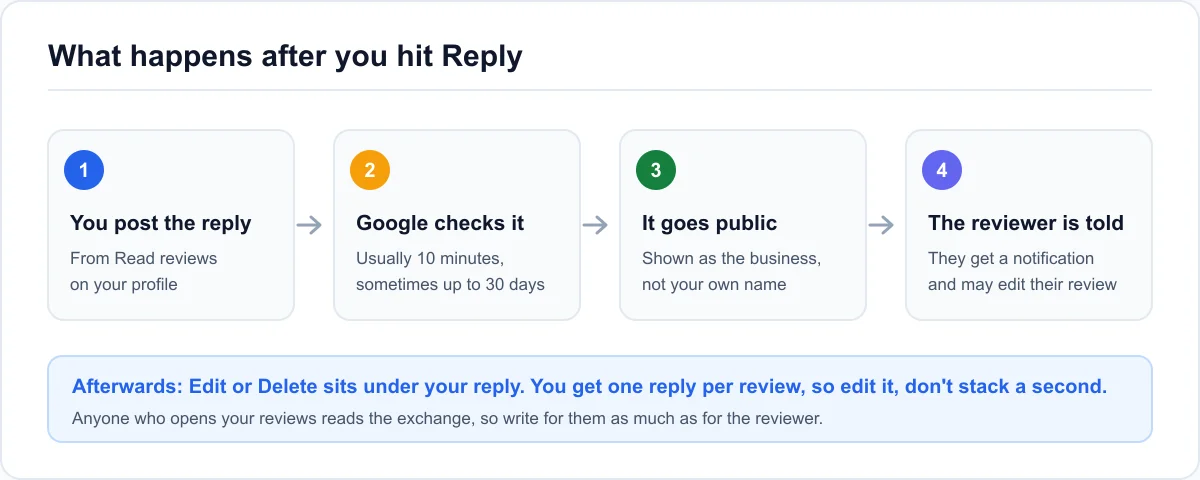
According to Google's help page on reviews, your reply appears as the business, and your personal name isn't shown. The reviewer gets a notification that you replied. Replies are checked before they go live, which usually takes up to 10 minutes but can take up to 30 days.
You can edit or delete the reply later from the same place. You get one reply per review. The reviewer can't reply under your answer, but they can edit their own review, and many do after a good reply.
Who your reply is really for
The person who wrote the review has already decided what they think. The people reading the exchange next month haven't. Most customers now expect a business to answer its reviews, and a profile full of unanswered complaints tells them nobody is listening.
The ranking effect is less certain, and it's worth being honest about. Google's own advice is to reply so customers can see their feedback matters, and it doesn't name replies as a ranking factor. Reviews themselves are a different story: their count, recency, and content together form one of the heaviest signal groups in the local pack (the map with three businesses at the top of local results). For the numbers, see how much reviews weigh in rankings.
Our own data points the same way. The 16 businesses in our study that never replied still ranked in the top three for their search, so replies alone clearly aren't what holds a local pack spot. What replying changes is what the next customer reads before they call.
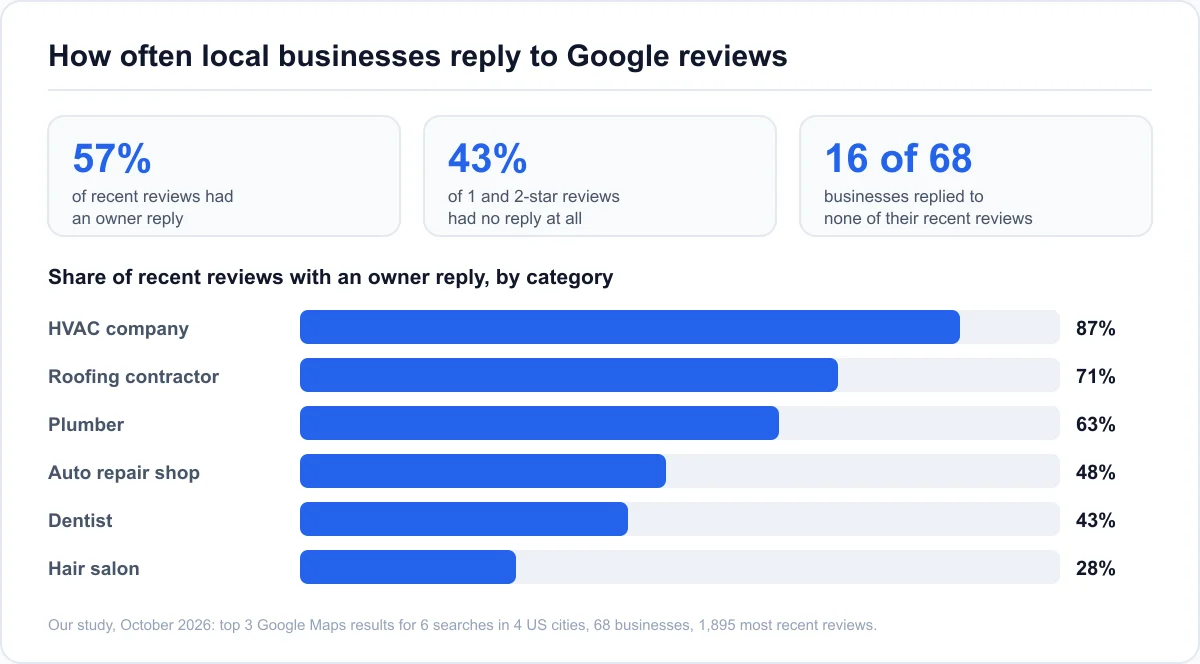
How we ran the study: In October 2026 we took the top three Google Maps results for six searches (plumber, dentist, HVAC company, hair salon, auto repair shop, and roofing contractor) in Austin, Denver, Columbus, and Charlotte. For each business we collected its 30 most recent reviews and checked which ones had an owner reply. 68 businesses returned reviews, 1,895 reviews in total. Reply rates stayed at 57% to 58% when we left out reviews less than a month old, so recent reviews still waiting for an answer don't skew the result.
So reply for the reader, and measure rank separately. If you're working on reviews to move your position, a Google Maps rank checker that tests your position from points across your area shows whether the work moved anything, and where.
Responding to positive reviews: examples that don't sound copied
Knowing how to respond to positive reviews looks easy, which is why most businesses fall back on templates: a five-star review feels like it needs no thought. It's also where a specific reply costs the least effort, since the customer has already handed you the details.
The detailed five-star review
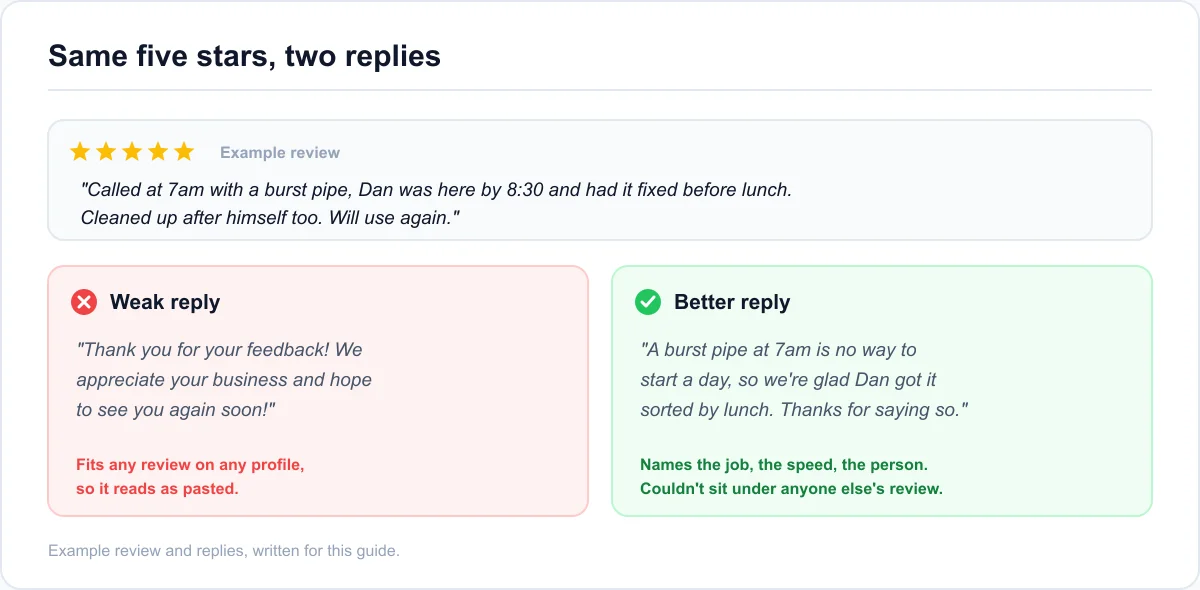
A good five-star review names the job, the timing, or the person. Your reply should hand one of those details back. Here's a 5-star review reply example built that way:
Review: "Called at 7am with a burst pipe, Dan was here by 8:30 and had it fixed before lunch. Cleaned up after himself too."
Weak: "Thank you for your feedback! We appreciate your business and hope to see you again soon!"
Better: "A burst pipe at 7am is no way to start a day, so we're glad Dan got it sorted by lunch. Thanks for saying so."
The weak reply could sit under any review on any profile, which is exactly why readers skip it. The better one proves a person read the review. It also repeats what the business wants to be known for (fast emergency plumbing) in plain words, without sounding like an ad.
The rating with no text
A star rating with no words gives you nothing to be specific about. Keep the reply to one line and don't fake detail: "Thanks for the five stars, it's good to know the visit went well." If the reviewer's name and your records make the job obvious, you can mention it lightly, but don't guess.
These are the reviews businesses skip most. In our study, star-only ratings got a reply 49% of the time, against 59% for reviews with text. A one-line thank-you closes that gap in seconds.
You don't need to answer every star-only rating on the day it arrives. They're the lowest priority on your list, and a batch of short, honest replies once a week is fine.
The review that names someone on your team
When a customer names a staff member on their own, credit that person in the reply: "Dan will be glad to hear this." It's one of the most persuasive things a future customer can read, because it shows real people doing the work.
The rule since Google's April 2026 review policy update is about asking, not about the review itself. You can't ask customers to mention a staff member by name, and you can't set staff review quotas. A review that names someone because the customer wanted to is fine, and so is a reply that thanks them. Check with the staff member before you use their name in public replies, though, as some people prefer not to be named.
How to respond to negative reviews without making it worse
Every guide on how to respond to bad reviews on Google says the same thing: stay calm and take it offline. That's right, but it skips the hard part, which is that different negative reviews need different replies. A fair complaint, a lukewarm three stars, and a review that gets the facts wrong each fail in their own way.
The angry one-star with a fair point
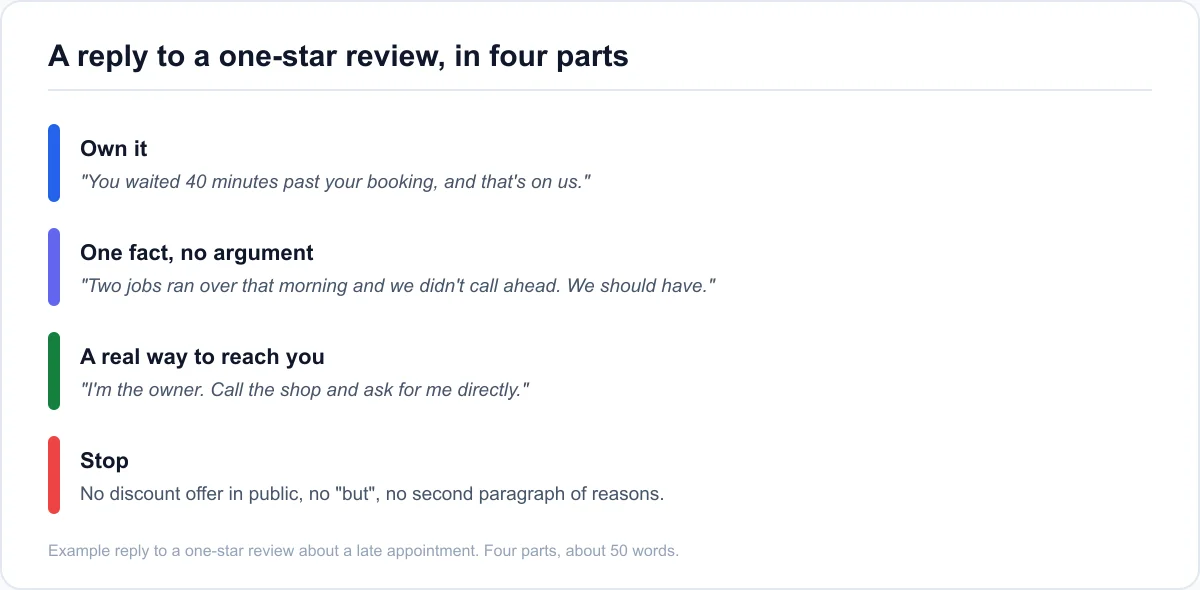
If the customer is right, say so in the first sentence. Then give one fact, if it helps, without turning it into an excuse. Then give them a real way to reach a real person. Then stop.
Review: "Booked a 9am appointment and nobody showed until 9:40. No call, no text. Won't use again."
Weak: "We're sorry you feel that way, but our technicians have very busy schedules and delays sometimes happen. We hope you'll give us another chance."
Better: "You waited 40 minutes past your booking with no call, and that's on us. Two jobs ran over that morning and we didn't phone ahead. We should have. I'm the owner, so please call the shop and ask for me directly."
"Sorry you feel that way" apologizes for the customer's feelings, not for what happened, and readers notice. The better reply is about 40 words, owns the problem, and gives a way forward. It does all that without a public discount offer, which tends to invite more complaints.
The three-star "it was fine, but..."
Mixed reviews get ignored more than any other kind, and they're often the most useful. The customer is telling you what kept the visit from being great. Thank them for the good part in a few words, then take the "but" seriously.
A bakery review that says "great bread, but the line was out the door on Saturday" deserves more than thanks. Try: "Glad the bread was worth it. Saturdays have outgrown our one register, and we're adding a second person at the counter from next month." A reply like that turns a three-star review into proof that you listen.
The complaint about price
Don't argue about whether the price was fair, and don't post numbers that start a public negotiation. Explain what the price covers, briefly, and offer to talk it through. For example: "Our quotes include parts, labor, and a 12-month warranty, which can make them look higher than a labor-only price. If anything on your invoice doesn't add up, call us and we'll go through it line by line."
Readers comparing businesses often care more about how you handle the question than about the number itself.
The review that gets the facts wrong
When a review states something false, such as hours you don't keep, a service you don't offer, or a charge that didn't happen, correct one fact neutrally. Write it for the reader, not to win the argument. "For anyone reading: we're open until 6pm on weekdays, not 5. We're sorry the sign on the door said otherwise, and we've fixed it."
Don't call the reviewer a liar, and don't publish their invoice or booking details to prove a point. If the review is wrong because it's about a different business entirely, that's the next section.
When the reviewer is a patient or client
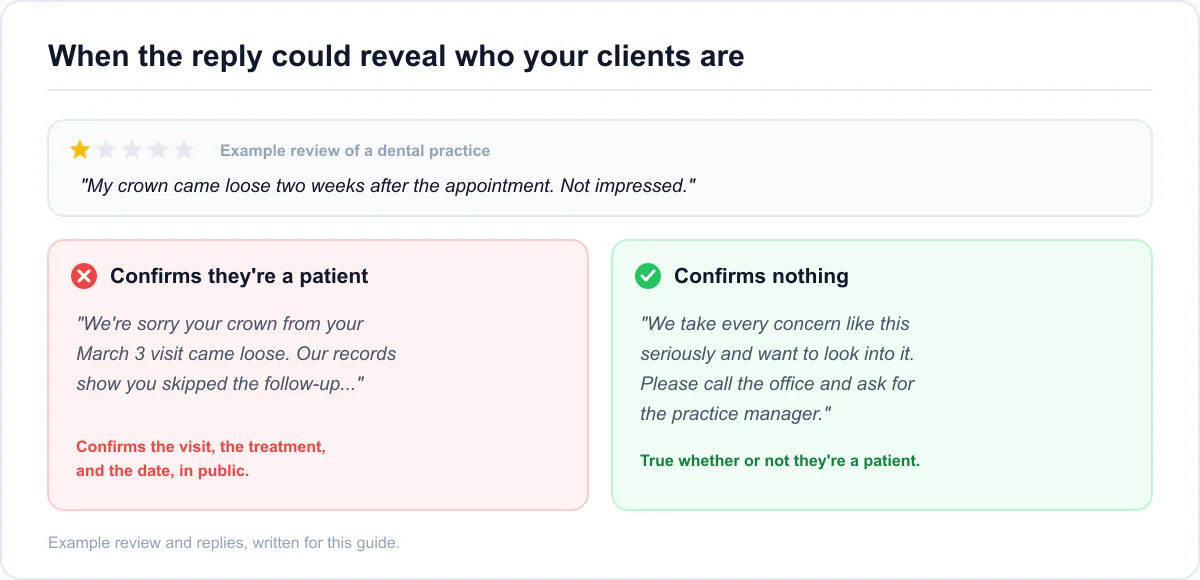
Dentists, doctors, therapists, lawyers, and accountants have an extra rule that templates miss: don't confirm in public that the reviewer is a patient or client. A reply that mentions the treatment, the date of the visit, or anything from their file shares personal information, even if the reviewer brought it up first.
The safe reply works whether or not the person is a client: "We take every concern like this seriously and want to look into it. Please call the office and ask for the practice manager." It reads as cautious, and in these fields cautious is what readers expect.
Silence is the more common choice. In our study, dentists answered only 2 of their 24 negative reviews, the lowest rate of any category we checked. Privacy worries may be part of the reason, but a reply like the one above protects the patient and still shows the next one that someone listened.
When you don't think they were ever a customer
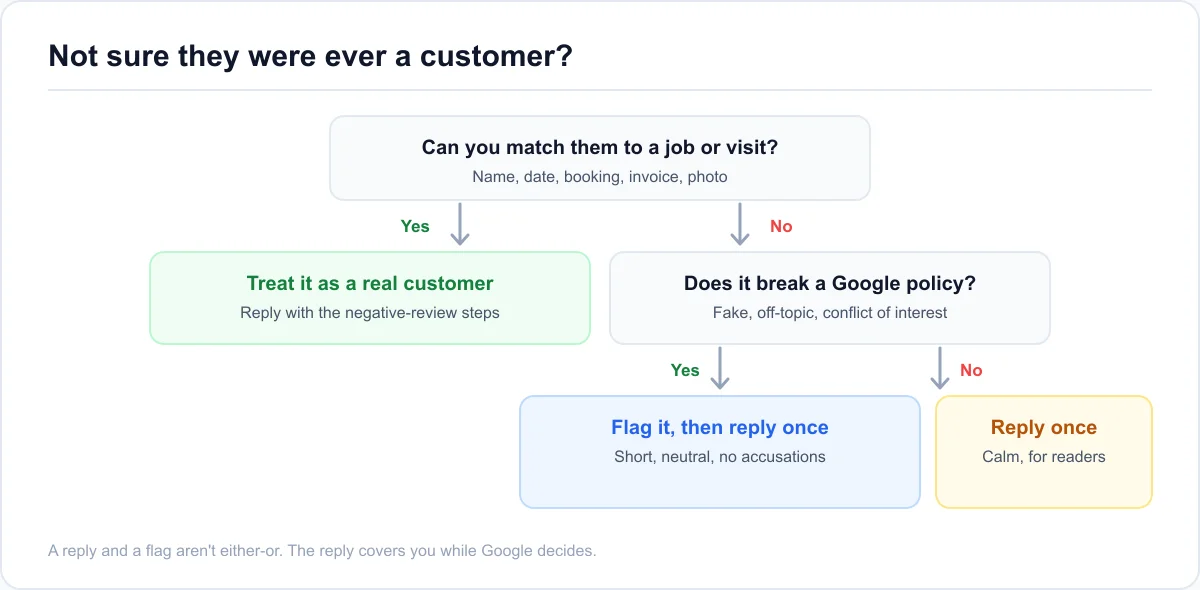
Some negative reviews come from people you can't find in any record, from someone who meant to review a different business, or from someone with an interest in hurting you. You can't delete them. You can reply and you can report them, and those are separate decisions.
Someone you have no record of
Check before you assume. Search your bookings, invoices, and messages for the name, and look at the date and details in the review. Customers often review under a nickname or a family member's account.
If you still can't place them, reply once, briefly and without accusations: "We can't find a booking that matches this, and we'd like to understand what happened. Please call us so we can look into it." Readers see a business that checked. If the review is fake, the reviewer won't call, and the reply has done its job.
A review meant for a different business
These are more common than you'd think, especially when a competitor has a similar name or sits on the same street. Reply politely and point to the likely mix-up: "We think this may be meant for another business, as we don't offer car rentals. We hope you get it sorted." Then report the review as off-topic, since it isn't about your business.
Flag it, reply to it, or both
If a review breaks Google's content policy (it's fake, it's off-topic, or the reviewer has a conflict of interest, like a competitor or a former employee), report it from your profile. Google won't remove a review just because it's negative or unfair, so be honest about which kind you're dealing with. The pillar guide covers the full flag-and-escalate process for getting it reviewed.
A reply and a report aren't either-or. Google can take weeks to decide, and in the meantime the review sits on your profile. A short, neutral reply covers you while you wait.
Keeping up without it eating your week
Replying well takes about two minutes per review once you have the habit. The hard parts are starting from a pile of unanswered reviews, deciding whether to let AI draft for you, and keeping several profiles consistent.
Clearing a backlog of unanswered reviews
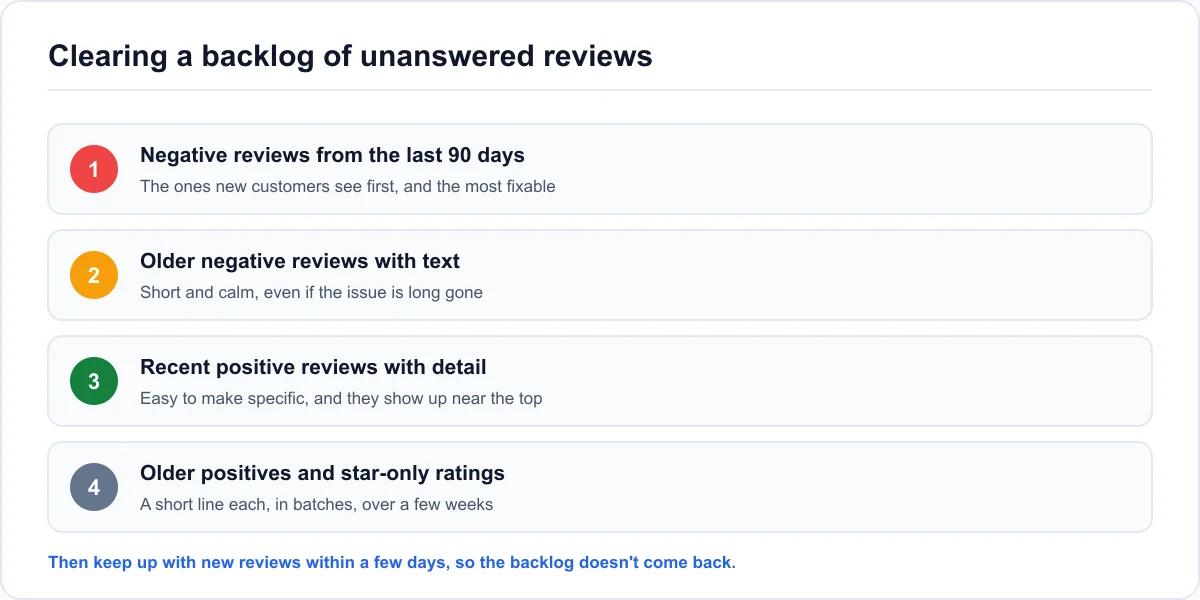
If you've never replied, don't start with last week's five-star reviews. Work through them in this order:
- Negative reviews from the last 90 days, which new customers see first and which you can still do something about
- Older negative reviews with text, with a short, calm reply even if the problem is long fixed
- Recent positive reviews with detail, since they're easy to make specific
- Older positive reviews and star-only ratings, a few short lines at a time over a few weeks
After that, keep up with new reviews within a few days. Treat a week as the outside limit, since a reply that arrives later reads as an afterthought.
Google's AI-suggested replies
In March 2026, Google began testing AI-drafted review replies inside some Business Profiles, reported in the US, Brazil, and India. The draft appears for you to read and edit before you post it. Availability varies by account, and many businesses don't have it yet.
Treat any AI draft, whether it's Google's or from another tool, as a first draft. It's often fine for a short positive reply. On negative reviews it tends to produce exactly the polite, empty paragraph that readers recognize as generic. Add one specific detail and cut anything you wouldn't say out loud.
Replying for clients or across locations
If you reply on behalf of a client or for several locations, three things keep it clean. First, use manager access on each profile, not shared owner logins. Second, agree in advance who approves replies to negative reviews, because the reply is public and signed by the client's business, not by you. Third, keep a short voice note for each business, so ten locations don't end up with one generic tone.
For multi-location brands, reply from the right location's profile and use that location's details. A reply that mentions the wrong town's team is worse than a short generic one.
Seven replies you should never post
The examples above show what to write. Most damage comes from a short list of replies that feel reasonable at the time and read badly to everyone after.
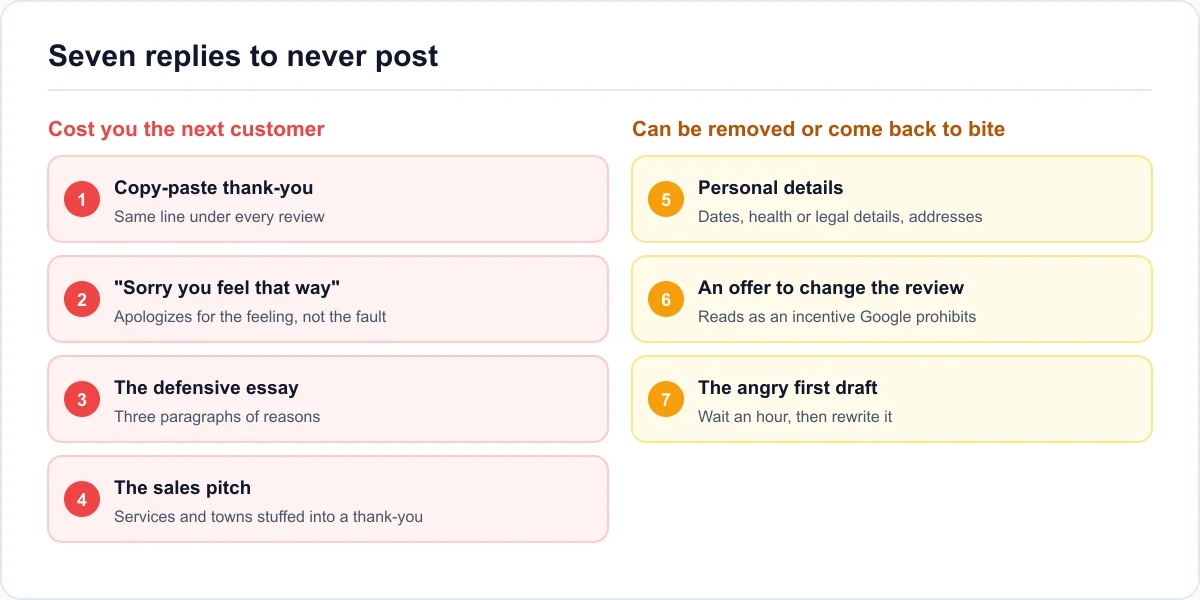
Replies that cost you the next customer
- The copy-paste thank-you. 10 of the 68 businesses in our study posted word-for-word identical replies under different reviews. Readers notice the repeat.
- "Sorry you feel that way." It apologizes for the reader's reaction, not your mistake.
- The defensive essay. Three paragraphs of reasons reads as an argument, and nobody wins one in public.
- The sales pitch. Stuffing services and town names into a thank-you reads as an ad, and it isn't a ranking trick either.
Replies that can be removed or come back to bite
- Personal details. Booking dates, health or legal details, family names, or the reviewer's address. Google checks replies and can take that content down.
- An offer to change the review. Anything that looks like a discount or refund in exchange for editing or deleting a review can read as an incentive, and Google's review policy prohibits incentives.
- The angry reply written in the moment. Write it, wait an hour, then rewrite it. You can edit a reply later, but people will have read the first version, and some will have taken screenshots.
If you only remember one thing
The short version of how to respond to Google reviews: be specific on the good ones, own it on the fair complaints, correct facts calmly, never reveal a client, and report only what breaks a policy. Then keep the habit going. Two minutes a review is less than the cost of one lost customer.
Quick answers before you hit Reply
Why can't I reply to a Google review?
You can respond to Google reviews only as an owner or manager of a verified Business Profile. If the Reply option is missing, check that the profile is verified and that your account has a manager or owner role on it. If you replied and the answer doesn't show, it may still be in Google's review, which usually takes minutes but can take up to 30 days.
Can you reply to a reply on a Google review?
The business gets one reply per review, which you can edit later. There's no back-and-forth thread under it. If the reviewer responds, they usually do it by editing their review. If their updated review raises something new, edit your reply to answer it, rather than trying to add a second one.
Should I respond to every Google review?
Yes, if you can keep it up. A profile where every review has an answer tells the next customer someone is paying attention. If time is short, reply to every review with text and answer star-only ratings in short weekly batches, starting with the negative ones.
What is a good response to a five-star review?
One or two sentences that hand back a detail the customer mentioned, such as the job, the person, or the timing, plus a plain thank-you. Skip the sales pitch and the "hope to see you again soon" filler.
How long should a reply to a Google review be?
Usually two to four sentences, roughly 25 to 80 words. The median owner reply in our 2026 study was 33 words. Positive replies can be shorter. Replies to negative reviews need room to own the problem and offer a way forward, but they shouldn't run past one short paragraph, since longer replies start to read as an argument.
Should I reply in the reviewer's language?
If you can write it well, yes. It shows you read the review properly. If you can't, reply in the language you normally use with customers, keep the sentences short and plain, and avoid idioms so the reply still makes sense after translation.
Can I reply to Google reviews from my phone?
Yes. Open your Business Profile in Google Maps or Google Search on your phone, go to the reviews section, and select Reply. It's the same reply that appears on a computer, so the same rules apply: check you're on the right profile before you post.