
Local SEO for Small Business: A Plan That Fits Two Hours a Week
Local SEO for small business fits into about one setup day and two hours a week, as long as you do the work in the order Google weighs it: your Google Business Profile first, then reviews, then your website, and directory listings last.
Most advice on local SEO for small businesses hands you a list of 15 tactics with no order and no clock. That's the wrong shape for someone who also has to run the business. What you need to know is what to do first, how long it takes, how to tell it's finished, and what to leave alone.
This plan answers those four questions. If you want the background first, start with how local search works, then come back here for the schedule. The time estimates assume one location and a website you can edit. They're estimates, not promises: a messy listing history or a site you can't change takes longer.
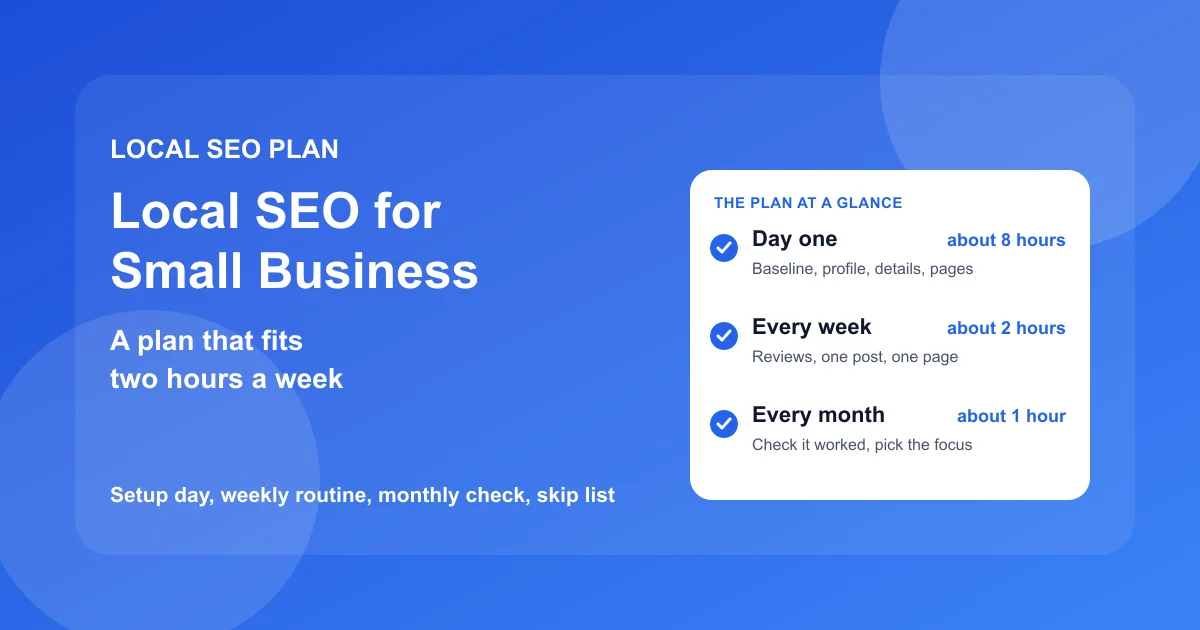
| When | Task | Time | Done when |
|---|---|---|---|
| Day one | Record a baseline | about 1 hour | You have rank, calls, and reviews written down |
| Day one | Fix the profile | 2 to 3 hours | Every field Google offers is filled in |
| Day one | Match your details everywhere | 1 to 2 hours | Name, address, phone match on the sites that matter |
| Day one | Fix the key website pages | 2 to 3 hours | Each main service has a page that names your area |
| Day one | Set up a review request | 30 minutes | You can send one in under a minute |
| Every week | Reviews, one post, one website fix | about 2 hours | It's on the calendar and it happened |
| Every month | Check whether it worked | about 1 hour | You know what to change next month |
In this guide:
- Write down where you stand before changing anything
- The setup day, in order
- The weekly two hours
- The monthly check
- What to skip
Before you change anything, write down where you stand
Skip this step and you'll never know whether the next three months of work did anything. Taking a baseline costs about an hour, and it's the only part of the plan you can't go back and do later.
Pick the three to five searches that bring you customers
Write down the searches a real customer types when they need you, not the words you'd use to describe your business. A bakery's list might be "bakery," "birthday cakes," and "gluten free bakery." A plumber's might be "plumber," "emergency plumber," and "water heater repair."
Keep the list short. Five searches you check every month beat 30 you never look at. If you aren't sure what people search, look at the "Searches" section of your Business Profile's performance view, which lists the terms that already show your listing.
Check your rank from more than one spot in your area
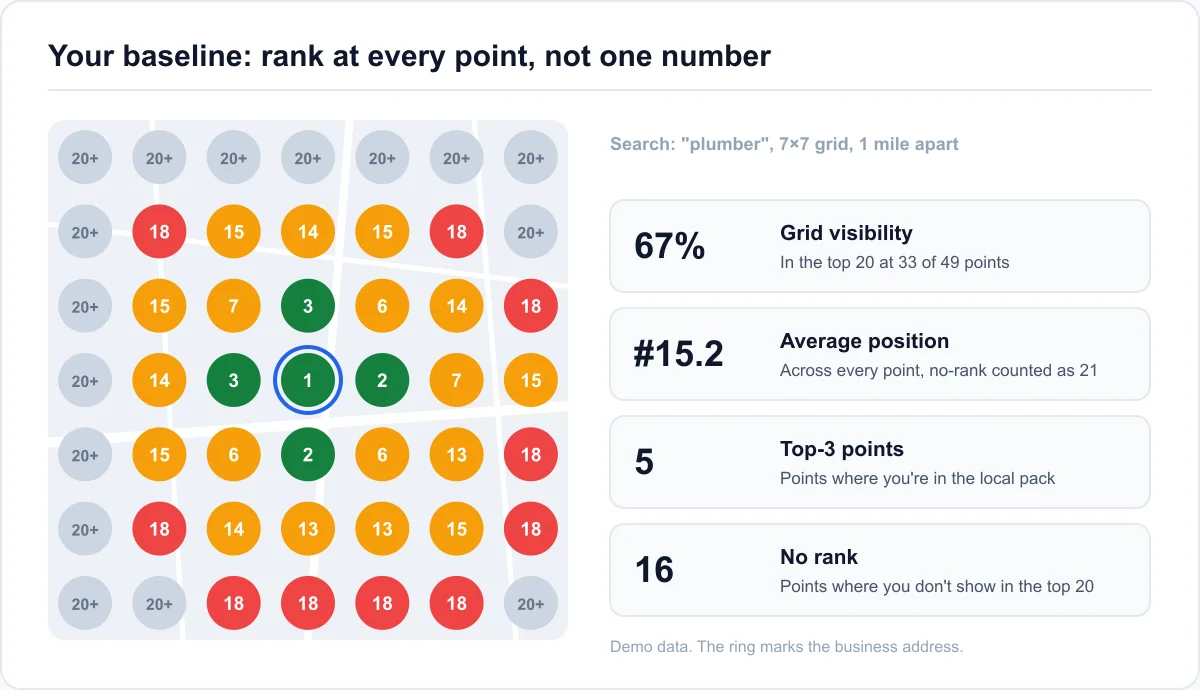
Google ranks local results on relevance, distance, and prominence, and distance means your position changes depending on where the searcher stands. Searching from your own counter shows your best case. A customer two miles away may not see you at all.
So check each search from several points across the area you serve, or run a scan with a local rank checker that tests a grid of points at once. Glocavo, the rank tracker we build, shows the result as a heatmap with your position at every point and the businesses that beat you there. Its free plan covers a handful of small scans, enough to baseline your one or two most important searches and check them again later.
Note this month's calls, direction requests, and reviews
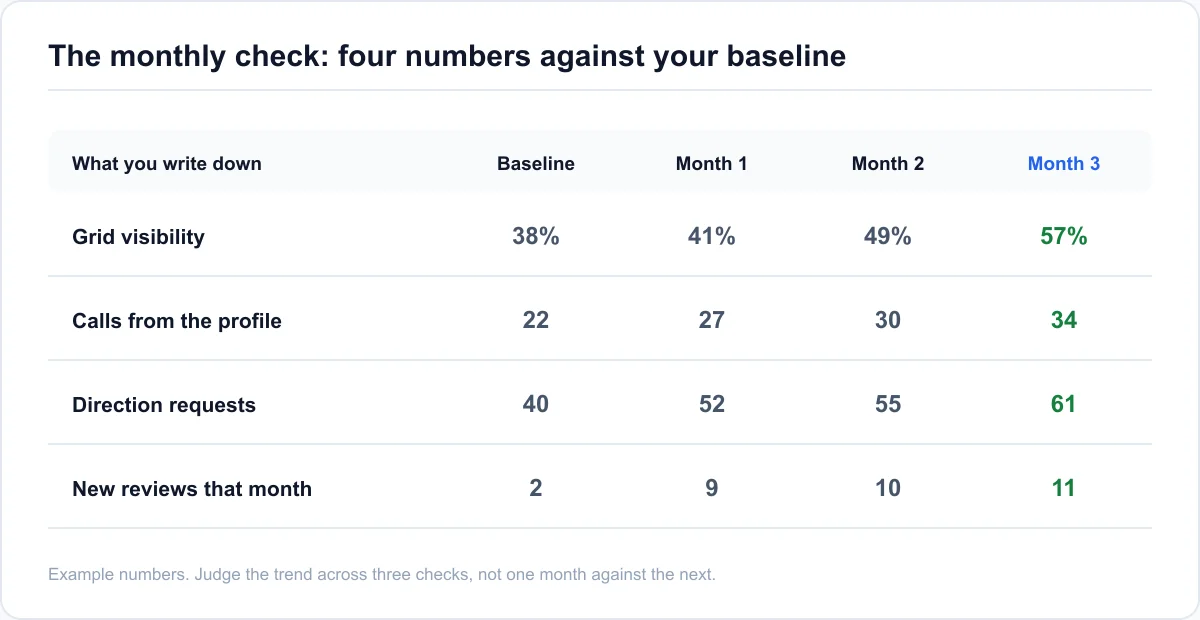
Rank is the means. Calls are the point. Open your Business Profile's performance view and write down last month's calls, direction requests, and website clicks, plus your current review count and star rating. These numbers move before rank does, and they're the ones that tell you whether the work is paying.
The setup day: what to fix once, and in what order
The setup takes roughly a full working day, spread over a week if that's easier. The order matters. Your Business Profile carries the most weight in the local pack (the three map results at the top of a local search), reviews come second, your website third, and directory listings matter least. Whitespark's 2026 ranking factor survey puts profile signals at 32% and citations at 6%, so fix in that order and the early hours do the most.
Profile first: category, services, hours, and photos (2 to 3 hours)
Start with the primary category, the one field that does the most for relevance. Pick the most specific match for what most of your revenue comes from: "Pediatric dentist" beats "Dentist" if children are most of your patients. Add secondary categories only for services you offer.
Then work through every profile field worth filling: services with short descriptions, accurate hours including holiday hours, the business description, attributes, and at least 10 real photos of your work, your team, and your storefront or vehicles. It's done when there's no blank field left that applies to you.
Your name, address, and phone, identical everywhere (1 to 2 hours)
Write your name, address, and phone number exactly as they appear on the profile. Then check them on your website, Facebook, Yelp, Apple Maps, Bing Places, and the two or three directories that matter in your industry.
Fix anything that doesn't match, especially old phone numbers and old addresses. You're done when a search for your business name shows the same phone number and address on every listing on the first page. Don't sign up for 50 new directories. That's on the skip list below.
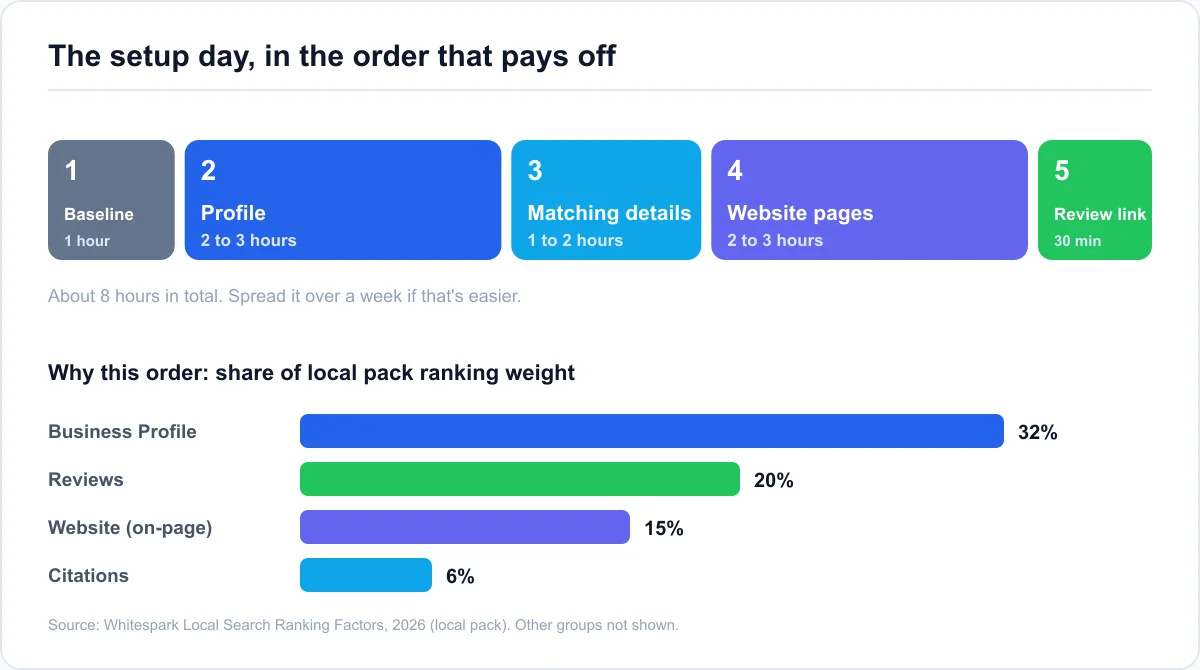
The website pages Google and customers check (2 to 3 hours)
Your website doesn't need a redesign. It needs one page for each main service, and the name of the town or area you serve on each one. The homepage title should say what you do and where, like "Emergency Plumber in Tucson | Your Business Name."
Put your name, address, and phone in the footer, matching the profile exactly, and link the profile's website field to the most relevant page. For a single-location business, that's usually the homepage.
A review request you can send in ten seconds (30 minutes)
Copy your review link from the profile and save it as a text message template or an email signature line. The goal is a request you can send while the customer is still pleased, without hunting for the link.
Ask every customer, not only the happy ones you hand-pick. Picking only happy customers to ask is review gating, and it breaks Google's policy. So does asking for a review that names a specific staff member. Both are covered in the skip list.
The two hours a week that keep you ranking
Local rankings reward a profile that's kept current: one that hasn't changed in months tends to lose ground to competitors who update theirs every week. So keep a fixed weekly slot of about two hours. Put it in your calendar like any other job.
Reviews: ask every customer, reply within a few days (about 45 minutes)
Send the request to every customer you served that week. Then reply to every new review, good or bad, within a few days. A reply to a bad review is written for the next customer reading it, so keep it calm, specific, and short.
A steady pace beats a burst. Ten reviews in one week and then nothing for three months looks less natural than two or three a week, every week.
One Google post and a few new photos (about 30 minutes)
Publish one short post a week: a finished job, a seasonal offer, a new service, a team photo with a caption. Three sentences and one photo is enough. Add two or three new photos while you're in the dashboard.
A bakery that posts its Saturday special every Friday gives searchers a reason to pick it this weekend, and gives Google a fresh, dated sign that the business is open and active.
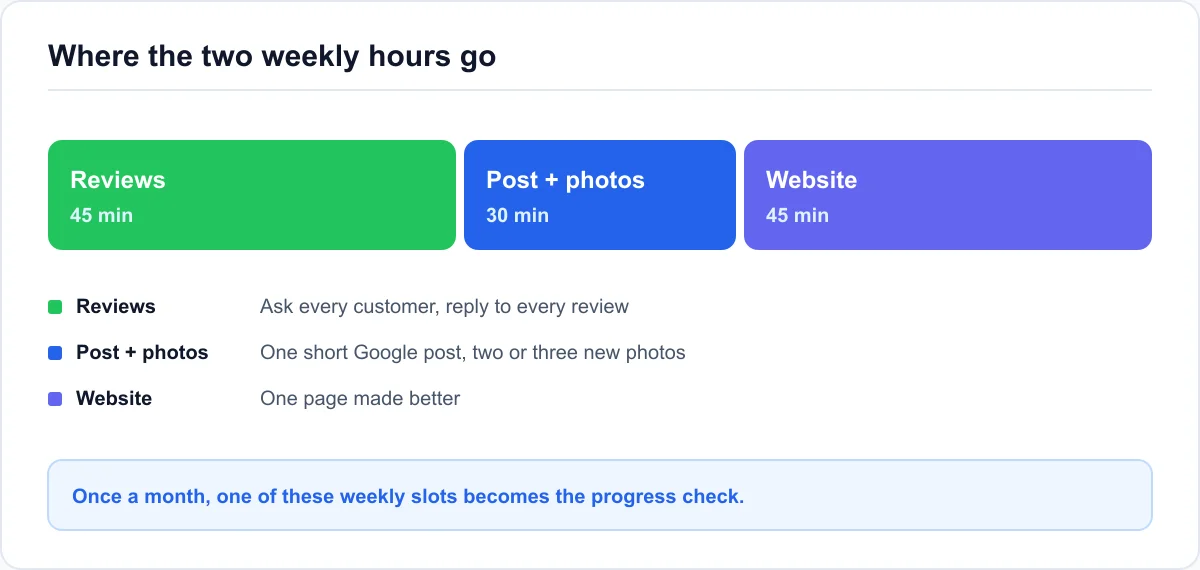
One small improvement to the website (about 45 minutes)
Each week, make one page better: answer a question customers keep asking, add photos of a recent job to a service page, or write a short page for a neighborhood you serve and want to rank in. A page about a real job in a real neighborhood helps more than a generic "areas we serve" list.
If you can't edit your site, spend the time on the profile instead: more photos, a fuller service list, or updated attributes.
Once a month, check whether any of it worked
Once a month, use one of your weekly slots for a check. It takes about an hour, and it's what turns a routine into a plan you can adjust.
Re-check rank from the same points, not from your desk
Run the same searches from the same points as your baseline. If you used a grid scan, run the same grid size around the same center, so you're comparing like with like.
Look for the pattern, not one number. One scan is a snapshot, and local rank moves from day to day, so judge the trend over two or three monthly checks. Ranking changes usually take two to six weeks to show after a fix, so don't expect anything from week one.
Read the profile numbers that move first
Compare this month's calls, direction requests, and website clicks with your baseline. These often change first, because a better profile converts more of the people who already see it.
A dental office that fixed its categories and started asking every patient for a review might see direction requests climb in month one, while its rank two miles out doesn't change until month two or three. Both numbers matter, and they don't move together.
Decide what changes next month
Point next month's weekly hours at the weakest number. If one search is weak everywhere, work on that service: the category, the services list, and its own page. If you're strong near the address but fade with distance, put the weekly time into reviews and pages for the areas you're losing.
If you do this for clients, this hour is your monthly report. The baseline, the four numbers, and next month's focus are what an owner wants to see.
Local SEO tips to skip, even when someone sells them
Plenty of the advice and paid services aimed at small businesses carry the least weight, and a few carry real risk. Skipping them is part of how the plan fits into two hours.
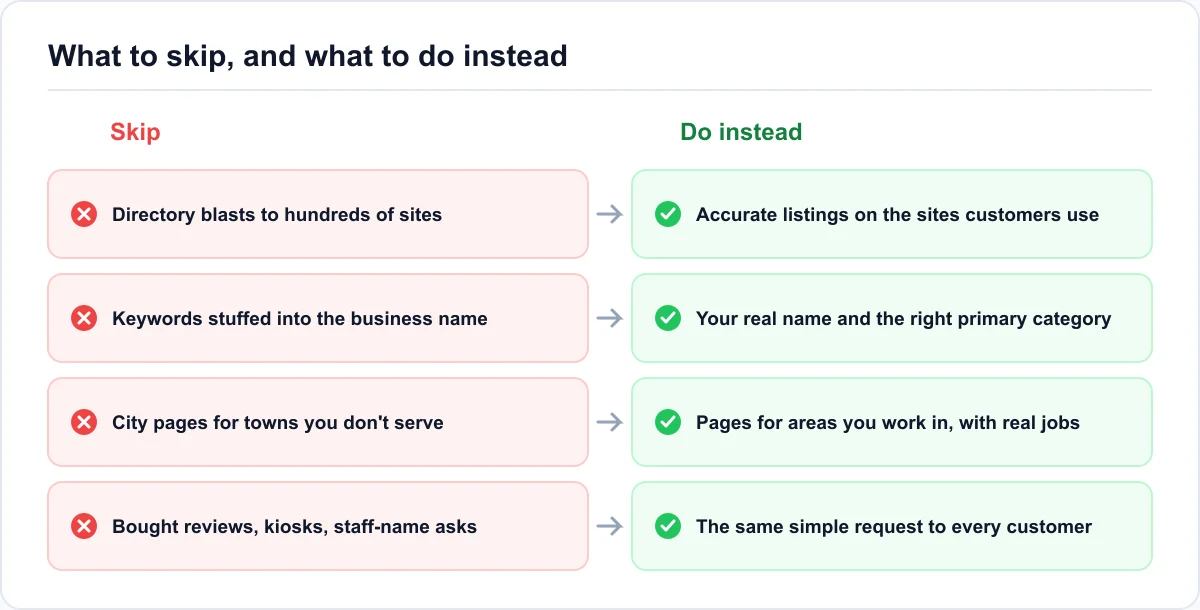
Directory blasts and "submit to 500 sites" packages
Citations, the listings of your name, address, and phone on other sites, are the lowest-weight group in local ranking. Accuracy on the sites customers and Google use matters. Volume on hundreds of sites nobody visits doesn't. Packages like this mostly create more listings you'll have to fix the next time you move or change your number.
Keywords in the business name, and pages for towns you don't serve
Adding "Best Plumber Tucson" to your business name can lift rank for a while, and it's also one of the most common reasons listings get suspended. Use your real name, the one on your signage and paperwork.
The same goes for dozens of near-identical city pages for towns you don't serve. They read as thin content, and they don't fix the distance factor. Build pages for the areas you work in, with real details from jobs there.
Bought reviews, review kiosks, and staff-name requests
Bought or swapped reviews are against Google's policy. Google removes them, and it can restrict a profile that keeps collecting them. Google's 2026 review policy also bans review kiosks and stations at your premises, and asking customers for reviews that mention a specific staff member. Keep the request simple and the same for every customer.
Local SEO for small business: what owners and agencies ask next
How many hours a week does local SEO take a small business?
For one location, plan on a setup of about one working day, then roughly two hours a week: reviews, one Google post with photos, and one website improvement. One of those weekly slots each month becomes the progress check. More locations, a crowded city, or a site you can't edit all add time.
Is local SEO worth it for a small business in 2026?
If customers find you by searching nearby, yes. Two hours a week is less time than most owners spend chasing one slow lead. The payoff shows up as calls and direction requests from searches you already serve, and it builds on itself: reviews and pages you add this month keep working next year.
When should I expect the first results from this plan?
Profile changes like a new category can register within days. Calls and direction requests often move within the first month. Rank changes across your area usually take two to six weeks per fix, and the full picture takes about three monthly checks. Judge the plan at month three, not week two.
Can a small business do local SEO for free?
Yes, free local SEO for a small business covers most of the plan. Google doesn't charge for your Business Profile, posts, photos, or review requests, and you can fix your own directory listings and website pages yourself. What paid tools add is speed: checking rank from many points at once, or tracking it over time without doing it by hand.
Do I need a website for local SEO?
You can rank in the local pack with a profile alone, and some businesses do. A website helps, though. It confirms what you do and where, gives Google pages to match against specific searches, and gives customers somewhere to check you before they call. One clear page per main service is enough to start.
Run the plan yourself, or hand it over
Local SEO for small business isn't a project you finish. It's a short setup followed by a routine that's small enough to keep.
The whole plan on one screen
- Day one: record a baseline, fix the profile, match your details, fix the key pages, and set up a review request.
- Every week: about two hours on reviews, one post with photos, and one website improvement.
- Every month: re-check rank from the same points, compare four numbers with the baseline, and pick next month's focus.
- Never: directory blasts, keyword-stuffed names, fake city pages, or bought or gated reviews.
Start with the baseline. Everything after it is easier to judge once you know where you started.
When two hours a week stops being enough
Watch the clock for a month. If the weekly slot keeps running into a third or fourth hour, or the monthly check shows no movement after three tries, the plan has outgrown the time you can give it. That's the point where paying someone costs less than your own hours.
If you hire someone, ask them to show you this plan in their terms: what they'll fix first, what they'll do every week, and how they'll show you the monthly change. If you're an agency, the same three cadences work as a client's onboarding week and monthly retainer, with the baseline as the "before" picture you'll report against.