
Google Review Management: We Read 5,713 Reviews and Half the Angry Ones Got No Reply
Half of the angry Google reviews we read never got a reply: 192 of 393 one- and two-star reviews, at businesses already in Google's top 20 map results. That's the gap Google review management is meant to close: seeing each review as it lands, answering unhappy customers first, and replying like a person who read what they wrote.
The surprise was what came next. A furious customer was no more likely to get an answer than a happy one. Three months later, the two groups looked the same.
That doesn't look like owners freezing over bad reviews. It looks like nobody deciding which review matters most.
This post shows what we counted, the four places the work falls apart, what Google gives you at no cost, and what a tool should add before you connect one to your profile. It's written for owners answering their own reviews and for agencies answering them on a client's behalf.
In this guide
- What the replies showed
- Four places the work falls apart
- What Google already gives you
- What to look for in a tool
- One bad review, start to finish
- Questions about handling reviews
- The one decision to make this week
Angry customers get the same silence as happy ones
Most advice treats a bad review as an emergency. Our numbers say most businesses don't handle it like one.
What we counted
In October 2026 we pooled four sets of review pulls from Google Maps businesses: 5,713 recent reviews at 237 US businesses in the top 20 map results, across trades like dentists, plumbers, salons, and auto repair shops. For each review we recorded the star rating, its age, and whether the owner had replied. Then we read how the replies were written.
Two limits matter. These businesses already rank well, so we're measuring what the next customer reads, not whether replying moves your ranking. And 91% of the reviews were five stars, so the low-rated group is small: 393 reviews. Some of those may be fake or under dispute, and an owner could have a good reason to hold back.
Our earlier look at only the top three results found 43% of low ratings unanswered. Adding businesses further down the top 20 moved that to 49%.
Waiting longer doesn't change it
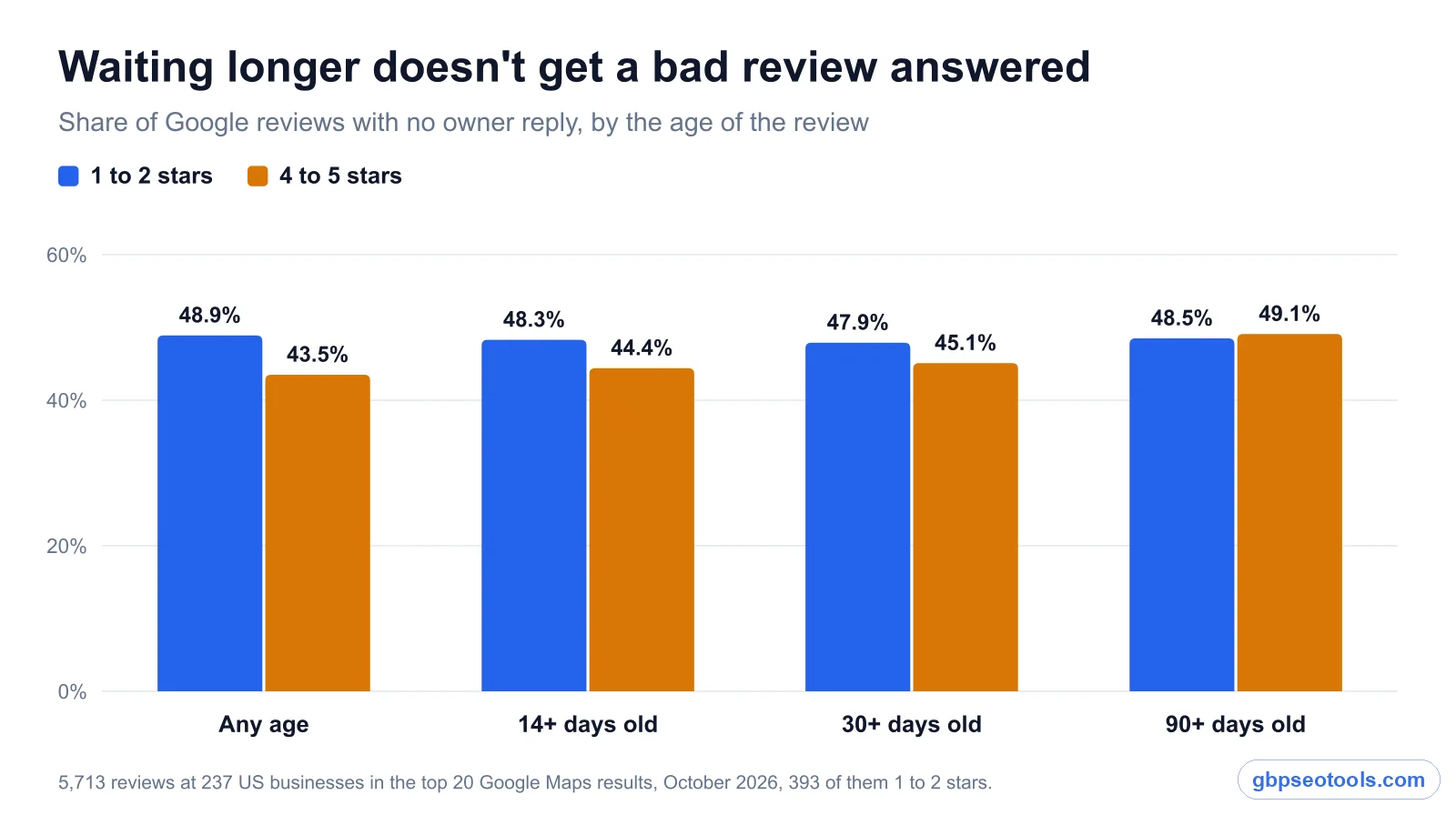
The obvious defense is that the owner hasn't got to it yet, so we re-ran the count on older reviews only. It barely moved.
| Age of the review | 1 to 2 stars, no reply | 4 to 5 stars, no reply |
|---|---|---|
| Any age | 48.9% | 43.5% |
| 14 days or older | 48.3% | 44.4% |
| 30 days or older | 47.9% | 45.1% |
| 90 days or older | 48.5% | 49.1% |
Look at the bottom row. After three months, a customer who gave you one or two stars and a customer who gave you four or five were equally likely to be ignored.
Try this now: open your own profile on Google Maps, sort your reviews by lowest rating, and count how many of the last 10 have a reply from you. It takes about a minute, and it's the number the rest of this post is about.
Some businesses answer every one, and more answer none
The average hides a split. Of the 141 businesses with at least one low-rated review in our sample, 48 had answered all of them, 37 had answered some, and 56 had answered none. Across all 237 businesses, 60 hadn't replied to a single review we read.
Most of these businesses had only a few low ratings in the sample, so read this as a habit check, not a score. Still, it points somewhere useful: answering every bad review is something some businesses manage and others don't, even among those already ranking well.
Four places the work falls apart
Silence is rarely a decision. When a review goes unanswered, it has usually slipped through one of four gaps.
Nobody notices the review land
Reviews arrive at night, on weekends, and in the middle of a job. In a separate check of 100 businesses, half had received a new one in the past seven days, and the email alert lands in an inbox that also holds invoices and supplier emails. If replying depends on somebody remembering to look, it stops the first busy week.
Every review waits in the same line
Our table is what no triage looks like. Reviews sit in date order and most of them are five stars, so praise fills the top of the list. The one-star review from last Tuesday sits where it fell.
A happy customer can wait a few days and lose nothing. A bad review with no answer under it stays on the page for every new customer to read. Those two reviews shouldn't share a queue.
Replies go out on autopilot
Getting a reply out doesn't mean someone read the review. Of the 3,209 replies we read:
- 335 (10%) matched another reply from the same business, once we removed the customer's name
- 223 (7%) ran under five words
- 136 said only "thank you", plus the customer's name at most
- 11 of the 146 businesses with five or more replies reused text in at least half of them
Copied replies are a symptom of the same problem: a pile, no time, and a shortcut. The fix is in how the work is set up. For the writing itself, our guide has examples showing which reply fits each review.
The review count drops and nobody asks why
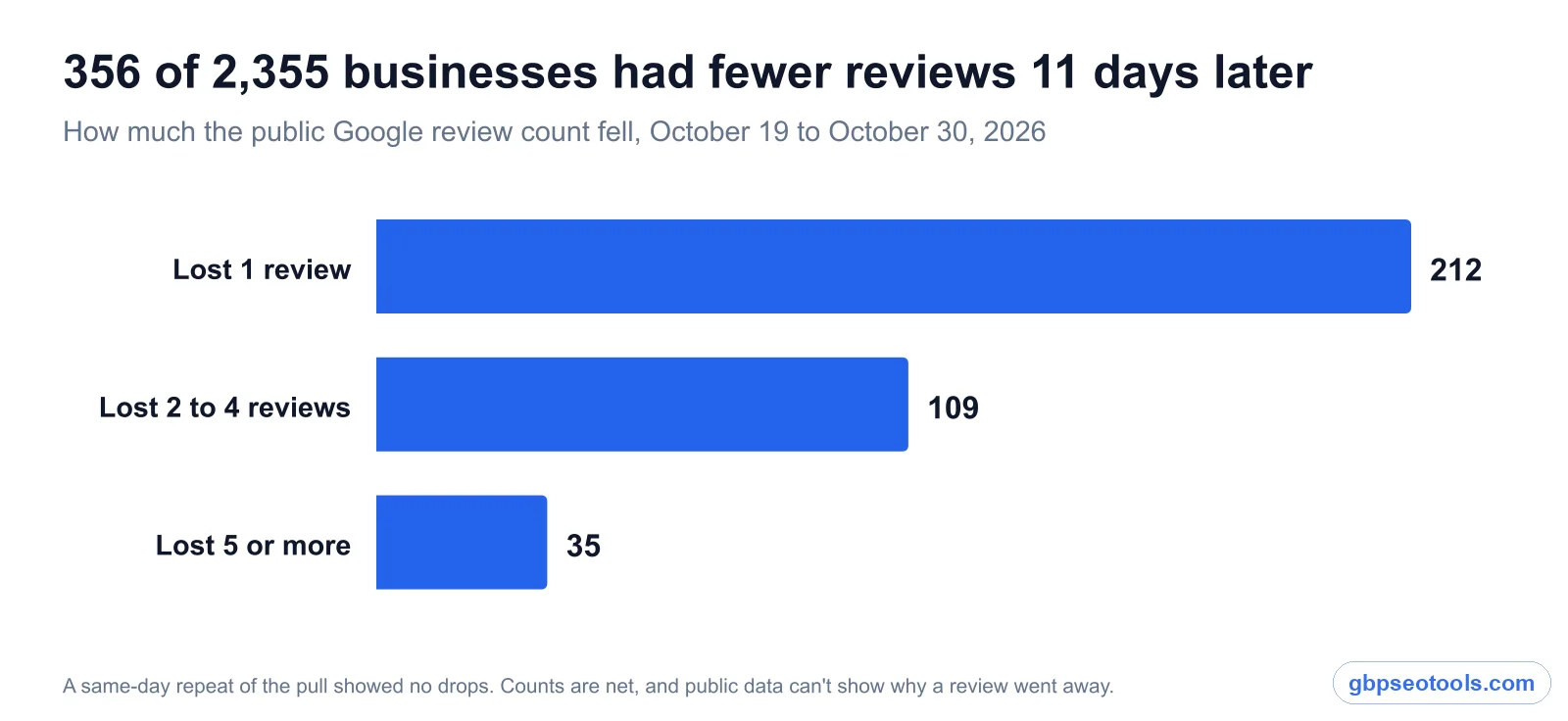
We also compared public review counts for the same businesses 11 days apart, on October 19 and October 30, 2026. Of 2,355 businesses, 356 (15%) showed fewer reviews on the second date. A repeat pull on the same day showed no drops at all, so this isn't noise in the data.
Most drops were small: 212 businesses lost one review, 109 lost two to four, and 35 lost five or more.
We can't say why from public data. A customer may have deleted a review, or Google may have filtered it. These counts are also net, so a business that gained three and lost four shows only one fewer. Either way, it's easy to miss without a record of what used to be there.
What Google already gives you
You don't need to pay anyone to answer reviews. Before comparing tools, it's worth knowing where the free option ends.
What you get at no cost
Your Business Profile lets you read and reply to every review, on desktop or in the Maps app. Google emails you about new reviews if notifications are on. In March 2026 it also began testing AI-drafted replies in some profiles, though many businesses don't have them yet.
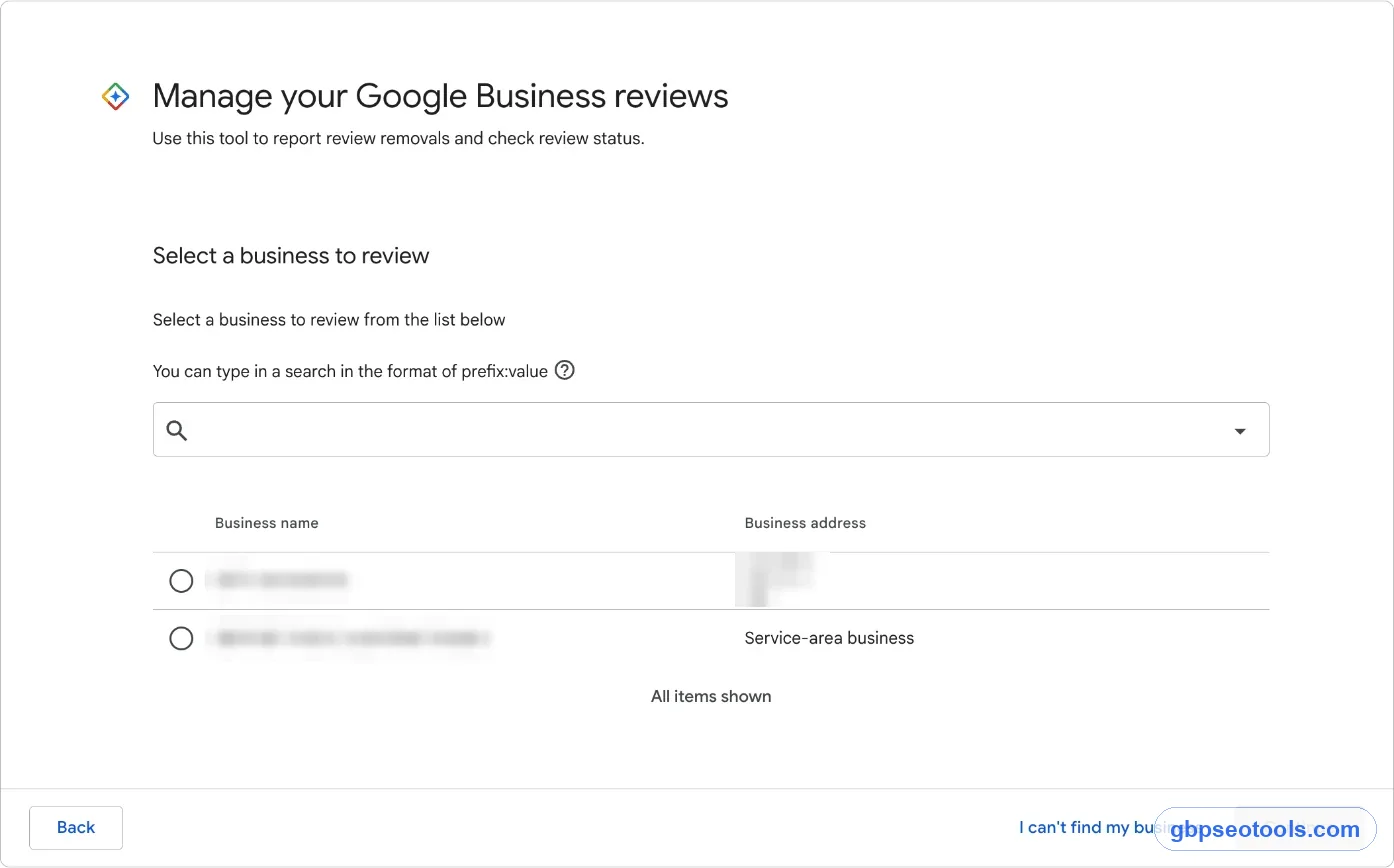
Removal requests also go through Google, using its own Reviews Management Tool. No outside product can take a review down for you.
For one location with a few reviews a month and an owner who checks every day, this is enough. Google's local ranking help page tells owners to respond to reviews, and you can do that for free for as long as you like.
What it leaves to you
Google shows you the reviews and leaves the rest of the job to you. It won't put the one-star at the top of your day or keep a record of one that vanished. It won't remember your sign-off or the words you never use. If you have several locations, you're opening each one in turn.
None of that matters at two reviews a month. It starts to matter once reviews arrive faster than you check, or once someone other than the owner is replying.
What Google review management tools should do for you
Review management software is worth paying for only if it closes the gaps above. A long feature list doesn't help if the worst review still waits in line.
Match each gap to a feature
| Where it breaks | What the tool should do | How to test it |
|---|---|---|
| Nobody notices | Send an alert with the review text, soon after it lands | Check how long the first alert takes |
| No triage | Show what's waiting, oldest and lowest first | See whether one screen answers "what needs me today?" |
| Autopilot replies | Draft from the review's own words, in your voice | Read five drafts for bad reviews and look for specifics |
| Vanishing reviews | Keep a record of reviews that were deleted | Ask where a removed review shows up afterward |
| Several locations | Separate each location, with roles and a log | Check who replied to what, and when |
Questions to ask before you connect one
A tool like this gets access to your profile, so ask these before you sign in with Google:
- Does it connect through Google's official Business Profile API, or does it ask for your password?
- Does anything post without a person reading it first?
- Whose address do review request emails come from, yours or theirs?
- Can you leave and keep your reviews? They live on Google, so the answer should be yes.
- If you run several locations or clients, does each one stay separate?
Promises that should worry you
Be wary of any product that says it can remove bad reviews. Only Google removes reviews, and only for policy violations. Also be careful with "review funnels" that send unhappy customers to a private form and only happy ones to Google. Filtering who gets asked is known as review gating, and it breaks Google's rules, however the feature is labeled.
One bad review, start to finish
Here's how we built this into Glocavo, using a made-up dental clinic. It's our own product, so check it against the table above like any other tool.
From alert to posted reply
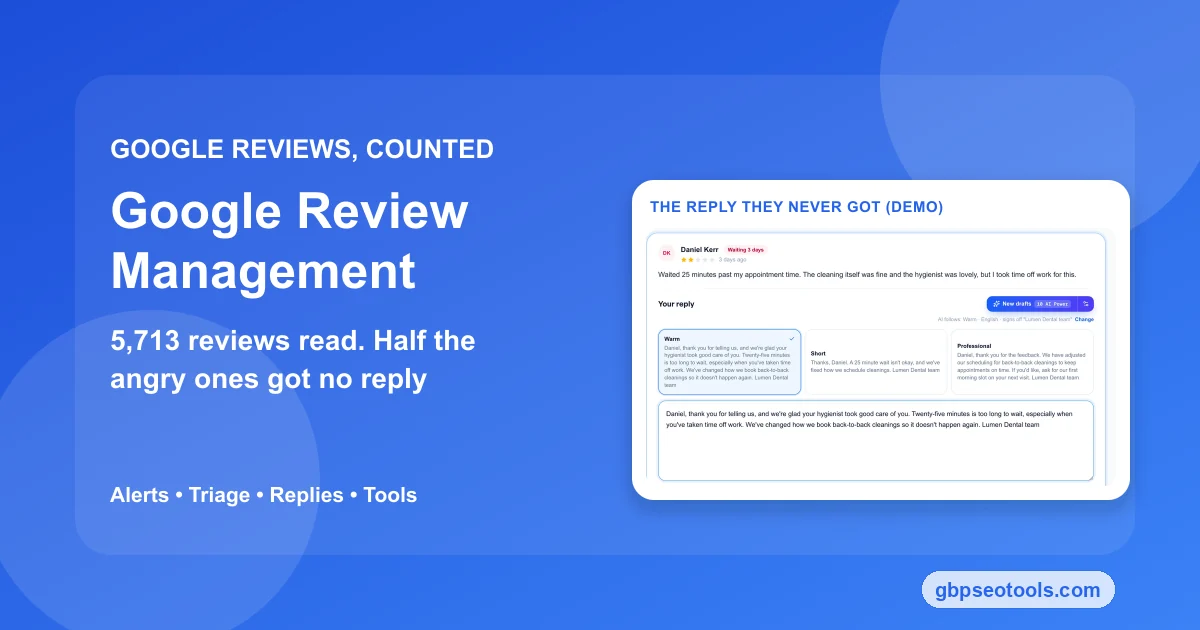
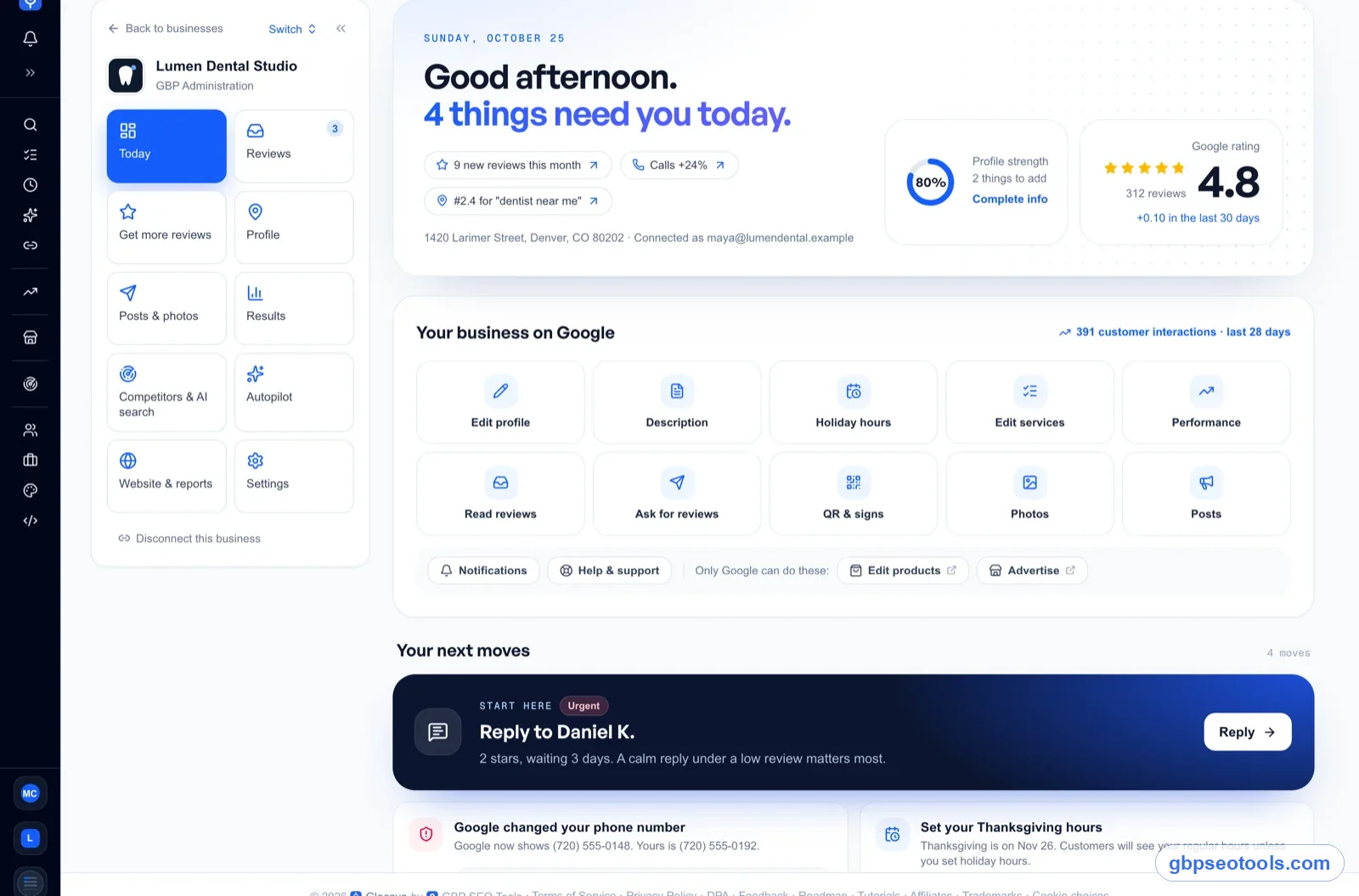
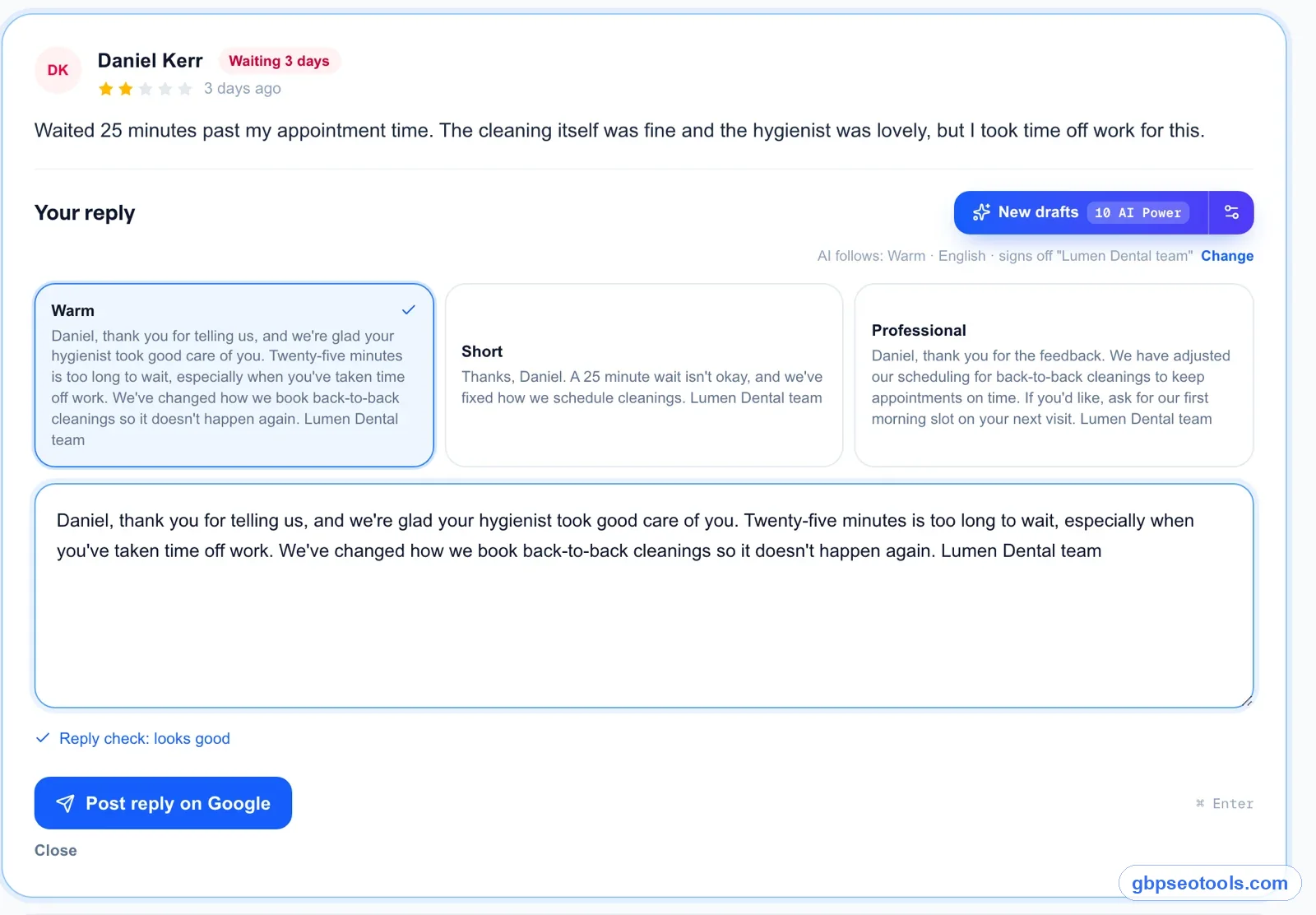
A 2-star review comes in about a 25-minute wait. Around a minute later, an email alert arrives with the review and a suggested reply, which you can post from your phone. At your desk, the review shows in the inbox as waiting, with a count of the days.
Press Reply and you get three drafts: Warm, Short, and Professional. Each follows your settings for language, sign-off, and words to avoid, and each picks up what the customer wrote. You read one, change what's wrong, and post it to Google. Nothing posts by itself, and a draft that sounds wrong is still your job to fix.
Finding the complaint behind the complaints
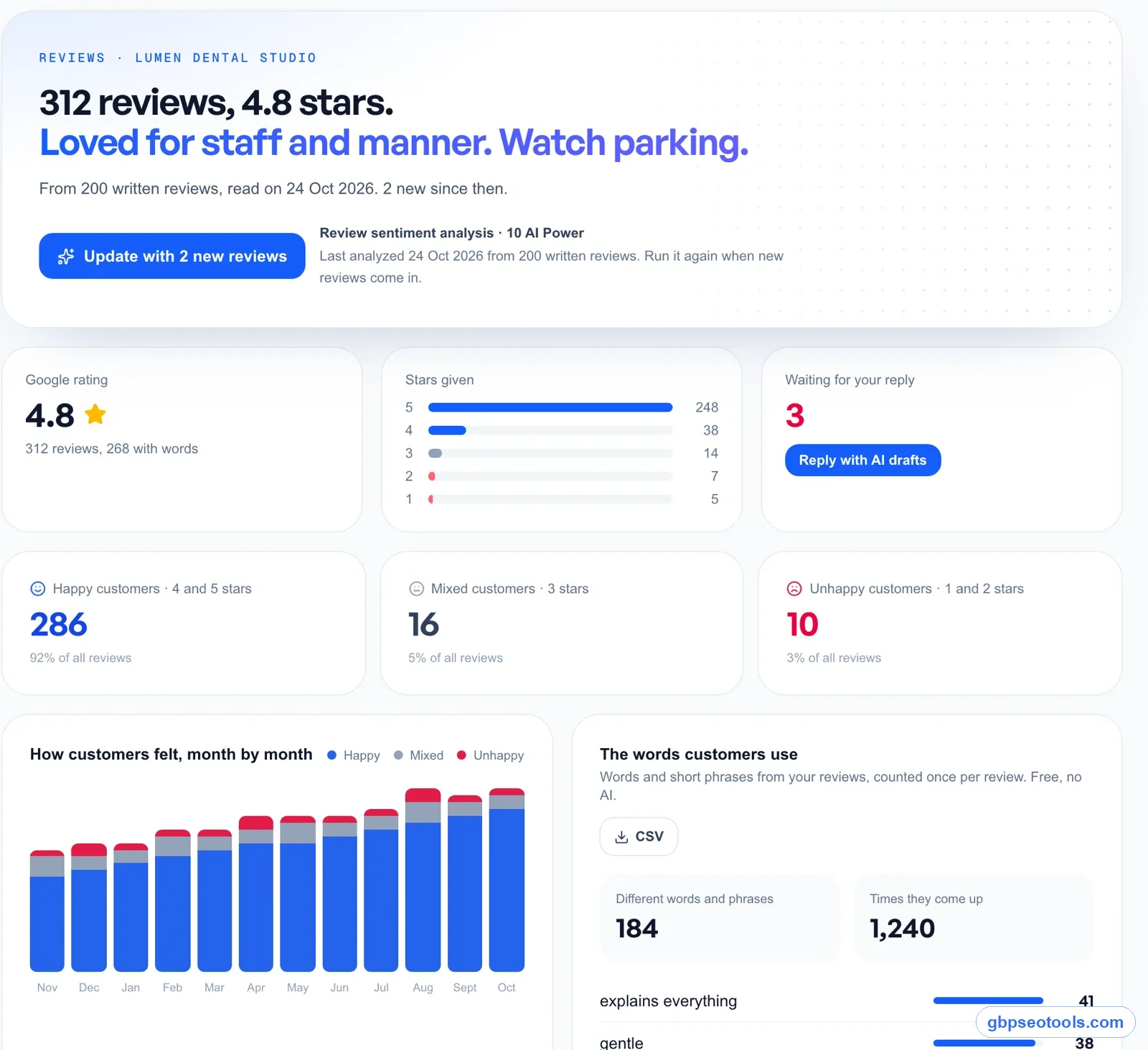
One review is a task. Thirty reviews are a report on your business. Glocavo's "What customers say" view groups reviews into topics, shows good and bad mentions for each, tracks mood month by month, and lists the phrases people repeat. If "wait" keeps turning up, the fix belongs in your scheduling, not in your replies.
The inbox also has a view for deleted reviews, so a review that disappears leaves a trace. All of this sits inside our Google Business Profile management software, next to posts, profile edits, and results for each business. It won't remove a review, ask Google to, or reply without you, because those decisions stay with Google and with you.
Questions about handling reviews
What does review management involve?
It's the ongoing work of tracking, prioritizing, and answering the reviews on your Google Business Profile, plus asking customers for new ones and reporting the ones that break Google's rules. You can do it by hand or with a tool. The job stays the same either way.
Are companies allowed to delete Google reviews?
No. A business can't delete a review on its own profile. You can report one that breaks Google's policy, and Google decides whether it comes down. A customer can delete their own review, which is one reason counts can fall without you doing anything.
Do I need a tool, or is Google's dashboard enough?
For one location with a few reviews a month and an owner who checks daily, Google's dashboard is enough. A tool starts to pay off when reviews pile up between checks, when someone else replies for you, or when you run several locations and need one way of working across them.
Does replying to reviews help my ranking?
We can't show that it does. Many businesses in our sample reached the top 20 while answering nothing. Google does tell owners to respond, and a reply clearly changes what the next customer reads, so we treat it as a way to win the call, with any ranking benefit as a bonus.
Should AI write my review replies?
AI can write the first draft, and a person should write the last one. Drafts save the most time on routine praise. On a bad review, read closely and add a specific detail, because the customer and everyone after them will judge the reply by whether anyone read the complaint.
The one decision to make this week
Tools and templates come second. Google review management starts with settling whose job this is and how fast it has to happen.
If you run the business yourself
Write one rule and keep it where you'll see it. A rule most owners can hold is low ratings within a day, everything else within a week. Then clear the one- and two-star reviews from the last 90 days before you touch anything else, and fit reviews into the rest of your profile routine.
If you look after clients or several locations
Name one person per location and agree who signs off on replies to bad reviews, since they're public and carry the client's name. Then run the count from earlier on every profile you manage. Sort by lowest rating, check the last 10, and put the numbers side by side. It's the fastest way to see which location needs you first, and it gives a client a number they can check themselves.