
Do Google Business Profile Posts Still Matter? We Checked the Top 3
Google Business Profile posts still matter, but not for the reason most guides give: across 400 businesses in 20 Google Maps searches, the top 3 posted no more often than businesses on page two. Posting every week didn't buy a top spot, and 4 of the 20 #1 businesses had no posts at all.
That doesn't make posts useless. It changes what they're for. A post won't lift a weak listing, but it can give someone who has already found you a reason to call this week. In many local markets, it's also a spot your competitors have left empty.
Below you'll find our numbers, a box where you can write a post and see how it reads, and every posts feature we built into Glocavo, shown on real screens.
In this guide:
- What 400 businesses told us about posting
- Your market may have stopped posting
- What GBP posts are good for
- Write a post customers finish reading
- Every posts feature in Glocavo, in order
- What to do this week
- Common questions
What 400 businesses told us about posting
On October 31, 2026, we ran 20 Google Maps searches, one trade in one US city each, from plumbers in Austin to accountants in Sacramento. We took the top 20 organic results of each search, then pulled the post history of all 400 businesses.
The top 3 look like everyone else
If posting pushed businesses up the map, the top 3 would post more than the businesses below them. They don't.
| Position on the map | Posted in the last 90 days | No posts found | About weekly (10+ in 90 days) |
|---|---|---|---|
| Top 3 | 31.7% | 38.3% | 13.3% |
| 4 to 10 | 28.6% | 42.1% | 13.6% |
| 11 to 20 | 31.0% | 43.0% | 17.0% |
The gaps are small, and they don't point one way. The top 3 are slightly less likely to have no posts, but page two has the most frequent posters.
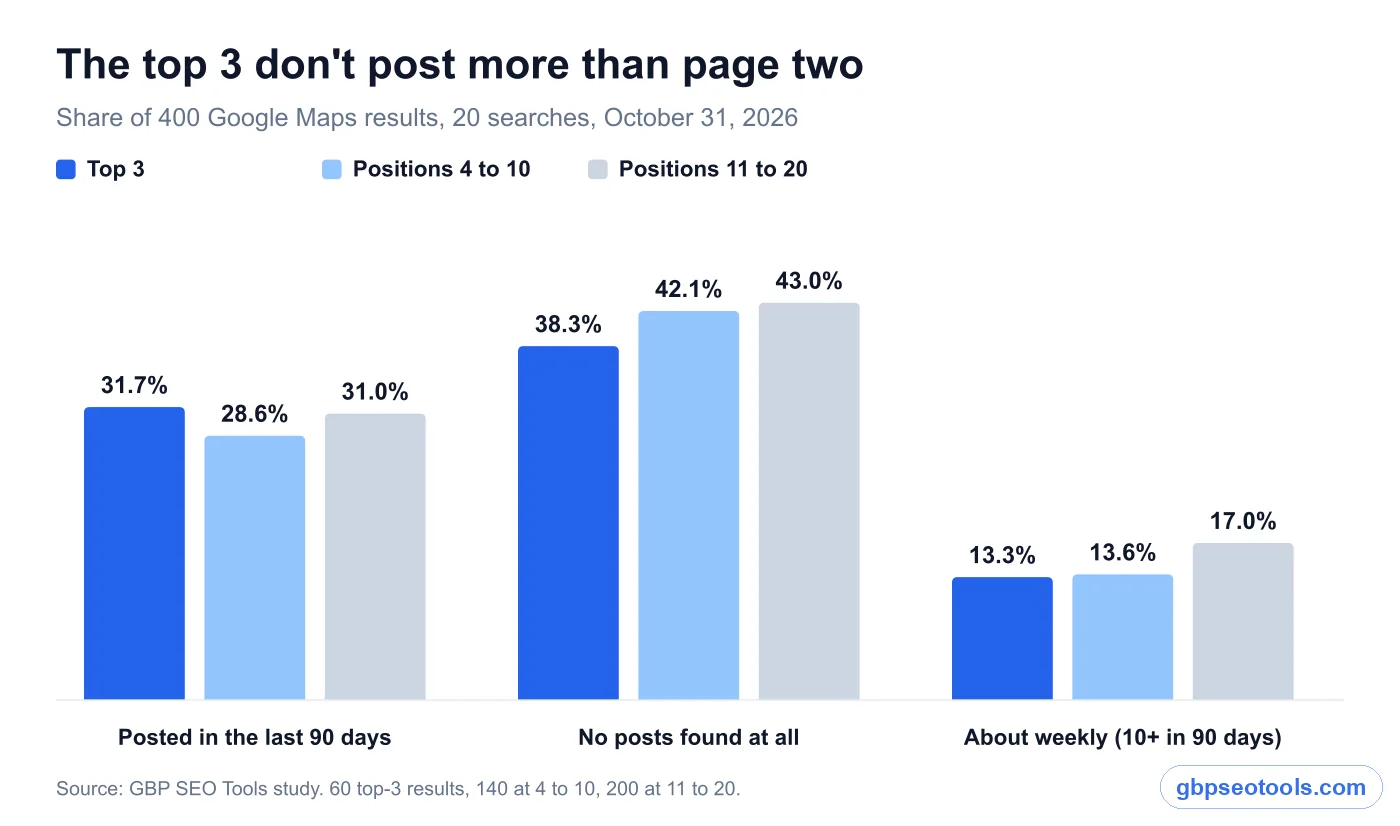
Posting every week didn't buy a top spot
We also looked at it the other way round. Top-3 spots make up 15% of our results, so that's the share you'd expect from any group if posting made no difference.
- 61 businesses posted about weekly. Eight of them (13%) were in the top 3.
- 168 businesses had no posts we could find. Twenty-three of them (14%) were in the top 3.
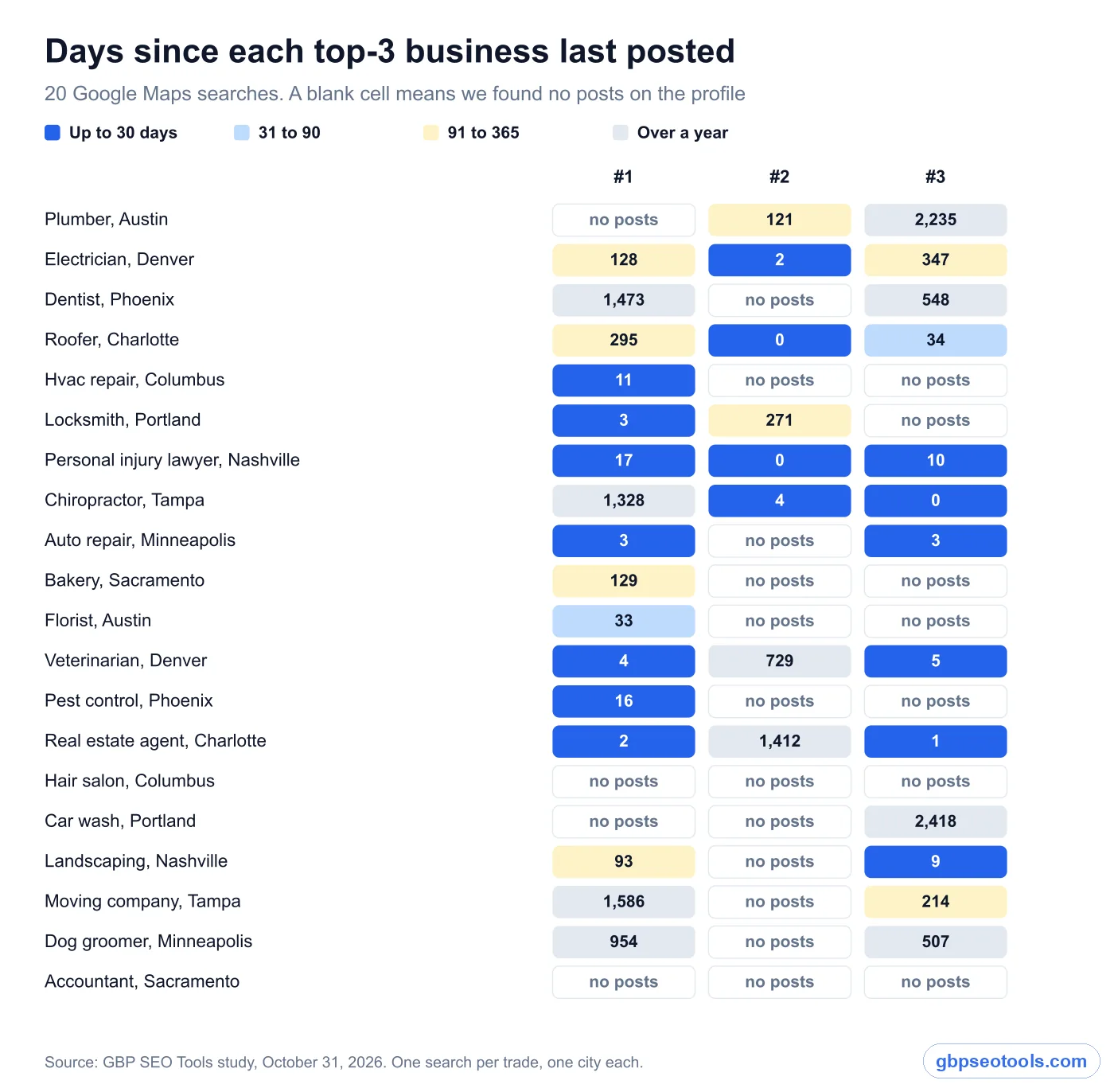
Four of the 20 #1 results had no posts at all. In 8 of the 20 searches, none of the top 3 had posted in the last 90 days. Hair salons in Columbus, car washes in Portland and accountants in Sacramento are very different markets, and in each one the top 3 hold their spots without a recent post.
What this test can't tell you
This is a snapshot, so it shows who posts, not what happens when a business starts. Each search ran once, from one point in one city, and a real before-and-after test would need months on the same profiles. "No posts found" also can't rule out older posts that were later removed.
One number leans the other way. Only 4 of the 20 #1 businesses (20%) had no posts, against 43% of everyone below them. With only 20 businesses that may be chance, and it doesn't show up across the top 3 as a group, but a bigger test could tell a different story.
So we aren't saying posts can't ever affect rank. We're saying they don't separate winners from everyone else, and other things clearly do. If rank is the goal, work on your primary category and your reviews before your posting calendar.
Your market may have stopped posting
The bigger gap in our data isn't between positions. It's between markets.
Some trades have nearly walked away
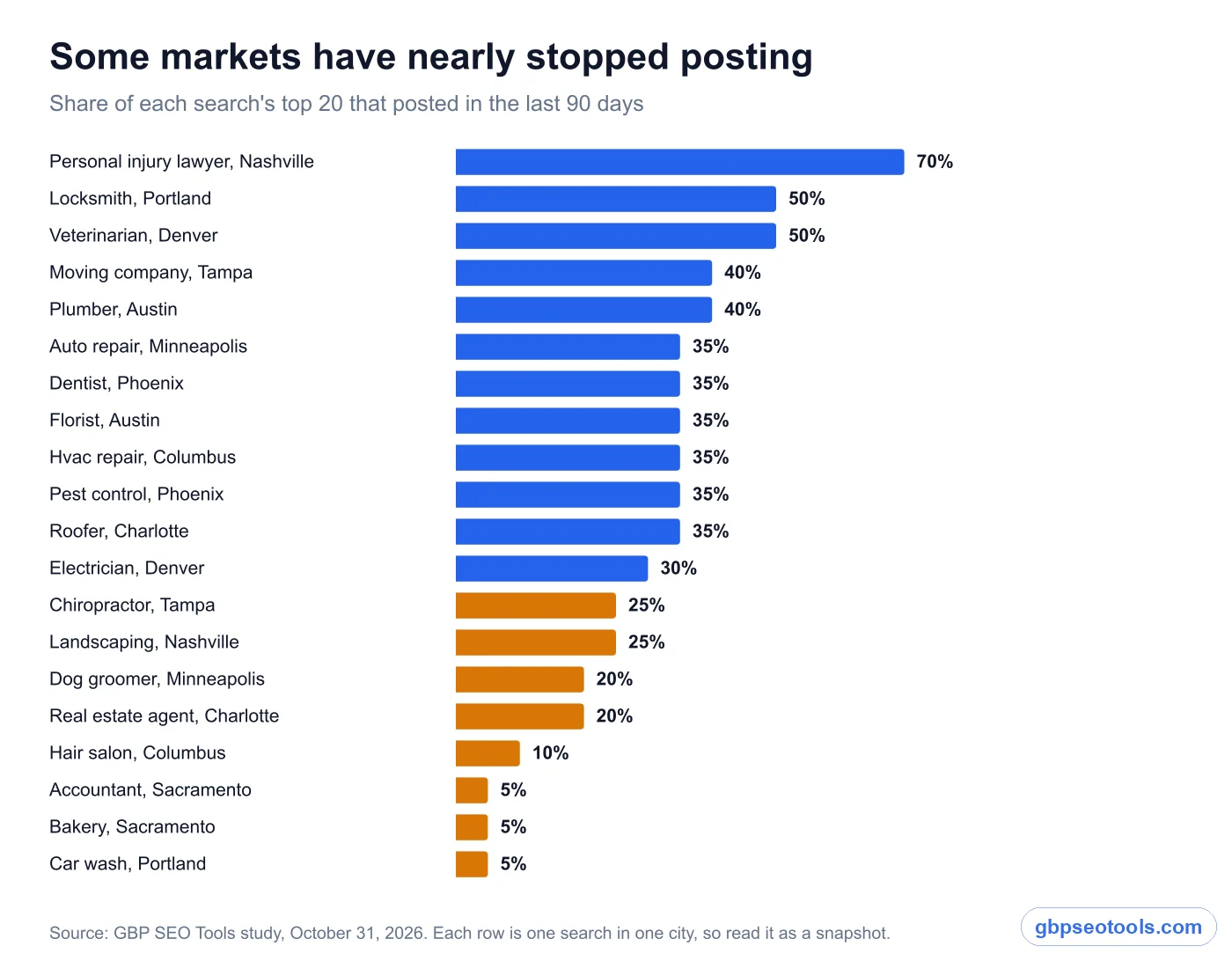
In the personal injury search, 70% of the top 20 had posted in the last 90 days. In the accountant, bakery and car wash searches, only one business in 20 had. Those last three searches also had the most profiles with no posts at all: 90% for accountants, 80% for car washes and 70% for bakeries.
Each bar below is one search in one city, so don't read it as a verdict on a whole trade. Your city could look different, which is why it's worth checking.
Check your own market in five minutes
- Search your main service on Google Maps, the way a customer would.
- Open each of the top 3 profiles and find their updates.
- Write down the date of each one's newest post.
If nobody has posted since summer, a post every couple of weeks already makes your profile the most current one a customer compares. If all three posted this week, posts are the minimum in your market, and yours will need a real offer or real news to get noticed.
What GBP posts are good for
Google Business posts, which many owners still call Google My Business posts, are short updates, offers and events that appear on your profile in Search and Maps. Google's posts help page doesn't promise a ranking benefit. It says posts help customers decide to visit your business by sharing current information. That's a fair description, and it's where we'd aim yours.
Answering "are they open, and can they do this now?"
A customer comparing three plumbers wants to know who can come this week. A post can say you now install tankless heaters, that you've added Saturday hours, or that you're booking two days out. Reviews tell people what you were like. Posts can say what you're doing now.
Giving offers and events a proper home
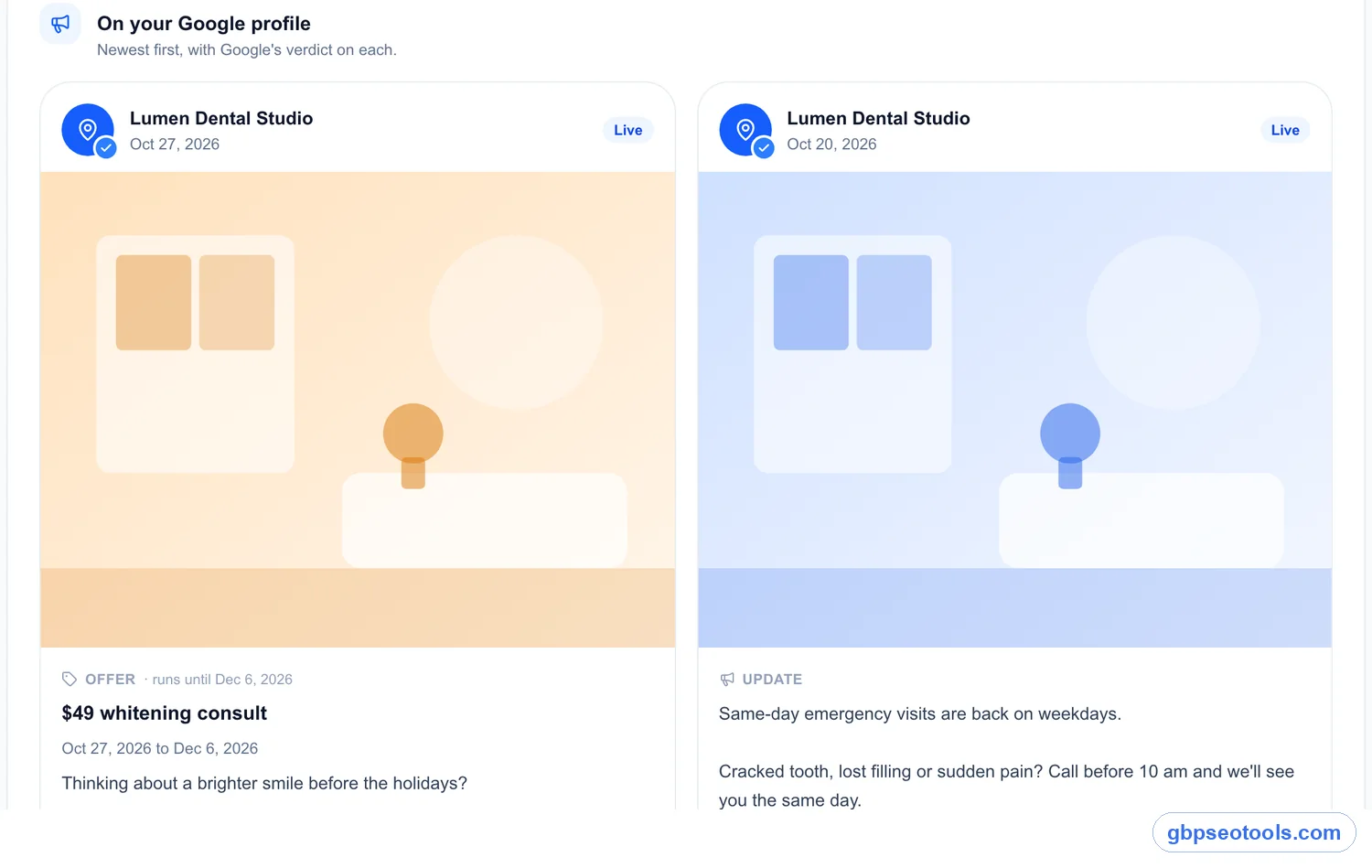
Offers can carry dates, a coupon code, a link and terms. Events get a title and dates. If you run a seasonal deal, an open day or a class, a post puts it on the profile people are already reading. Google also says it may feature posts about events, deals or specials on mobile profiles, currently for some single-location food and drink businesses.

Showing whether anyone read them
Google began rolling out view counts for posts in fall 2026, shown on each post in your Business Profile. They combine Search and Maps, and Google hasn't said exactly what counts as a view. They still beat guessing: if your offers get read and your general news doesn't, you know what to post next. To see clicks, add a tracking tag to the button link and watch it in your analytics.
Write a post customers finish reading
The typical post in our sample with any text ran 37 words. Short is normal and fine, as long as those words say something a customer can act on.
Try yours here
Pick an example, change the words, and watch the preview and checks update. Nothing leaves your browser.
Try writing one. Nothing gets posted.
Button
Update
Water heater acting up before the cold weather? We now carry tankless models and can usually install one within two days. Ask about the size that fits your home.
Call now
- 161 of 1,500 characters.
- No phone number in the text.
- The button says Call now.
Pick the type that fits
| Type | Use it for | What it needs |
|---|---|---|
| Update | News, a new service, recent work, hours | Text, ideally a photo and a button |
| Offer | Anything with a deadline or a code | A title, dates and times |
| Event | Open days, classes, seasonal hours | A title and dates |
The rules that get posts hidden
Google reviews each post after you publish it. A post shows as Live, Pending (not shown yet), or Not approved. Three rules are easy to miss:
- Phone numbers in the text can get a post rejected if Google can't verify they're yours. Use the Call now button, which uses your profile's number.
- Posts older than six months are archived unless you set a date range, so don't count on an old post to keep working.
- An event with no times shows as lasting 24 hours on its dates, so add times if they matter.
A rhythm you can keep
Weekly is a sensible ceiling, not a ranking requirement. Among top-3 businesses with posts, the median was 34 days since the last one. We'd rather see one specific post every two weeks than four empty ones a month. Keep posts as one line in a weekly profile routine, and use your best reviews for ideas. If you have few reviews to draw on, start with asking customers for reviews.
Every posts feature in Glocavo, in order
Glocavo is our local SEO app, and its Google Business Profile post scheduler is part of GBP Management, included on every paid plan. Click through the tour below. The screens are the real app, filled with a made-up dental clinic.
The full tour, from blank page to published post
See where your posts stand
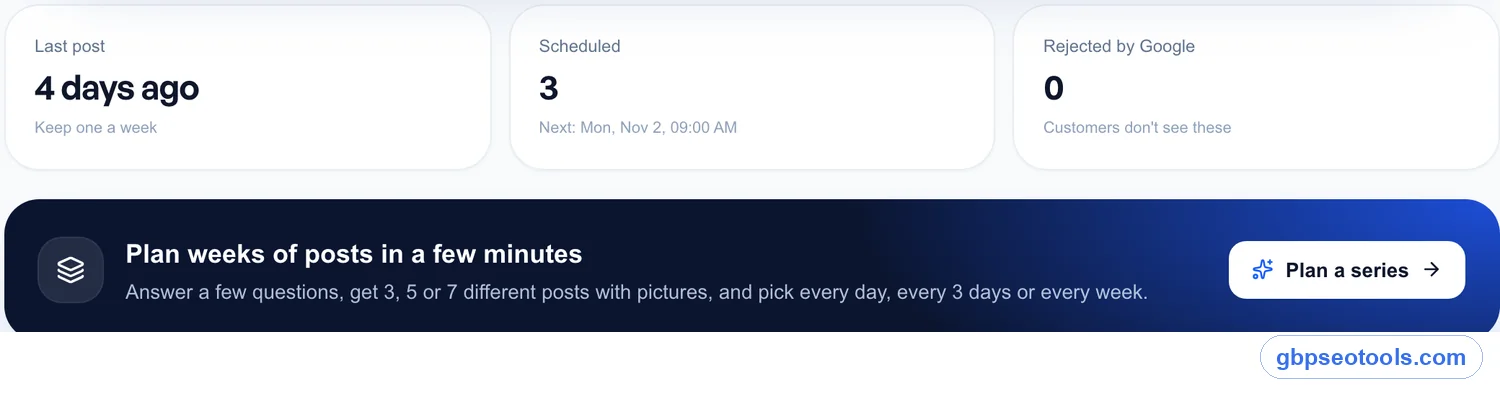
Three counters sit on top: your last post, what's scheduled, and anything Google rejected, since customers don't see those. Below them is the shortcut to plan a whole series.
Write an update, offer or event
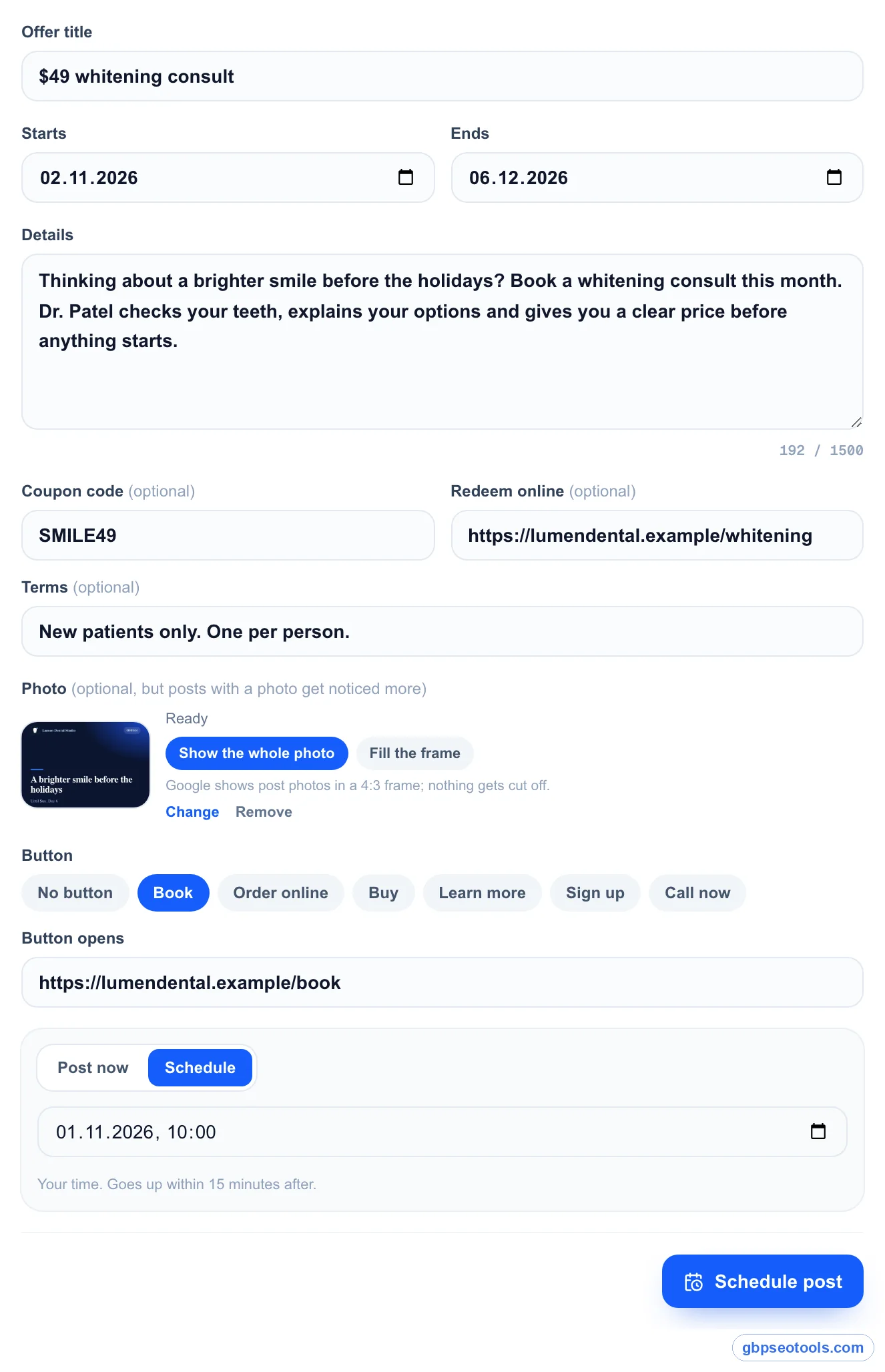
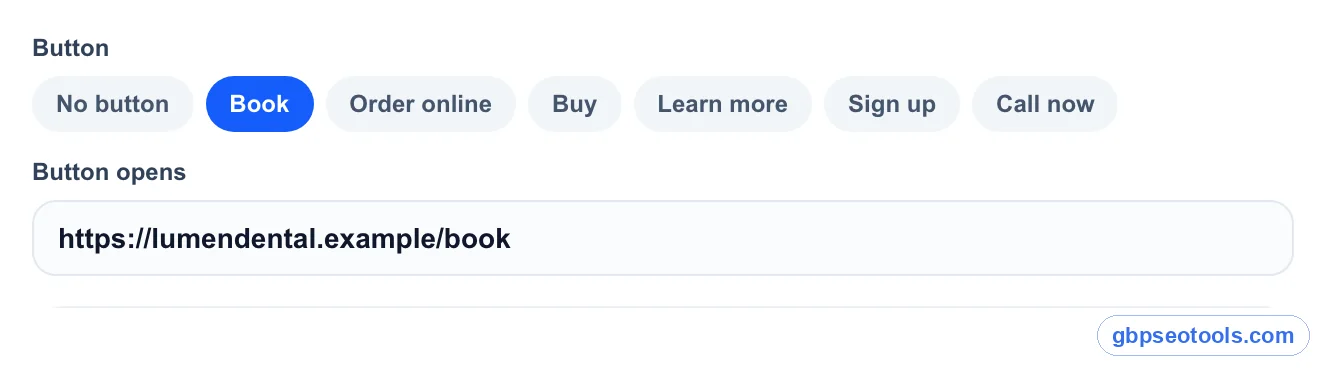
An offer has its title, start and end dates, coupon code, redeem link and terms. Add a photo and choose whether to show all of it or fill Google's 4:3 frame. Then pick a button: Book, Order online, Buy, Learn more, Sign up or Call now, which calls the number on your profile. Post now, or pick a time.
Events with dates, and times if you want them
Leave the times empty for an all-day event. The same photo, button and scheduling options apply.
See it the way customers will
A live preview follows every word you type, with the dates, the code and the button, so you catch mistakes before Google does.
Start from what customers praise
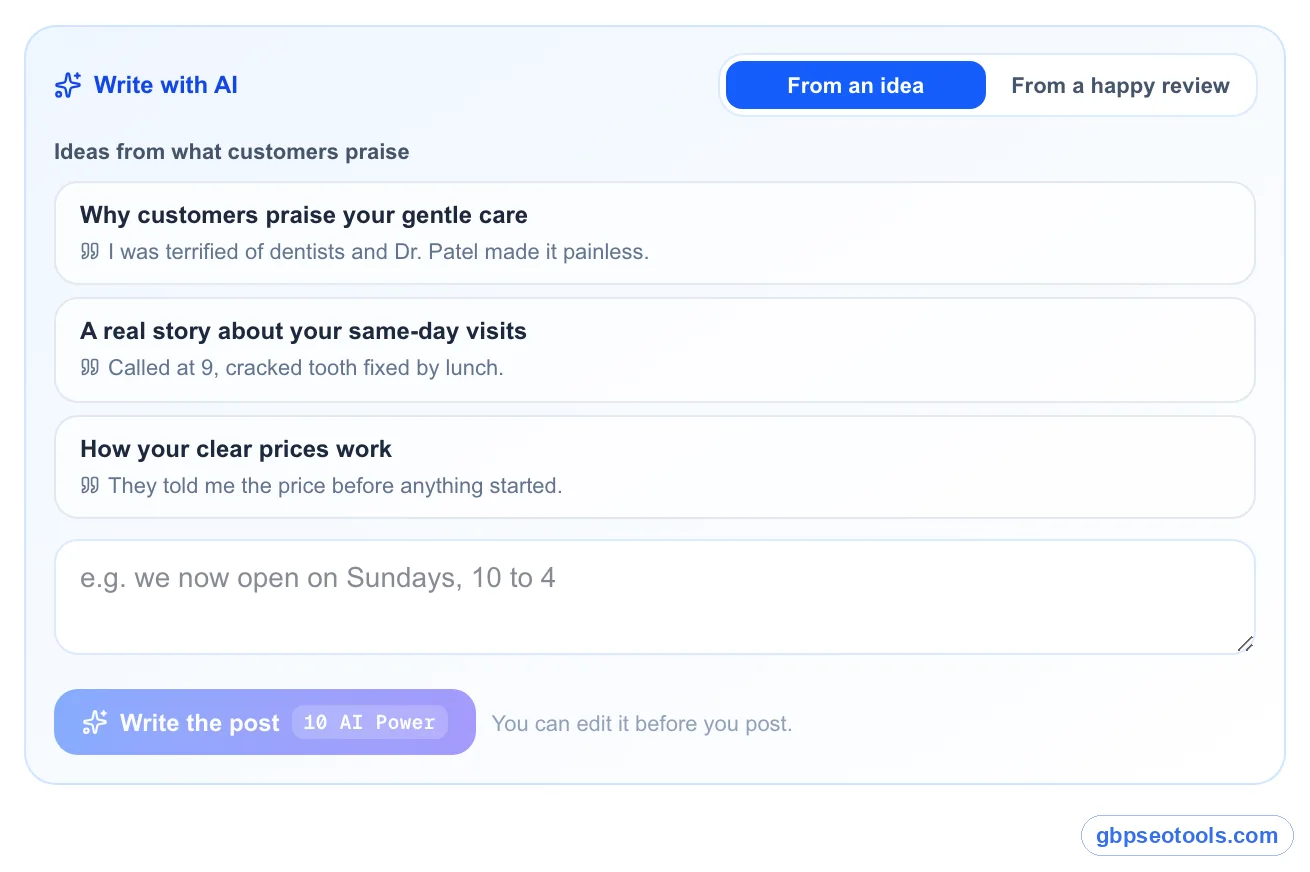
Write with AI turns a few of your words into a post. Once your reviews are analyzed, it also suggests ideas based on what customers keep praising, with the quote that inspired each one. You can edit everything before it posts.
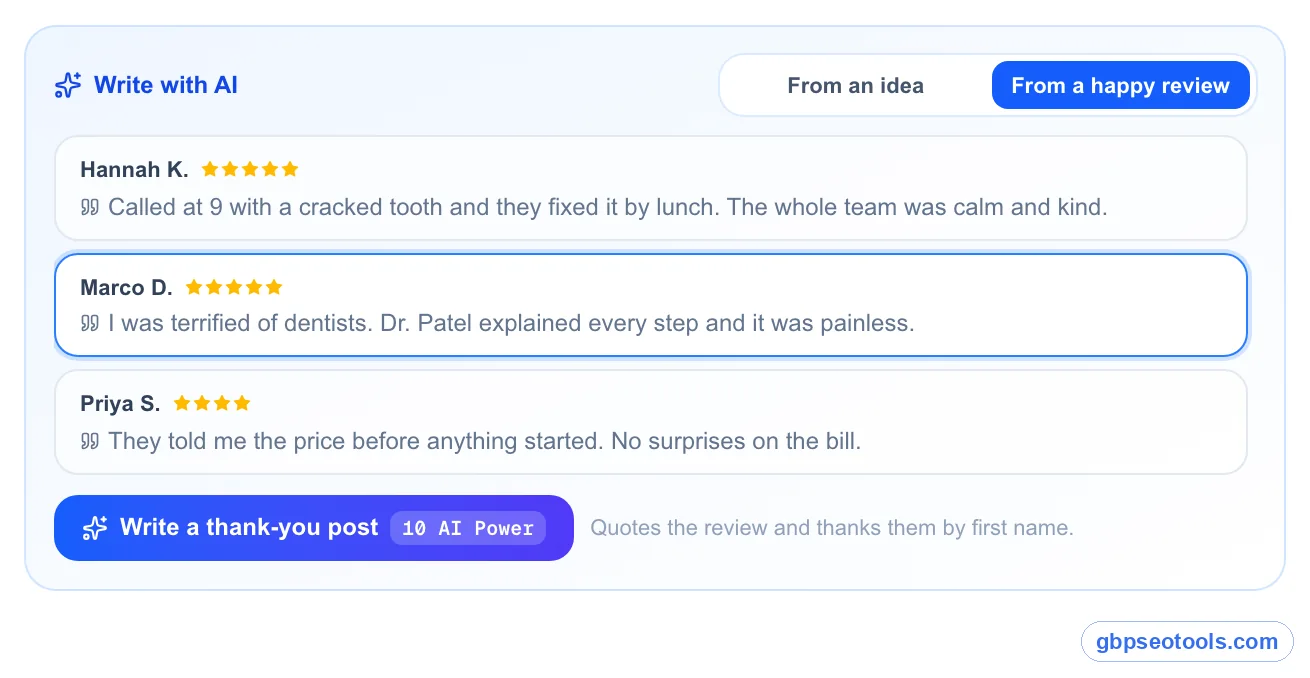
Turn a happy review into a post
Pick a recent 4 or 5 star review and Glocavo writes a thank-you post that quotes it and thanks the customer by first name.
Plan weeks of posts in a few minutes
Choose 3, 5 or 7 posts and the mix of updates, offers and events. Add what's new, the services to show and who the posts are for. The AI reads your profile and only uses those facts: no made-up prices, dates or discounts.
Edit every draft and give it a picture
Every draft stays editable, or ask the AI to rewrite it with your instruction. For the picture, upload your own, use a photo from your Google profile, or let Glocavo design one in midnight, blue or light with your own headline.
Pick a rhythm and see the dates
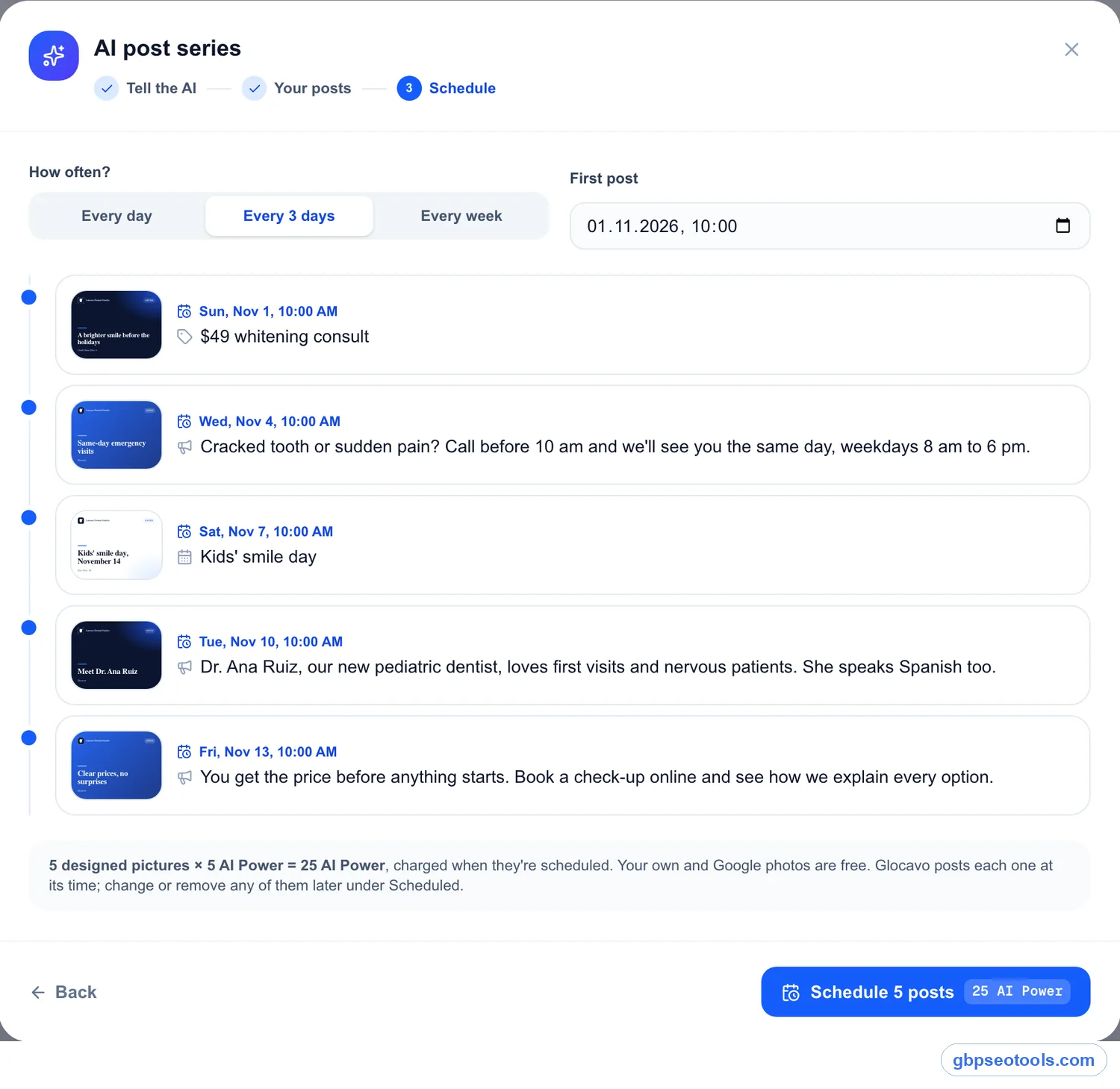
Every day, every 3 days or every week. Glocavo lays out each post with its date and picture, and warns you if an offer or event would go out after it has ended.
Change your mind any time
Everything waiting sits in one list. Post one now, change its time or remove it. Glocavo checks every 15 minutes and publishes what's due.
See what Google did with each post
Your published posts appear newest first, each marked with Google's verdict. Use again copies a post that worked into a new draft, and you can remove any post from your profile.
Photos that post themselves
Drop in up to 30 photos, pick a start and a gap, such as one every 7 days, and choose a category. Each photo goes up on its day, and you can move or remove any of them first.
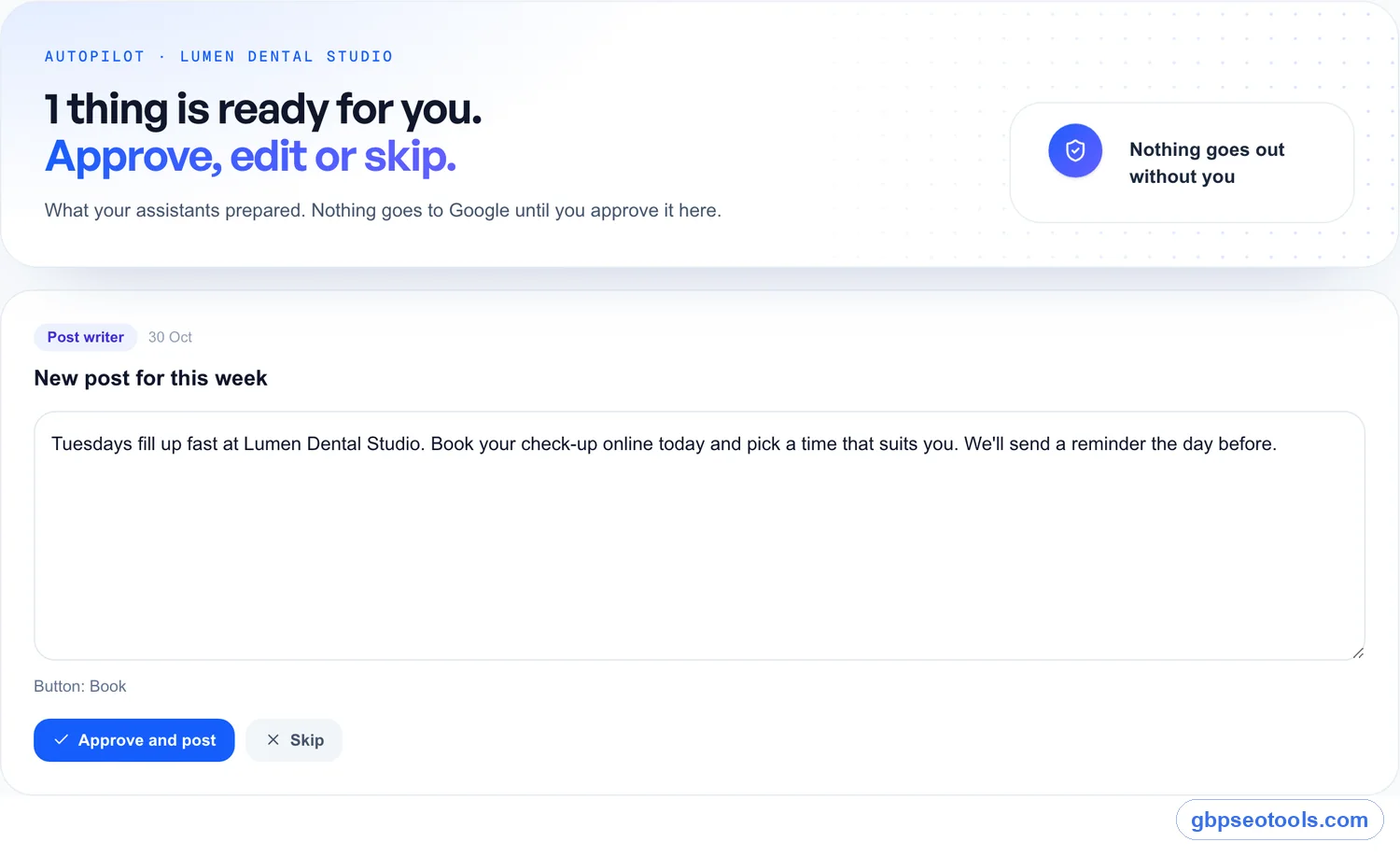
Let an assistant draft the week's post
Turn on Post writer in Autopilot and it drafts a post when you haven't posted for six days, using your services and what's coming up. Nothing reaches Google until you approve it. If a profile goes 30 days without a post, Today also puts it on your list.
Real Glocavo screens with demo data. Click an image for full size.
What Google's own tool already does for free
You don't need software to post. Google's Business Profile lets you write all three post types, schedule them, repeat them and share one post to several profiles, and it shows the view counts. If you post once a month to one profile and enjoy writing them, that's enough.
Glocavo earns its place when writing is the part that stalls: ideas from your reviews, a month of drafts at once, pictures when you have no photo, photo drops, reminders and an approval step. Post view counts aren't available to outside tools yet, so check those in Google.
If you post for clients
Each client's posts sit under their own business, with the same queue and verdicts, and Autopilot leaves a draft waiting for approval. You work one business at a time, since each post should sound like that business. To push one identical post to many locations, Google's own sharing option does that.
What to do this week
Our test gives you a simple way to decide how much effort posts deserve.
If nobody near you posts
Publish one specific post this week: a real offer, a new service or your next open day. Add a photo and a button. Then repeat every two weeks. You may be the only current profile in the comparison.

If everyone near you posts
Don't compete on volume, because we found no sign that it wins. Compete on substance: real prices, real dates and real work. Then check view counts after a month and post more of whatever gets read.
Google Business Profile posts: common questions
Do Google posts help you rank?
We found no clear sign of it. In our 400 results, the top 3 posted about as often as positions 11 to 20, and weekly posters reached the top 3 no more than businesses with no posts. #1 businesses were somewhat less likely to have no posts, though on a small sample. This is a snapshot rather than a controlled test, so we can't rule out a small effect. Google doesn't promise one either.
How often should a business post on Google?
Every week or two is plenty, if each post says something real. Nothing in our data says weekly beats less often for rank. Pick a rhythm you can keep for a year, and post more when you have an offer or event worth sharing.
How long do Google posts stay up?
Google says posts older than six months are archived unless you set a date range. Offers and events are tied to the dates you give them, so set those carefully.
Why was my Google post not approved?
Google checks each post against its content policy after you publish. A phone number it can't verify is a common cause, so use the Call now button instead. A question mark next to the status shows which policy the post broke.
Can you schedule Google posts?
Yes. Google's own tool can schedule and repeat posts. Glocavo also schedules them, one at a time or as a series, and shows the whole queue in one list.
Can I see how many people viewed my post?
Yes, if the feature has reached your account. Google has been rolling out view counts on each post in your Business Profile, covering the past 18 months and combining Search and Maps. Outside tools can't read these numbers yet.