
SERP Monitoring for Local SEO: What to Watch Beyond Your Rank
SERP monitoring for local SEO means watching the whole results page for your keywords, or a client's, not only the position: whether a local pack appears, what else sits above the organic results, which competitors are moving, and what Search Console says about clicks.
A rank number on its own tells you less than it seems to. A business can hold position 2 for "emergency plumber" while ads, a local pack, and an AI Overview push that result below the first screen on a phone. The rank report says nothing changed. The phone says otherwise.
Most businesses and agencies already track positions. The gap is everything around them. This guide is a watch list for local work, whether you're watching your own business or a roster of clients. It covers which parts of the results page to track, how to check them from where your customers actually search, which competitor changes deserve an alert, and which Search Console reports find wins a rank tracker can't. It closes with a weekly and monthly routine you can run for one business or twenty, and it comes from the team building local search monitoring tools for exactly this kind of work.
In this guide:
- What SERP monitoring covers when the market is local
- SERP features tracking: what sits above your listing
- How to track local SERPs from where your customers search
- Competitor changes worth an alert
- Search Console data a rank tracker can't show
- SERP checkers, free tools, and rank screenshots: quick answers
- A weekly and monthly routine you can keep up
What SERP monitoring covers when the market is local
SERP monitoring is checking the search engine results page (SERP) for your keywords on a schedule and recording what changed on it. Done weekly, it shows you a problem the week it starts instead of the month the phone goes quiet.
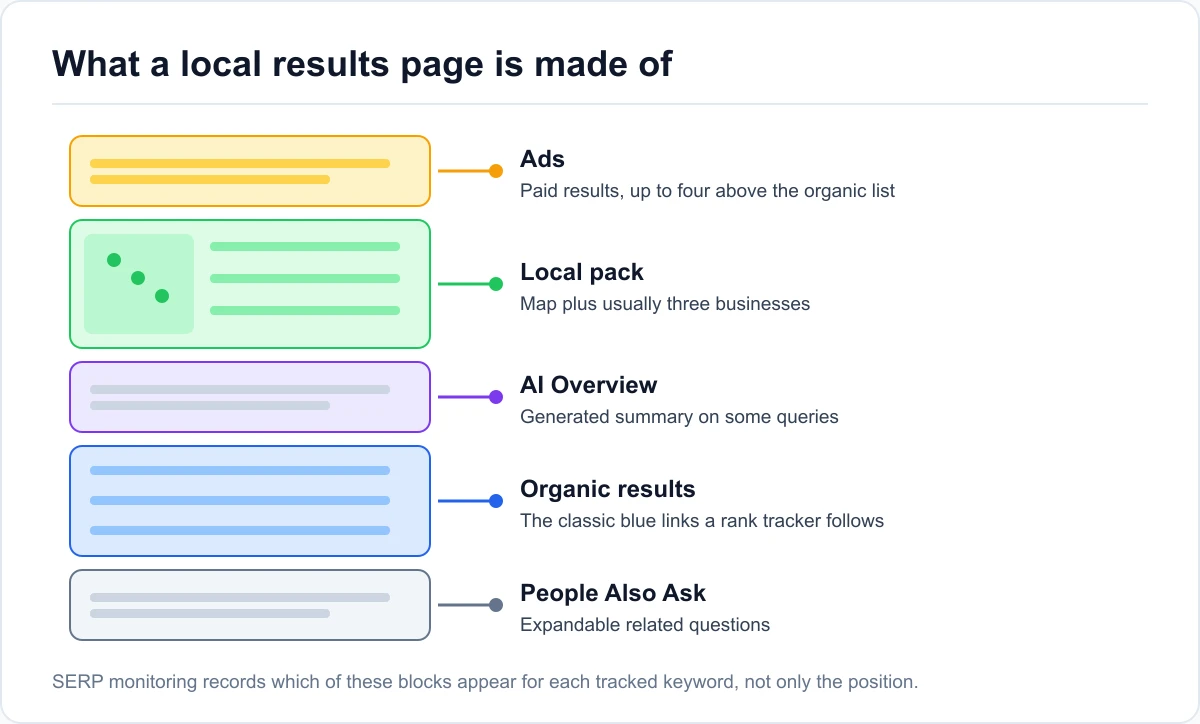
Rank tracking answers one question, monitoring answers several
A rank tracker answers "where does your page sit in the organic list?" That's useful, and it's also incomplete. For local queries, the organic list shares the page with ads, a local pack (the block of usually three businesses with a map), People Also Ask boxes, and sometimes a featured snippet or an AI Overview.
Monitoring adds the questions a position can't answer:
| What to watch | What it tells you | How often |
|---|---|---|
| Organic position and ranking URL | Whether the right page ranks, and where | Weekly |
| SERP features on the page | Whether the result is still visible on the first screen | Weekly |
| Local pack presence and members | Whether the query triggers a map, and who's in it | Weekly |
| Competitor movement | Who is gaining, and whether it's organic or in the pack | As alerts arrive |
| Search Console opportunities | Queries and pages with room to gain, or already slipping | Monthly |
Why local results pages shift by city, device, and day
National rankings move slowly. Local ones don't, because Google builds the page around the searcher. The same query returns a different local pack in a different part of town, a different layout on mobile than on desktop, and a different set of features from one week to the next as Google tests formats.
That's why one check from one place is a snapshot, not a trend. It's also why this guide treats organic monitoring and map tracking as two different jobs. An organic check reads the page from one location per keyword. How a business shows up on the map across its whole service area is what a grid scan measures, and the two answer different questions.
SERP features tracking: what sits above your listing
SERP features are everything on the page that isn't a plain blue link. Tracking them is the part of SERP monitoring that explains most "our rank is fine but traffic dropped" puzzles, whether you're solving one for your own site or explaining it to a client.
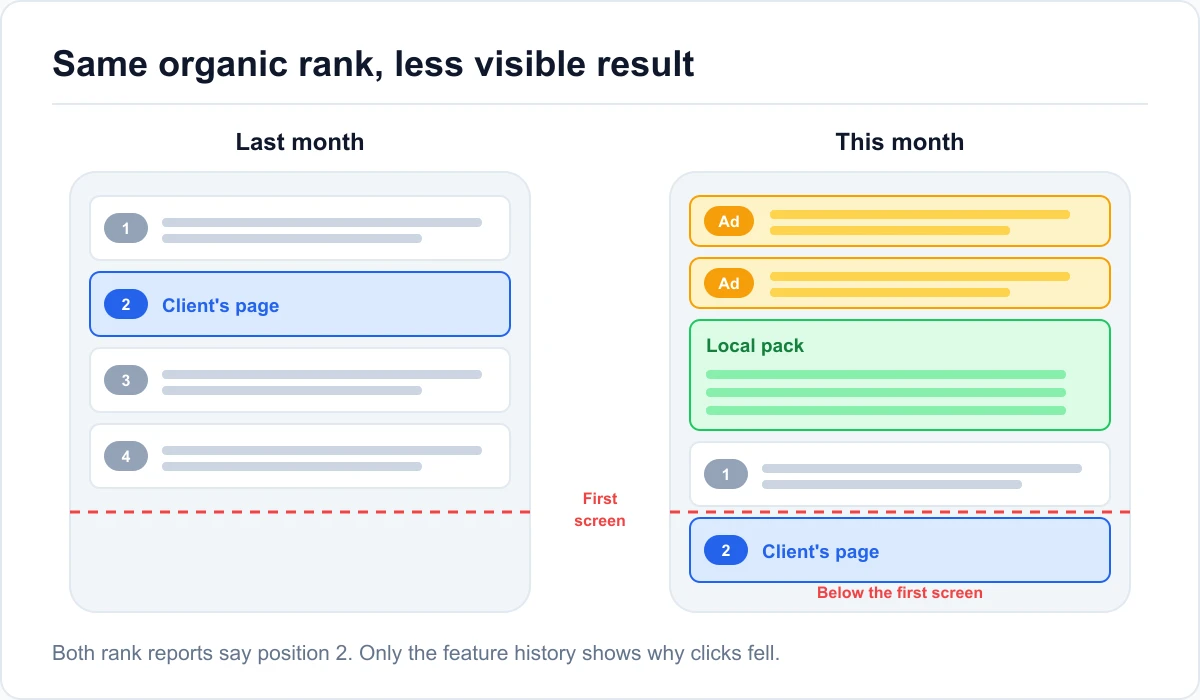
When a map block lands above the organic results
The local pack is the feature that matters most for local businesses, because it takes the top of the page on most service and "near me" queries. Record two things on every check: does the query trigger a local pack at all, and which businesses are in it.
A query that didn't show a local pack last month and shows one now has changed character. The organic result is worth less, and your Google Business Profile is worth more. That's a different fix: profile work, reviews, and categories instead of on-page changes.
Featured snippets, People Also Ask, and ads
Featured snippets and People Also Ask boxes appear mostly on question queries, like "how much does a water heater replacement cost." They can be won. A page that answers the question in a tight paragraph under a matching heading has a real chance at the snippet.
Ads can't be won through SEO, but you should count them. Three ads above the organic results change the value of a position 1 on mobile. When your clicks drop with no rank change, the ad count is one of the first things to check.
Reading a traffic drop when the rank didn't move
Here's a common case. A dental practice holds position 2 for "dentist [city]" all quarter, and organic clicks still fall month over month. The rank report is flat, so the owner assumes the SEO stopped working.
The feature history tells the real story: a local pack started showing for that query mid-quarter, and an extra ad appeared on mobile. The practice didn't lose ground. The page changed around it. The fix is to push the Business Profile into that local pack, and if you report to a client, the conversation gets much easier when you can show exactly when the page changed.
How to track local SERPs from where your customers search
Most bad local rank data comes from checking in the wrong place. Google localizes results for any query with local intent, so a check from your own shop shows a version of the page your customers may never see. Agencies have a bigger version of the same problem: a check from an office in another city describes a market the client doesn't even sell in.
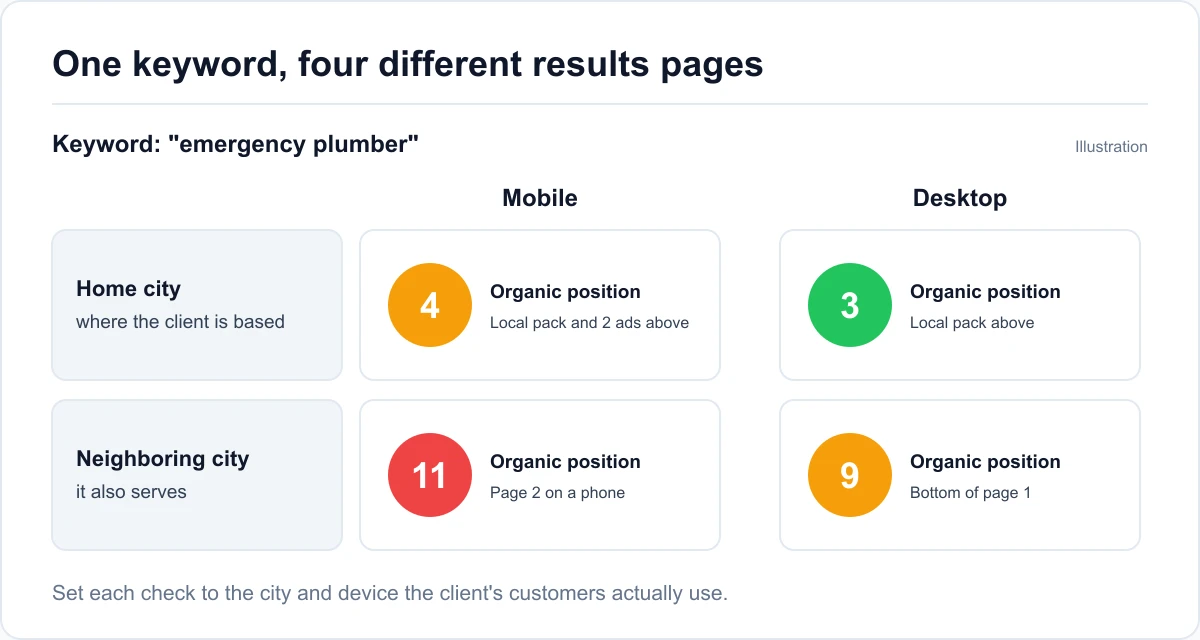
Set the search location to where the customers are
Set every tracked keyword to the city or area where your customers search. If you serve two cities, track the main keywords in both. A plumbing company can rank 4th in the city it's based in and 11th in the neighboring city it also serves, and a single check would only ever show one of those numbers.
This is also where a local SERP checker earns its keep over a manual incognito search. Incognito mode removes your search history, not your location, so the result still reflects wherever you're sitting.
Check mobile and desktop separately
Mobile and desktop results pages are laid out differently, and local queries lean heavily mobile. Track each important keyword on both devices at least once, then keep the device your customers actually use. For most service businesses, that's mobile.
The difference is often in the features, not only the position. The local pack and ads take up more of a phone screen, so the same organic position can be visible on desktop and buried on mobile.
Decide how deep to check
Checking only the first page is cheaper and fine for keywords you already rank well on. For new pages and weaker keywords, check deeper, to the top 50 or top 100. A page moving from position 64 to 31 is real progress, and a first-page-only check shows it as "not ranking" both times.
Competitor changes worth an alert
Competitors are part of the results page too. The point isn't to watch every move they make. It's to get told about the few changes that predict a problem.
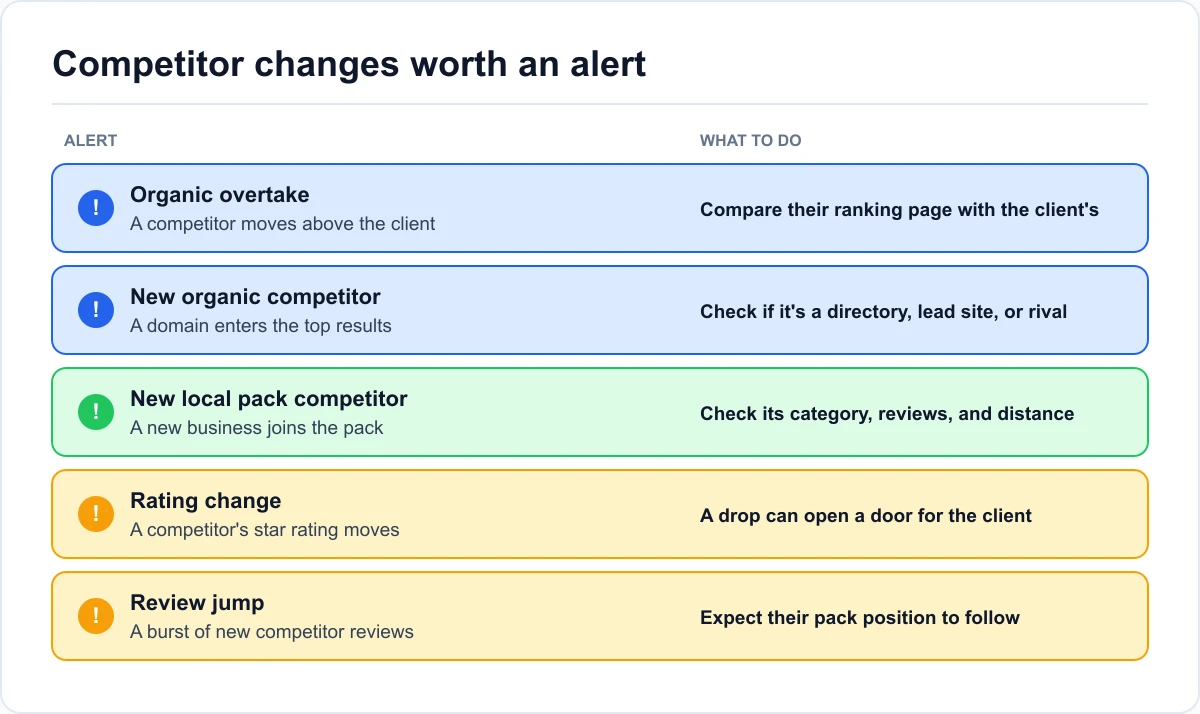
A competitor overtakes the client in organic results
When a competitor moves above you on a tracked keyword, find out why before it becomes a trend. Look at the competitor's ranking page. Did they publish a new service page, expand an old one, or add location detail your page doesn't have?
A new domain appearing in the top results deserves the same look. It's often a directory or a lead-generation site, which you can't outrank with one fix, but it tells you where the space on the page is going.
A new business appears in the local pack
A new name in the local pack means Google found a better-fitting or closer business for that search. Check the newcomer's primary category, review count, and distance from the search location. If it's a new competitor that opened nearby, your pack position may drop for reasons you can't fix. Knowing early lets you plan around it, and if you manage the profile for a client, tell them now rather than explaining it after the fact.
Rating and review jumps as an early warning
Review signals carry about a fifth of local pack ranking weight in Whitespark's 2026 Local Search Ranking Factors survey, so a competitor's review count is a leading indicator. A competitor that adds a large batch of reviews in a month is usually running a review campaign, and their pack position tends to follow.
Watch the rating too. A competitor's rating dropping can open a door for you. A rating jumping sharply in a short time can also be worth a closer look, since sudden bursts are the pattern Google's review policies are built to catch.
Search Console data a rank tracker can't show
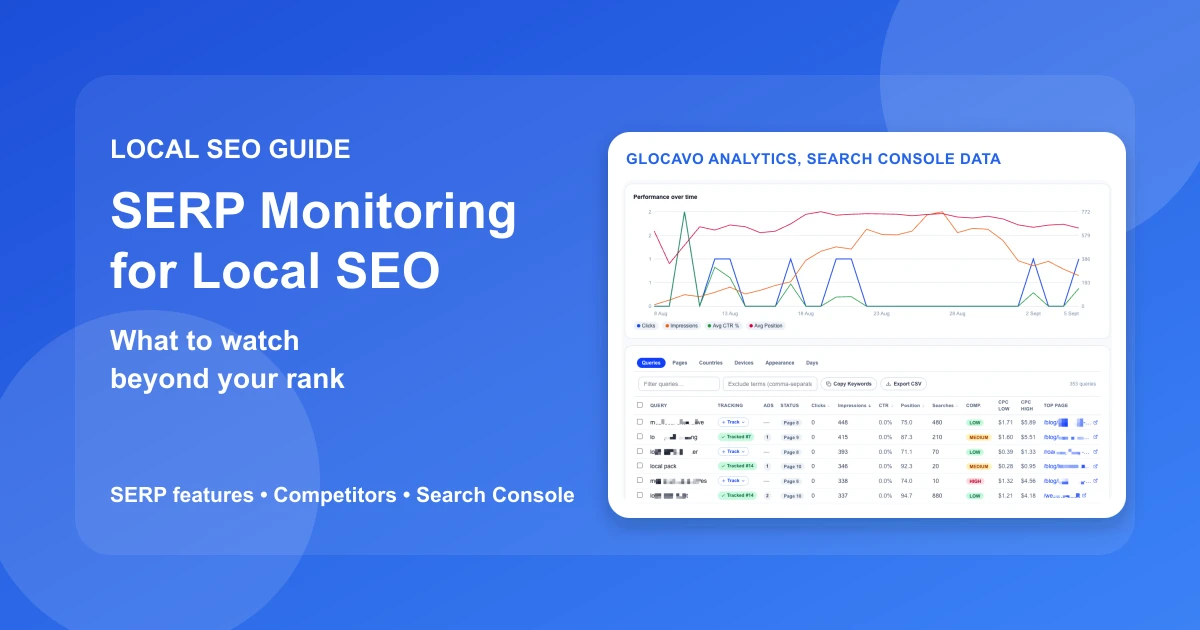
A rank tracker shows positions for the keywords you chose. Search Console shows the queries Google actually shows your site for, including hundreds nobody thought to track. That's where most of the easy wins are.
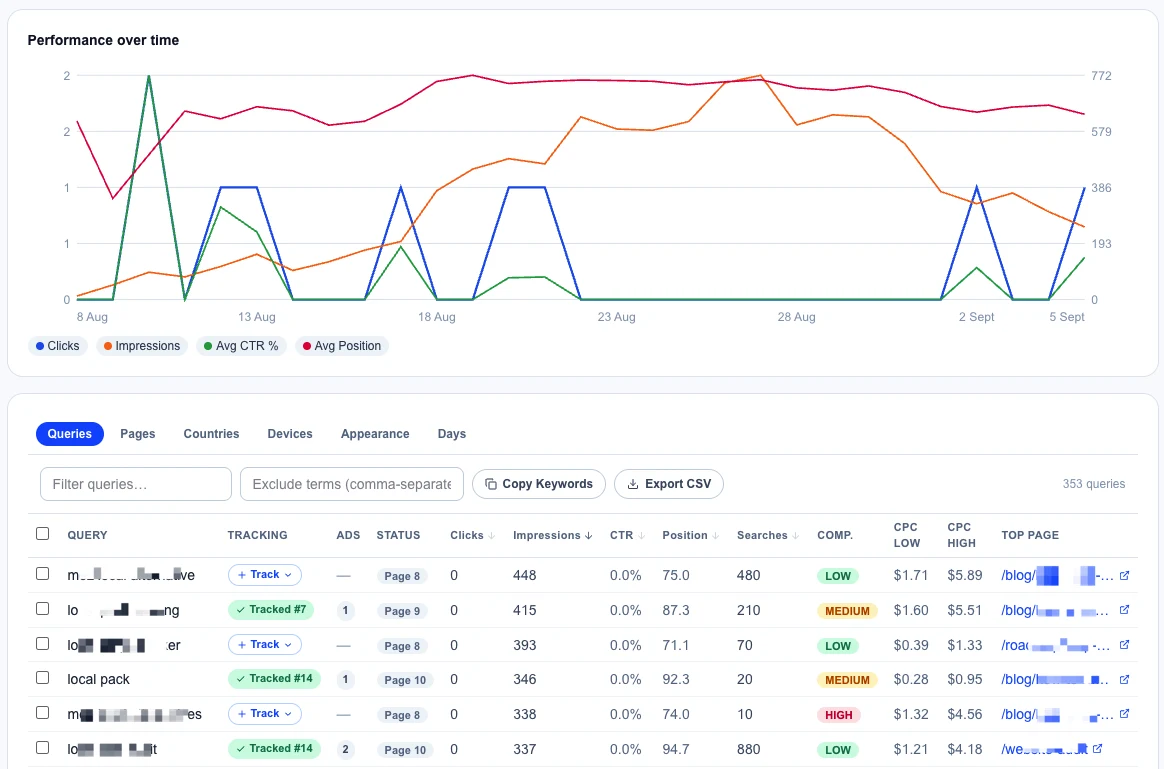
According to Search Console's performance report documentation, position is averaged across every time the site appeared for a query. Treat it as a direction, not an exact rank. The most recent couple of days are usually incomplete, so don't read them as a drop.
Quick wins at positions 4 to 20
Queries where you average positions 4 to 20 with real impressions are the classic low hanging fruit in SEO. Google already considers the page relevant. It needs a push, not a new page.
The usual fixes are small: use the query's wording in a heading, answer the question more directly, add an internal link from a stronger page. These are the SEO quick wins worth putting at the top of a monthly plan, because they move faster than anything built from scratch.
CTR gaps: ranking fine, losing the click
A CTR gap is a query where the click-through rate is well below what that position usually earns. Two causes cover most of them. Either the title and meta description don't match what the searcher wants, or a SERP feature above the result is taking the clicks.
Check the live results page before rewriting anything. If a local pack or snippet is the cause, a new title won't fix it.
Decay: pages losing impressions before they lose rank
Decay is a page whose impressions are falling compared with the previous period. It usually shows up in impressions weeks before it shows up as a rank drop, which makes it the earliest warning Search Console gives you. Common causes are a newer competitor page, outdated information, or a change in what the query returns.
Keyword cannibalization: two pages splitting one query
Keyword cannibalization is when two or more of your pages show for the same query and take turns ranking. Say an HVAC company has a service page and a blog post that both target "ac repair [city]." Google keeps switching between them, and neither holds a strong position. The fix is to pick one page to own the query, then merge, redirect, or re-angle the other so it stops competing.
SERP checkers, free tools, and rank screenshots: quick answers
What does SERP stand for?
SERP stands for search engine results page: the full page Google returns for a query. For local searches that includes ads, a local pack with a map, organic results, and boxes like People Also Ask, not only the list of links.
How is a SERP checker different from ongoing monitoring?
A SERP checker gives a one-time reading: where a page ranks for a keyword right now. Monitoring repeats that check on a schedule, keeps the history, and records what else was on the page, so you can see trends and explain changes instead of reacting to a single number.
Why does my rank look different when I search it myself?
Because Google localizes results to where the searcher is, and adjusts them to their device. Searching from your own shop shows the most favorable version of the page. Check from your customers' area instead. If a client sends you a screenshot like that, share checks run from their market and explain the difference in one sentence rather than disputing it.
Is there a free way to check SERP rankings?
Search Console is free for any site you own or manage, and it's the best free source of position data, though it shows averages rather than a live results page. Manual searches are free too, but they're unreliable for local queries because they reflect your location, not your customers'.
A weekly and monthly routine you can keep up
SERP monitoring only pays off if it runs the same way every week. Here's a routine that fits into a normal week, for your own business or inside a client retainer, without turning into a second job.
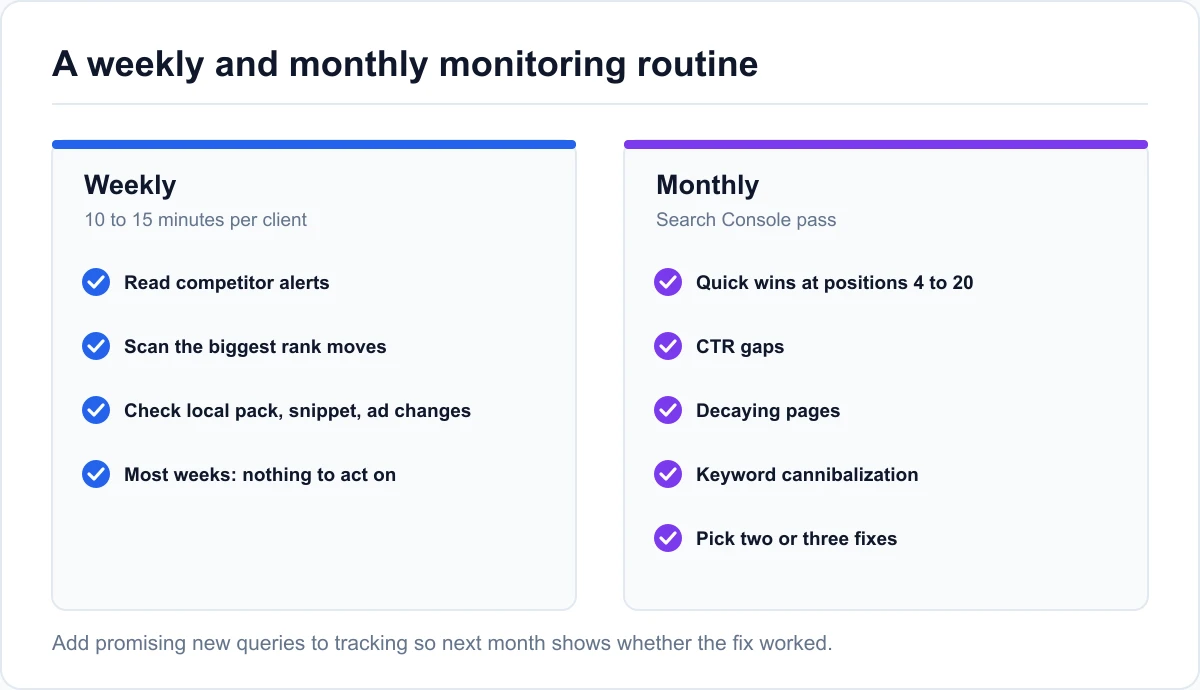
Weekly: alerts, rank changes, and feature shifts
Once a week, per business, spend 10 to 15 minutes on three things. Read any competitor alerts and decide whether each one needs action. Scan the rank changes for the tracked keywords and look at the biggest moves in either direction. Check whether any main keyword gained or lost a local pack, snippet, or extra ad.
Most weeks, the answer is "nothing to act on." That's fine. The value is catching the one week that isn't.
Monthly: Search Console opportunities and what to report
Once a month, work through the Search Console views: quick wins, CTR gaps, decaying pages, and cannibalization. Pick two or three fixes for the coming month and add any promising new queries to tracking so you can measure the result.
If you report to a client or a manager, decide what they see. Most of this is working data, not report material. They need the outcome, the map, and the plan. If you're building a template, here's what belongs in a local SEO report and what to leave out.
Running the routine in one place
The routine above works with a rank tracker, Search Console, and a spreadsheet. It's easier when they're one view. That's why we built Glocavo's Analytics tab, the SERP monitor that sits next to its Google Maps grid scans.
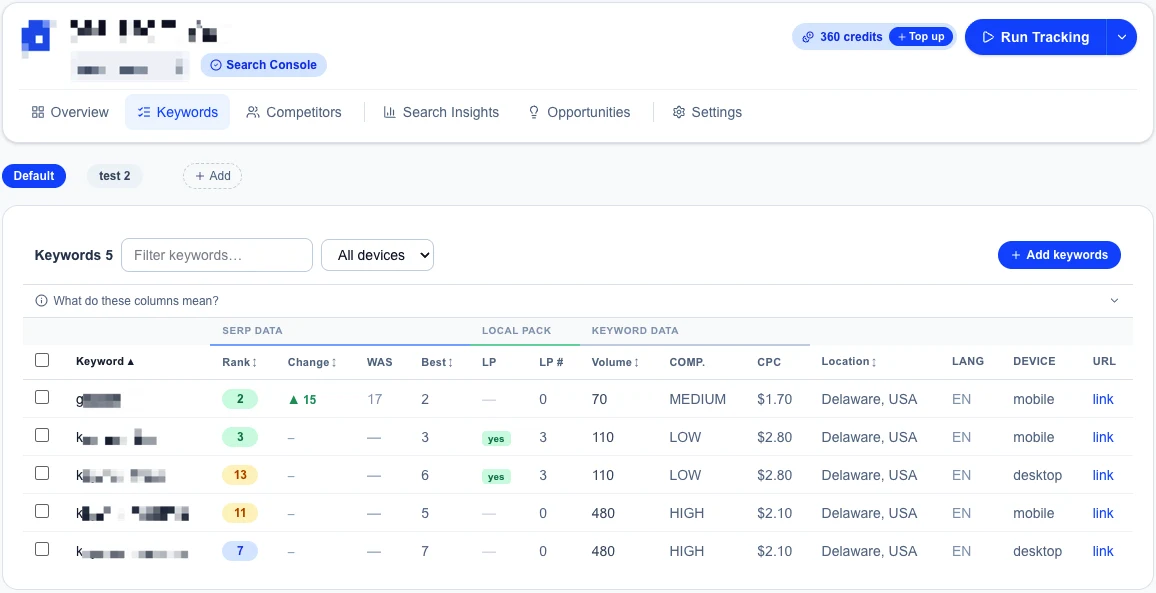
Analytics checks each keyword daily, weekly, or monthly from the location and device you set, one, five, or 10 result pages deep. It records the SERP features on every check, including whether a local pack showed and which businesses were in it, with their ratings and review counts.
It emails competitor alerts for the five changes above. Its read-only Search Console connection surfaces quick wins, CTR gaps, decay, and cannibalization, and adds any query to tracking in a click. It never changes anything in the Google account.
Two honest limits. Analytics is part of Glocavo's paid plans, not the free plan. And it reads the organic page from one location per keyword.
For the map itself, the grid scan is the right tool. For the organic list, see how our SERP tracker for local websites checks it on a schedule, in the same account.
Good SERP monitoring comes down to a few habits:
- Track the whole page, not only the position. A local pack or new ad can cost clicks with no rank change.
- Check from your customers' market and on the device they use.
- Set alerts for the few competitor changes that predict trouble, and ignore the rest.
- Use Search Console every month to find quick wins, CTR gaps, decay, and cannibalization.
- Run the same routine every week, so the one week that matters doesn't slip past.
Start with your five main keywords this week, or your biggest client's, and build the routine from there.