
Moz Local Alternative: A Rank Tracker You Don't Have to Learn
A Moz Local alternative worth actually comparing is Glocavo, a Google Maps rank tracker from the same local SEO software lineup as the rest of this site, built around one job: show exactly where a business ranks across a real grid of points on the map. Moz Local's GeoRank feature, now called Local Grid, does something similar: a heatmap of local pack rankings by area, but it only ships bundled inside a $20-to-$40-a-month-per-location listing management subscription built around distribution, reviews, and social posting.
This guide compares Moz Local's Local Grid heatmap to Glocavo's grid scans directly: what each one actually shows, what a business pays to get it, and which one fits a single-location owner who wants a rank number without learning a bigger platform first. Where Moz Local genuinely earns its subscription, this says so. Where a business is paying for four features to get the one it wanted, this covers that too.
In this guide:
- What Is Moz Local?
- Moz Local Pricing: What You Actually Pay
- Moz Local Grid vs. a Glocavo Grid Scan
- A Google Maps Rank Tracker You Don't Have to Learn
- Where Moz Local Wins
- Where Glocavo Wins
- Who Should Use Moz Local?
- Who Should Use Glocavo?
- Moz Local Alternative: Common Questions
What Is Moz Local?
Moz Local is a subscription platform built around getting a business listed correctly across the web and keeping it that way, rank visibility is one feature inside a larger bundle, not the product itself.
What's in Each Plan
The platform's three consumer tiers, Lite, Preferred, and Elite, each add a layer on top of the last: Lite covers listing distribution to 90+ directories and basic monitoring, Preferred adds review response tools and social posting to Google and Facebook, and Elite adds AI-assisted listing management and posting to Instagram, LinkedIn, and TikTok. A separate Enterprise tier exists for 50+ locations, priced on request.
What Local Grid (Formerly GeoRank) Shows
Local Grid is Moz Local's local-pack visibility feature (it was called GeoRank until Moz renamed it, and the pricing page now lists it as "Local map pack ranking"), an interactive heatmap showing how a business ranks across different neighborhoods for a given search, rather than a single number. It's included starting at the cheapest Lite tier, which means a business doesn't need the top plan just to see it. What Moz Local's own materials don't publish is an exact grid size or point count, so it's hard to know from the outside how granular that heatmap actually is.
Moz Local Pricing: What You Actually Pay
The subscription structure and the per-location multiplier are what change the math fastest for a business with just one storefront.
Three Tiers, Billed per Location
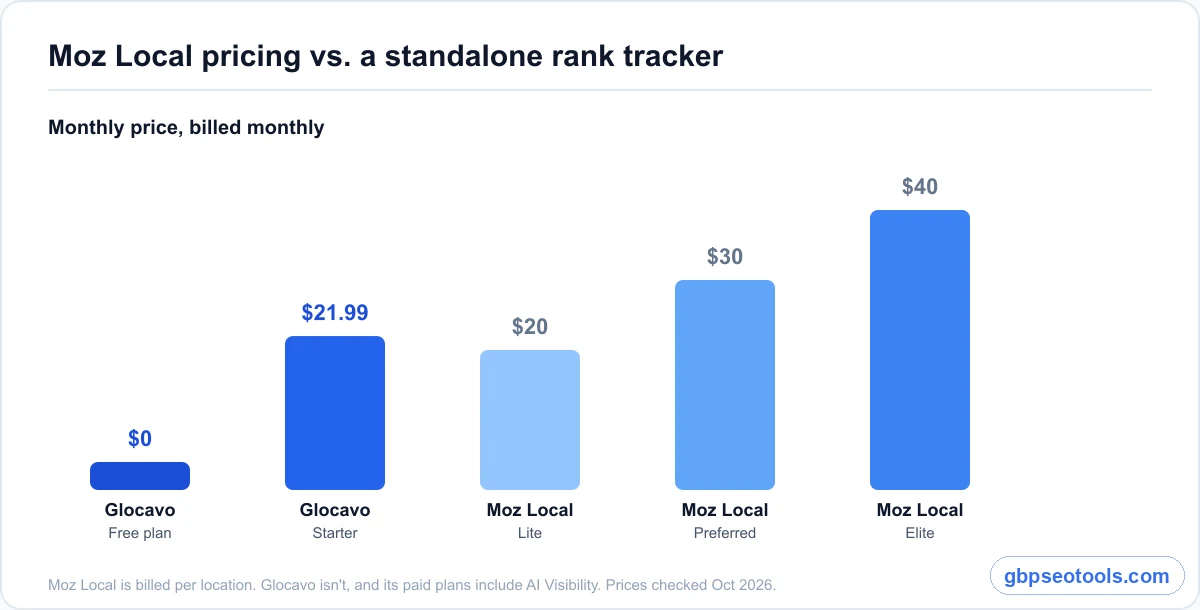
Moz Local's own pricing page lists three consumer tiers, all billed per location. Lite runs $20 a month billed monthly, or $16 a month billed annually. Preferred runs $30 a month, or $24 annually. Elite runs $40 a month, or $33 annually. A business with two storefronts pays double at any tier, since the per-location multiplier applies regardless of which one it picks.
What Glocavo Costs Instead
Glocavo's free plan includes 100 scan credits to start, enough for a handful of real grid scans, with no card required, for 14 days. After that, it doesn't force an upgrade either, scan credits and AI Power credits can both be topped up anytime, as many times as needed, without ever starting a monthly subscription. Paid plans, for a business that wants one anyway, scale by scan volume and grid size instead of by location count, so a business isn't charged twice just for having two addresses.
Moz Local Grid vs. a Glocavo Grid Scan
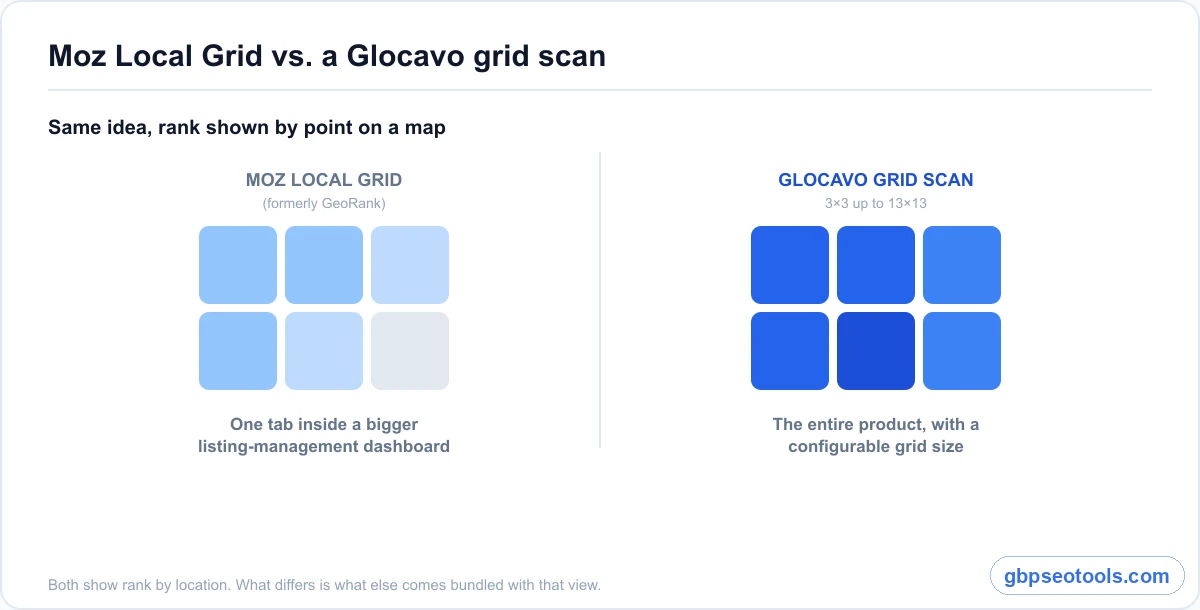
Both tools answer the same underlying question, where does a business actually rank across the map, not just at its own front door, but they get there from different starting points.
How Local Grid Works
Local Grid sits inside the Moz Local dashboard as one tab among several: listings, reviews, social, and analytics all live alongside it. That's convenient for a business already managing all four. It also means the rank view is one feature competing for space and attention inside a bigger tool, not the reason the subscription exists.
How a Glocavo Grid Scan Works
A Glocavo scan starts from choosing a grid size, a 5×5 grid on the free plan, up to 13×13 on paid plans for a service business covering a whole county, then running the scan for a business name and keyword. The result is the same idea as a heatmap, rank by point, but it's the heart of the product, not a tab inside a listings tool.
| What matters | Glocavo | Moz Local |
|---|---|---|
| Core product | Google Maps rank tracker with AI Visibility built in. | Listing management platform, Local Grid is one feature. |
| Pricing model | Free plan, then scan-based paid tiers. | $20-$40/month per location, billed on a subscription. |
| Grid/heatmap view | Configurable grid size, 5×5 free, up to 13×13 paid. | Heatmap included from the Lite tier, exact grid size not published. |
| Recurring scans | Included, cadence set by the business. | Tied to the ongoing subscription. |
| AI-assisted analysis | AI Analysis feature, on demand. | Not part of the rank-tracking feature. |
| AI-search visibility | Included on every paid plan: ChatGPT, Perplexity, Gemini, Claude, AI Mode, AI Overviews. | Not included in Moz Local plans. |
| Listing distribution | Not offered. | Included, 90+ directories. |
| Review and social tools | Not yet, on the roadmap. | Included from Preferred tier up. |
| Free tier | 100 scan credits for 14 days, no card, then one-time top-ups. | 14-day style trial, then a subscription. |
| Learning curve | A few labeled blocks, no onboarding needed. | A full dashboard: listings, reviews, social, analytics. |
A Google Maps Rank Tracker You Don't Have to Learn
The menu is arranged so there's nothing to actually learn. A new account opens straight into a sidebar sorted by job: the grid scan tools sit together at the top, with Analytics (for tracking your Google search rankings), AI Visibility, and the workspace settings in their own blocks below, and every item does exactly what its label says.
One Job, One Simple Menu
Moz Local's dashboard has to serve four different jobs at once, listings, reviews, social, and rank visibility, so the navigation reflects that spread. Glocavo sticks to local visibility, on the map and in AI answers, so the interface never has to explain itself. Picking a business, setting a grid, and reading the result feels closer to using a tool you already know than learning a new one.
What This Means Day to Day
A business owner checking rank once a month doesn't want a dashboard onboarding sequence to get through first. Running a first scan, reading the grid, and setting up a recurring check takes a few minutes precisely because there's nothing else on the screen competing for that attention.
Where Moz Local Wins
Being honest about this matters more than winning every row in a table.
Listing Distribution and Data Sync
A business that needs its name, address, and phone number pushed consistently across 90+ directories gets real value from Moz Local's core distribution feature, something Glocavo doesn't attempt to do at all.
Bundled Reputation and Social Tools
Review response workflows, sentiment analysis, and scheduled social posting on the Preferred and Elite tiers genuinely save time for a business already juggling those tasks separately. Paying one subscription for all of it, Local Grid included, can be the more efficient choice for that specific workload, at least until review and social tools land on Glocavo's own roadmap.
Where Glocavo Wins
The gap runs the other way for a business that only wanted the rank view in the first place.
A Rank Tracker That's Actually Standalone
Nobody has to buy listing management or social scheduling to get a grid scan. Choosing Glocavo means paying for exactly the feature that was wanted, not three others that came attached to it.
AI Answers Moz Local Doesn't Track
Moz Local shows where a business's listings are published, not whether ChatGPT or Google's AI Overviews actually recommend it. Every paid Glocavo plan includes an AI Visibility campaign that asks ChatGPT, Perplexity, Gemini, Claude, Google AI Mode, and AI Overviews the questions customers ask, and it flags answers carrying wrong hours, a wrong phone number, or a wrong address, the same listing accuracy Moz Local exists to protect, checked where customers now read it.
A Free Tier With Real Grid Scans
100 scan credits at signup, no card required, means a single-location business can run its first real grid scans before paying anything. After the 14-day free plan, keeping going just means topping up scan credits or AI Power credits, anytime and as many times as needed, not a monthly subscription. Moz Local's plans all require an ongoing paid subscription to see Local Grid at all.
Who Should Use Moz Local?
Fit matters more than features here. Moz Local is the right call for a specific kind of workload.
Multi-Location Brands Managing Listings at Scale
A brand with locations across several cities that all need consistent directory listings, synced business data, and review monitoring gets more value out of one subscription covering all of it than out of stitching together separate tools per task.
Agencies Already Paying for the Bundle
An agency already running Moz Local for listing and reputation management gets Local Grid as a genuine bonus at no extra cost, since it's included from the Lite tier up. Adding a separate rank tracker on top only makes sense once Local Grid's lack of published grid detail becomes a real limitation for that agency's reporting needs.
Who Should Use Glocavo?
For everyone else, a single-location business or someone who only wanted the rank number, the calculation flips.
Single-Location Owners Who Just Want Their Rank
A bakery, a plumber, a dental practice, one address, doesn't need a listing-distribution subscription to find out where it ranks across town. Seeing your rank on a real map starts on the free plan, with no obligation to pay for tools the business doesn't need yet.
Anyone Who Wants to See the Whole Grid, Not Just a Score
A configurable grid, from a tight radius up to a wide service area, matters most to a business that has already outgrown a single search-position number and wants sizing a grid to your service area done right the first time, not guessed at.
Moz Local Alternative: Common Questions
Is there a free Moz Local alternative?
Glocavo's free plan includes 100 scan credits at signup, no card required, for 14 days, and after that a business can keep scanning by topping up scan or AI Power credits anytime, as many times as needed, instead of starting a paid subscription. Moz Local doesn't offer a comparable free plan, Local Grid only appears once a paid Lite plan or higher is active.
How does Moz Local pricing compare to a standalone rank tracker?
Moz Local charges $20 to $40 a month per location depending on tier, before annual discounts, and that price includes listing distribution and reputation tools alongside Local Grid. A standalone tool like Glocavo starts free and scales with scan volume instead of location count, so a single-location business isn't paying a bundled rate for features it won't use.
What's the real difference between Glocavo and Moz Local's Local Grid?
Local Grid is a heatmap feature living inside a broader listing-management dashboard, useful once a business is already paying for that platform. Glocavo is a dedicated local tracker built around a configurable grid scan, and its paid plans also show whether AI engines like ChatGPT recommend the business.
Do I need Moz Local's other features to track my rank?
No. If listing distribution, review management, and social posting aren't things a business needs handled right now, paying for Moz Local's subscription just to reach the Local Grid tab is paying for three unused features to get one wanted one.
Which tool is easier to learn for someone who isn't a marketer?
A rank tracker built around a single job has a shorter path from signup to a real answer. Moz Local's dashboard has to accommodate listings, reviews, social, and analytics, so a first-time user has more to navigate before finding Local Grid specifically.
Can I switch from Moz Local without losing my ranking history?
Moz Local's ranking history lives inside its own dashboard and isn't something Glocavo imports. Since a Glocavo grid scan pulls a fresh, live read at the moment it runs, switching means starting a new tracking history rather than migrating an old one.