How to Use a Local Rank Tracker (the Right Way in 2026)
A local rank tracker only earns its name once it runs more than once. A single grid scan is just a wider version of a single search. It still only describes one moment. Tracking is the discipline that turns repeated scans into a real record. That means a schedule, a grid size that fits the business, and proof of whether last month's fix moved anything.
Most guides stop at explaining what a single check misses. That part matters, but it's not the hard part. The hard part is running this as an ongoing practice: sizing a grid correctly, deciding how often to scan, handling more than one location, and reading a weak spot as a trend instead of a one-off bad result.
This guide covers picking a grid size that fits the real service area, and what that costs in scan credits. It also covers tracking multiple locations or clients, building a cadence that survives past the first month, and turning a weak corner of the map into a fix. This picture comes from patterns across real local rank checker results, not a single case.
In this guide:
- Checking Once vs. Building a Tracking Practice
- Choosing the Right Grid Size for Local Rank Tracking
- Tracking Rank Across Multiple Locations or Clients
- Building a Scan Cadence That Actually Sticks
- Fixing a Weak Corner of the Grid Over Time
- Local Rank Tracker: Common Questions
Checking Once vs. Building a Tracking Practice
A single grid scan and an ongoing local rank tracker answer two different questions. One shows where a business stands right now. The other shows whether that position is getting better, worse, or staying put.
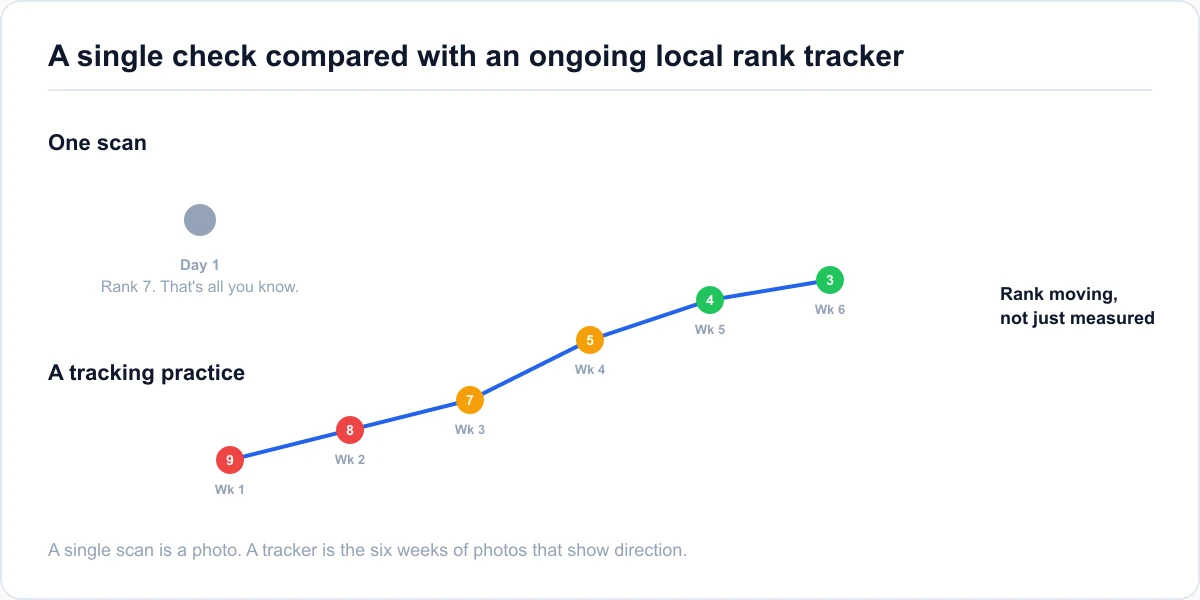
What changes once a check becomes a practice
Why one search from the front door isn't representative, and what a grid actually covers, is explained in full in the free and paid checking methods guide. Treat that piece as the starting point.
What that guide doesn't cover is what happens after the first scan. That means choosing a grid that fits a specific business, running it on a schedule, and reading results as a pattern across weeks, not a single readout.
Why the pattern still needs an explanation
Google's own distance and relevance guidance explains why one search result depends on where it's run from. That's true for a first check. It's still true for the hundredth one. A tracking practice doesn't change that fact, it just stops treating each scan's result as a surprise.
Choosing the Right Grid Size for Local Rank Tracking
Grid size should match how far a business's real customers actually come from, not a default setting left untouched.
Matching grid size to your service area
A single storefront with a tight walk-in radius, a bakery or a dry cleaner, is usually well served by a 5×5 or 7×7 grid. A service-area business needs more room. A locksmith or an HVAC company covering a whole county needs a wider grid, often 9×9 or 13×13. "Close to the business" isn't a meaningful boundary when the business travels to the customer.
What grid size costs in scan credits
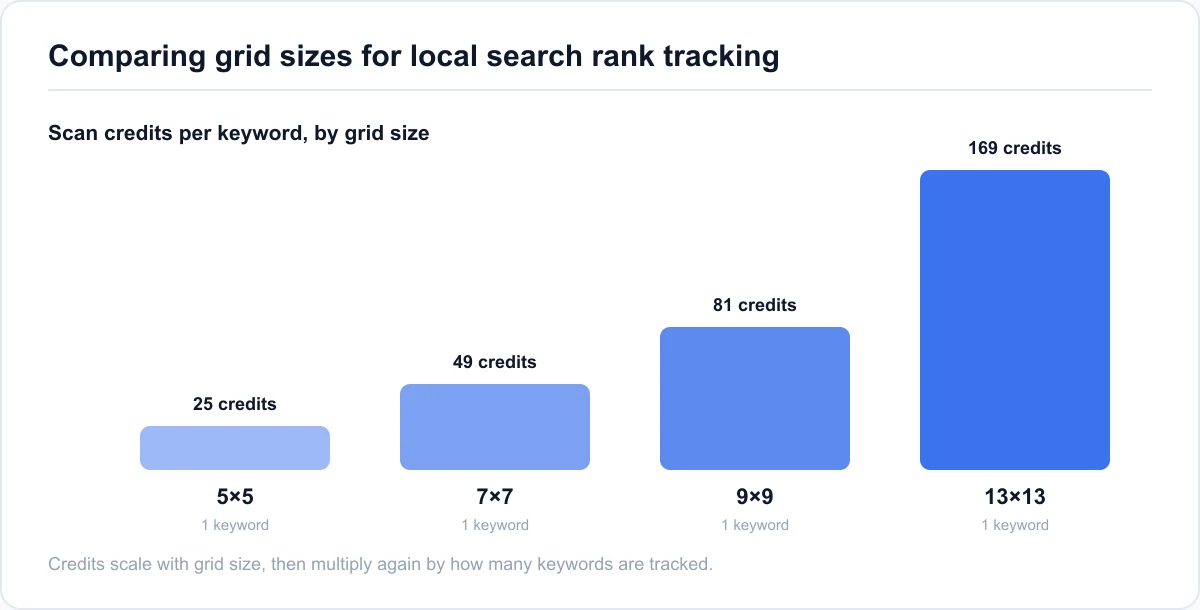
A local rank tracker typically spends one scan credit per grid point, per keyword. A 5×5 grid costs 25 credits for one keyword. A 7×7 grid costs 49. A 9×9 grid costs 81. A 13×13 grid costs 169. Tracking three keywords on a 9×9 grid costs 243 credits, not 81, since the cost multiplies by keyword count.
Point spacing matters as much as grid size. A 7×7 grid spaced a quarter-mile apart covers under two miles across. That's fine for a dense storefront but leaves most of a county-wide area unchecked. The same 7×7 grid spaced two miles apart covers 12 miles across, better for a service-area business but wasteful for a single downtown shop. Match spacing to how far customers actually travel, then size the grid to fit inside that distance.
| Grid size | Typical spacing | Best for | Credits per keyword |
|---|---|---|---|
| 5×5 | 0.25–0.5 mi | Single storefront, tight radius | 25 |
| 7×7 | 0.5–1 mi | Small city or suburb service area | 49 |
| 9×9 | 1–2 mi | Multi-neighborhood service area | 81 |
| 13×13 | 2+ mi | County-wide or multi-city service area | 169 |
Tracking Rank Across Multiple Locations or Clients
A single-location owner and an agency managing a dozen clients both use a local rank tracker. The setup that makes it usable looks different for each.
Running one scan per location, not one combined check
Every location has its own address, its own nearby competitors, and its own service area. Multi-location tracking means running a separate grid scan per location, not one wide scan spanning all of them. A three-branch dental group tracking a shared keyword across three cities needs three scans. Each one gets sized to that branch's own service area, not stretched into one oversized grid where most points land on empty territory between cities.
What an agency needs beyond the scan itself
For an agency running this across multiple clients, the bottleneck usually isn't the scan. It's keeping each client's results, history, and credits separate. Mixing two clients' scan history in one place makes it hard to hand either of them a clean report. Mixing credit pools makes it hard to bill accurately. Look for a tracker with per-client workspaces and a shareable report link, so results go straight to a client without rebuilding a screenshot by hand.
Building a Scan Cadence That Actually Sticks
The schedule that works in week one rarely survives to month three unless it's tied to something specific.
Tying cadence to a specific change, not a calendar habit
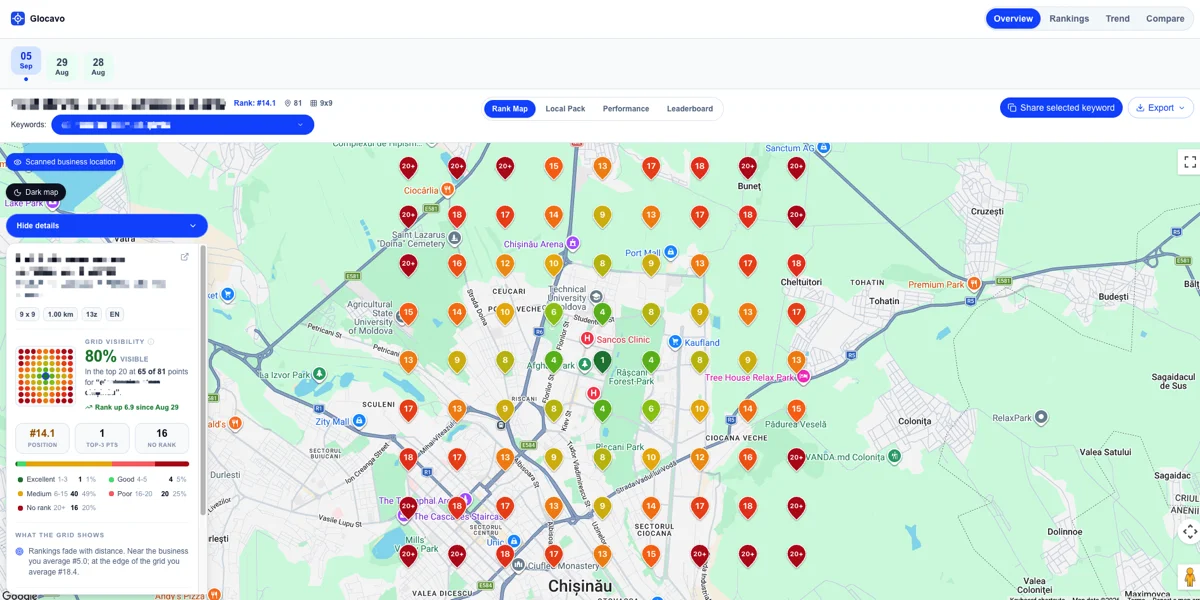
A weekly scan makes sense while a specific fix is fresh: a new category, a push for reviews in a weak neighborhood, a new service-area page. The scan checks whether that specific change moved anything, it isn't just running because a week passed. Once nothing specific is being worked on, weekly scans mostly just confirm what monthly already would have shown.
Why the schedule, not the single scan, is the point
A monthly cadence is usually enough once a listing is stable. The habit that actually pays off is comparing this month's scan to last month's, not judging any single scan alone. A tracker with recurring scans on a schedule removes the part that usually breaks a good intention: remembering to run it by hand.
Fixing a Weak Corner of the Grid Over Time
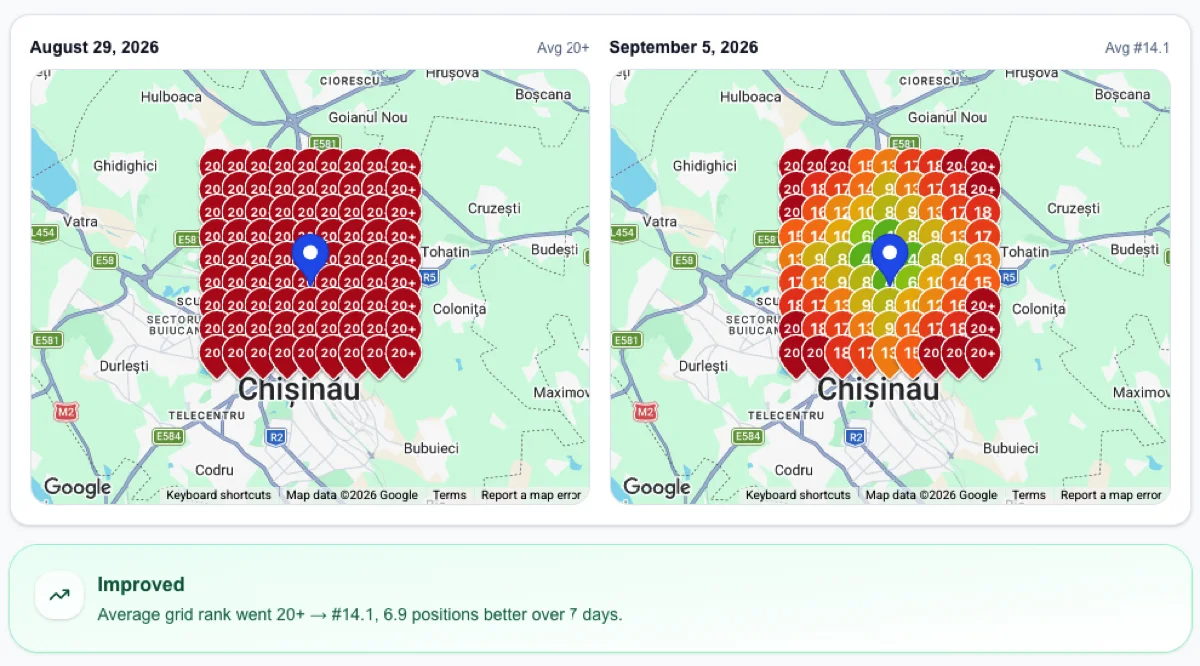
A red patch on a heatmap is a finding, not a diagnosis. Whether a fix is working only shows up across more than one scan.
Diagnosing why an area is red
A weak corner usually traces back to one of three things:
- Distance the business genuinely can't shorten.
- A thin or incomplete profile that loses on relevance even nearby.
- A prominence gap, few reviews or little activity, that shows up worse the further a search gets from the business's center of gravity.
A dental practice's grid scan showed a consistently red patch in one neighborhood about four miles out. The pattern didn't match distance, two competitors much farther away ranked fine there. It matched prominence instead: almost no reviews mentioned that neighborhood by name, and the practice's own service-area content never named it either.
Confirming the fix with a second scan, not a guess
The fix isn't a setting, it's the slower work. Reviews that mention the outlying area by name. A service-area page naming it specifically. A profile complete enough to compete when the business isn't the closest option. The practice encouraged reviews from patients in that neighborhood, added a short section naming it on the site, then re-scanned five weeks later. The red patch didn't disappear, but it faded to a strong amber, confirmed by the second scan, not assumed from the first fix alone.
Local Rank Tracker: Common Questions
What is a local rank tracker?
A local rank tracker checks a keyword's local pack position from multiple points across a service area, on a recurring basis. It reports average rank and coverage percentage as a trend over time, not a single number from one scan.
What should a small business look for in a local rank tracker?
Look for a genuine grid scan, per-point competitor visibility so it's clear who's winning nearby, coverage percentage alongside average rank, and recurring scans on a schedule. Together they turn results into a trend automatically instead of relying on remembering to check by hand.
Can I use a local rank tracker across multiple business locations?
Yes. Each location gets its own grid scan sized to its own service area. Combining locations into one oversized grid wastes most of its points on territory between them rather than inside either one.
Can an agency use a local rank tracker for multiple clients?
Yes, this is a common use case. The main requirement isn't the scan itself, it's keeping each client's scans, history, and credits organized in separate workspaces so results and billing don't mix across accounts.
How do I know if my scan cadence is actually working?
Compare a scan to the one before it, not to a single target number. A weak corner fading over two or three scans after a specific fix means the cadence is doing its job. No change after several scans means the fix needs revisiting, not the schedule.
Is there a free local rank tracker?
Some tools, including Glocavo, offer a genuinely usable free tier with no card required. Glocavo's gives 100 scan credits, enough for about ten small grid scans, with one-time top-ups after that. It won't cover daily tracking across a large multi-location account. It's real enough to build a first month of history before deciding whether to pay for more.
Where do I start if I've never run a rank check before?
Start with the free and paid checking methods covered earlier in this guide to run a first scan. Come back here once it's time to decide on a grid size, a schedule, and how to read what the results mean over time.
Track Your Local Rankings the Right Way
Key takeaways
A local rank tracker only shows its value across more than one scan. Grid size should match the real service area, not a default. Multi-location and agency use both come down to keeping scans, history, and credits separate per location or client. A weak corner is a finding to confirm with a second scan, not a one-time verdict.
Your next step
Pick a grid size that actually matches the service area. Decide a cadence tied to whatever is actively being worked on. Then compare each new scan to the last one instead of judging any single result alone. Run a local rank tracker scan and start building that record.