
Best Local SEO Tools for Small Business in 2026 (Free and Paid)
Most lists of the best local SEO tools are written by the platforms trying to sell you a subscription. Scroll through the top-ranking results and you'll notice the pattern: the free options that actually move the needle get buried under three paid recommendations before anyone mentions Google Business Profile itself.
That's backwards. The right way to build a local SEO toolkit is to start with what's free, get a real first read on where you stand, and only pay for a platform once you know precisely what gap it needs to fill.
The best local SEO tools fall into three tiers: free foundational tools every business should use regardless of budget, all-in-one paid platforms built for managing multiple listings, and specialized single-purpose tools that solve one problem well. This guide covers all three, in that order, so you can see exactly where your money is (and isn't) worth spending.
Ready to see where you actually stand before picking a tool? Run a Google Business Profile audit, no sign-in required, $4.99 one-time, and use the results to decide which tier below you actually need.
The Best Tools to Start With
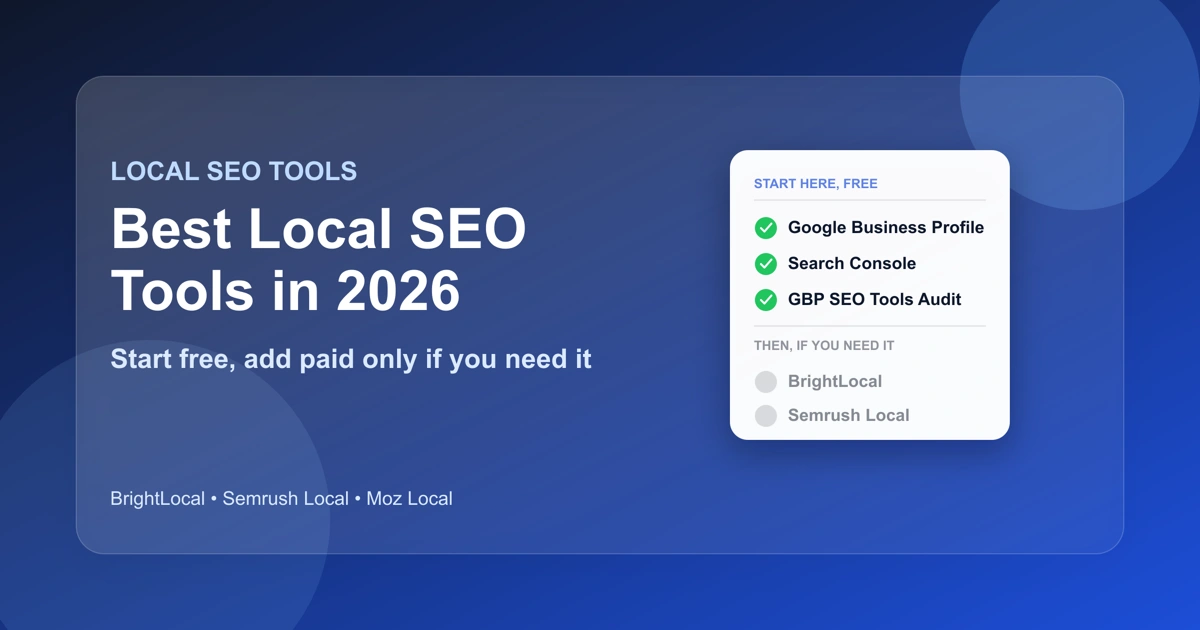
Not ready for a subscription yet? These three cover most of what a single-location business needs before committing to a monthly plan. Skipping straight to a paid platform without touching these first is one of the most common and avoidable mistakes small business owners make.
Google Business Profile
Google Business Profile is free, and it's the single most important local SEO tool that exists, because it's the actual listing Google shows in the local pack and on Maps. Every other tool on this list either reads data from it, writes data to it, or measures how well it's performing.
Claiming and fully completing your profile, hours, categories, service areas, photos, and a real business description, costs nothing and takes under an hour. If you haven't done this yet, every other tool below is premature.
Google Search Console
Search Console is free and shows you the queries actually driving traffic to your website, including local, near-me style searches you might not expect to be ranking for. Marcus, who runs a two-location HVAC company outside Denver, assumed his site only ranked for "HVAC repair Denver." A quick look at Search Console showed 40% of his impressions came from "furnace repair near me" queries he'd never specifically targeted, which changed how he wrote his next three service pages.
Pair it with Google Business Profile's own Insights tab (built into the free listing itself) and you have a real, if basic, picture of local visibility before spending anything. Glocavo's website rank tracker shows that Search Console data next to the keywords you track.
Run a Local SEO Audit Instantly
Here's the gap almost every other "best local seo tools" list skips: a no-signup, no-subscription way to check your Google Business Profile against the checks that actually affect local ranking. Run a Google Business Profile audit and get the full 54-check report for a one-time $4.99, built from live Google data. No account, no login, nothing recurring, so it works on your own listing or a competitor's. It sits alongside a website audit on GBP SEO Tools that covers the on-site half of the same picture, at the same one-time price.
Most of the paid platforms further down this list bury a version of this behind a trial signup or a monthly fee. This one is a single small payment instead, which makes it the natural first step before deciding whether you need anything else on this page at all.
Start here, in this order
Add a paid platform only after these three point at a real, ongoing gap.
All-in-One Local SEO Platforms
Once a business is managing more than a handful of locations, or needs ongoing citation, review, and rank tracking in one dashboard, an all-in-one platform starts to make sense. These are subscription tools built for google local seo management at scale, agencies and multi-location brands, not single-location businesses just getting started.
BrightLocal
BrightLocal is the name that shows up in nearly every "best local SEO tools" list on the internet, and for good reason: it bundles rank tracking, citation building, review management, and audit reporting into one dashboard, and BrightLocal states it's trusted by 80,000 marketers. It's a strong fit for agencies managing many client accounts who need one tool that does everything.
For a single-location business, though, BrightLocal's full feature set solves problems most owners don't have yet, tracking dozens of keywords across multiple competitors, managing citations across hundreds of client listings, and so on. Most of that dashboard sits unused for a single storefront, which is worth knowing before you commit to a monthly subscription for features you'll never open. It's worth trying only once you've confirmed, via a free audit, that you have specific gaps a single dashboard needs to manage on an ongoing basis, not because every list on the internet mentions it first.
Semrush Local
Semrush Local extends Semrush's broader SEO suite into local-specific features: listing management, review monitoring, and local rank tracking, synced across major directories from one place. If you're already a Semrush customer for general SEO or content work, the local add-on is a natural extension rather than a new tool to learn.
If you're not already in the Semrush ecosystem, it's a heavier, more expensive commitment than most single-location businesses need for local SEO specifically. The local features live inside a much larger SEO suite built for content, backlinks, and technical audits well beyond local search, so you're paying for a lot of tooling you may never touch if local visibility is the only problem you're solving.
Moz Local
Moz Local focuses primarily on listing distribution and citation accuracy, pushing your business's name, address, and phone number consistently across the directories that matter for local search. It's a narrower tool than BrightLocal or Semrush Local, and a reasonable pick if citation consistency is specifically the gap you've identified, rather than a general local SEO tool you want covering everything at once.
If a free citation checker turns up more than two or three mismatches across major directories, and manually fixing each one sounds like more than an afternoon's work, that's the point where a distribution tool like Moz Local starts to pay for itself. Below that threshold, fixing listings by hand is usually faster than setting up and paying for automated distribution.
Quick Comparison
| Tool | Tier | Best For | Not Ideal For |
|---|---|---|---|
| Google Business Profile | Free | Every business, no exceptions | N/A, this is the foundation |
| Google Search Console | Free | Seeing what local queries actually drive traffic | Listing/citation management |
| GBP SEO Tools Audit | $4.99, one-time | A full, prioritized 54-check diagnosis, no signup | Ongoing monitoring over time |
| BrightLocal | Paid, subscription | Agencies and multi-location brands | Single-location businesses just starting out |
| Semrush Local | Paid, subscription | Existing Semrush customers | Businesses without a broader SEO tool need |
| Moz Local | Paid, subscription | Citation distribution specifically | General-purpose local SEO management |
| Citation checkers | Varies | Confirming NAP consistency | Ongoing review or rank tracking |
| Review management tools | Varies | Requesting and tracking reviews | Citation or rank tracking |
| Rank trackers | Varies | Watching keyword position over time | Citation or review management |
All-in-one platforms: who each one fits
All three are subscriptions, built for scale, not single-location businesses.
Specialized, Single-Purpose Tools
Not every local SEO problem needs an all-in-one platform. Sometimes the actual gap is narrow enough that a single-purpose tool solves it more directly, and often more cheaply, than a full suite.
Citation and Listing Checkers
If your business's name, address, or phone number has ever changed, even a suite number or an area code, inconsistent listings across Yelp, Facebook, Bing Places, and other directories can quietly work against your local ranking. A dedicated citation checker scans for where your business is listed and flags mismatches, without requiring a full platform subscription just to run that one check.
Review Management Tools
Review volume, recency, and your response rate all factor into local ranking, and a single-location business often just needs a way to request reviews consistently and get notified when new ones land, not a full local SEO dashboard. Purpose-built review tools handle this narrower job well.
Local Rank Trackers
If the one thing you actually need is "am I moving up or down for my main keywords," a standalone local SEO rank tracker answers that question directly, without the citation management or review tooling bundled into a bigger platform you won't touch. We built one into GBP SEO Tools that maps your Google Maps rank point by point across your service area.
How to Choose the Best Local SEO Tools for Your Business
The right toolkit depends almost entirely on how many locations you're managing and what you've already confirmed is actually broken, not on which tool has the longest feature list.
Choosing the best local SEO tools by size
- Start with the free basics
- Run a one-time audit first
- Add a subscription only if a real gap repeats
- 5+ listings or accounts
- Manual checks stop scaling
- A paid platform's cost is easy to justify
Solo and Single-Location Businesses
Start with the three tools above, in that order: complete your Google Business Profile, connect Search Console, then run a GBP audit for a one-time $4.99. Sarah, who owns a single bakery in Austin, ran her audit and found her business category was set to the generic "Bakery" instead of the more specific "Wedding Bakery," a five-minute fix that a paid platform would have buried in a longer report anyway. Add a paid tool only once that first read points at a specific, recurring gap, like citation consistency or ongoing rank tracking, that you actually need to monitor over time.
See what the audit's 54 checks actually cover before deciding you need anything more.
Multi-Location Businesses and Agencies
Once you're managing five or more listings, or client accounts, the math flips. Manually checking each profile individually stops scaling, and an all-in-one platform's monthly cost becomes easy to justify against the hours saved. This is where BrightLocal, Semrush Local, or Moz Local's centralized dashboards earn their keep, since they're built specifically for managing many locations at once rather than optimizing a single storefront.
Local SEO Audit Mistakes That Cost You
Paying for a Platform Before Auditing
The single most common mistake is subscribing to an all-in-one platform before running a one-time audit to see what's actually wrong. A business with a strong, complete Google Business Profile and consistent citations doesn't need a citation-management platform's monthly fee, it needs to know that things are already fine, or to find the two or three specific issues actually holding it back.
The team at Riverside Dental signed up for a full local SEO platform in January 2026 after a cold email promised it would "fix their local rankings." Eight months of subscription payments later, an audit of their own listing turned up the actual problem. Their business category had been set to the generic "Dentist" instead of "Cosmetic Dentist," which is what most of their target searches actually used.
Fixing it took four minutes. The platform's rank tracking, citation building, and review tools had been running the entire time on a listing with one specific, fixable gap. A $4.99 check would have caught it on day one.
The most common mistake, fixed
- Pay for a platform
- Find out later what was wrong
- Run a one-time audit
- Pay monthly only for a confirmed, real gap
A one-time audit takes minutes and tells you which order applies to you.
Choosing a Local SEO Checker That Doesn't Match Google's Actual Checks
Not every "local SEO check" a tool runs maps to something Google's official guidance on local ranking actually weighs. Relevance, distance, and prominence, categories, completeness, reviews, and citation presence, are the factors that matter. A tool that scores you on dozens of vanity metrics unrelated to those three factors can make a listing look worse (or better) than it actually is. Before trusting any tool's score, check whether its checks map back to Google's documented ranking factors, not just to what's easy for the tool to measure.
Best Local SEO Tools: Common Questions
What are the best local SEO tools?
The best local SEO tools are software that help a business manage, monitor, or improve its visibility in local search results, Google's local pack, Maps, and location-specific organic rankings. That ranges from free tools like Google Business Profile itself to paid platforms that bundle citation management, review tracking, and rank monitoring into one dashboard.
Do I need a paid tool to rank locally?
Not necessarily. A single-location business with a complete Google Business Profile, consistent citations, and a healthy review volume can rank well using only free tools. Paid platforms earn their cost once you're managing multiple locations or need ongoing monitoring across dozens of listings, not before.
What's the difference between a local SEO tool and a Google Business Profile audit?
A local SEO tool is often an ongoing platform, tracking, managing listings, monitoring reviews over time. A Google Business Profile audit is a point-in-time check instead. A one-time audit flags the basics and goes deeper, using Google's own structured data standards and public ranking factors as the benchmark. Either way, you know more before deciding whether you need an ongoing tool at all.
Is BrightLocal worth it for a single-location business?
Usually not on its own. BrightLocal's dashboard is built to manage many locations or client accounts at once, features a single-location business won't fully use. Run a one-time audit first; if it surfaces a specific, recurring need like multi-directory citation management, an all-in-one platform becomes worth evaluating. If it doesn't, the free tools above likely cover what you need.
How often should I run a local SEO audit?
For a single-location business, a monthly check of your Google Business Profile Insights and a quarterly full audit is usually enough to catch drift, a changed hours listing, a new negative review pattern, before it becomes a real problem. Multi-location businesses managing an all-in-one platform typically monitor weekly, since more listings mean more surface area for something to quietly break.
The Bottom Line
These tools work best in the order you actually need them, not the order a vendor wants to sell them to you.
What to Do Right Now
Start small. Complete your Google Business Profile, connect Search Console, and run a one-time $4.99 audit, no signup required for any of the three.
What to Add Later, If You Need It
Add a paid, all-in-one platform only once you've confirmed a specific, ongoing gap that justifies the monthly cost. That might mean managing multiple locations. It might mean tracking citations across dozens of directories. Either way, confirm the gap first.
Most single-location businesses never need to leave the free tier. The only way to know which category you're in is to check.
Run your Google Business Profile audit now, no sign-in, $4.99 one-time, results in about a minute.