Analytics
How SERP credits work in Analytics
What a Google rank check costs in SERP credits, your monthly allowance per plan, how to plan a campaign that fits it, top-up packs, what happens when you run out and where your credits went.
Updated October 5, 2026 · 5 min read
Analytics runs on its own balance, SERP credits, separate from the scan credits of the Google Maps rank tracker. Your plan refills them every month, and top-up packs add more when you need them. This guide shows what a check costs, where to see your balance, how to plan a campaign that fits your plan and what happens when you run out.
The screenshots use a made-up website, yourbusiness.com, on the Studio plan, with a weekly campaign of 8 keywords.
- Where
- The credits button on every campaign, your plan badge in the sidebar and Usage & activity.
- Who
- Starter plan and up. The Free plan doesn't include Analytics.
- In short
- Each check costs 1, 5 or 10 SERP credits per keyword, depending on the search depth.
Know what a check costs
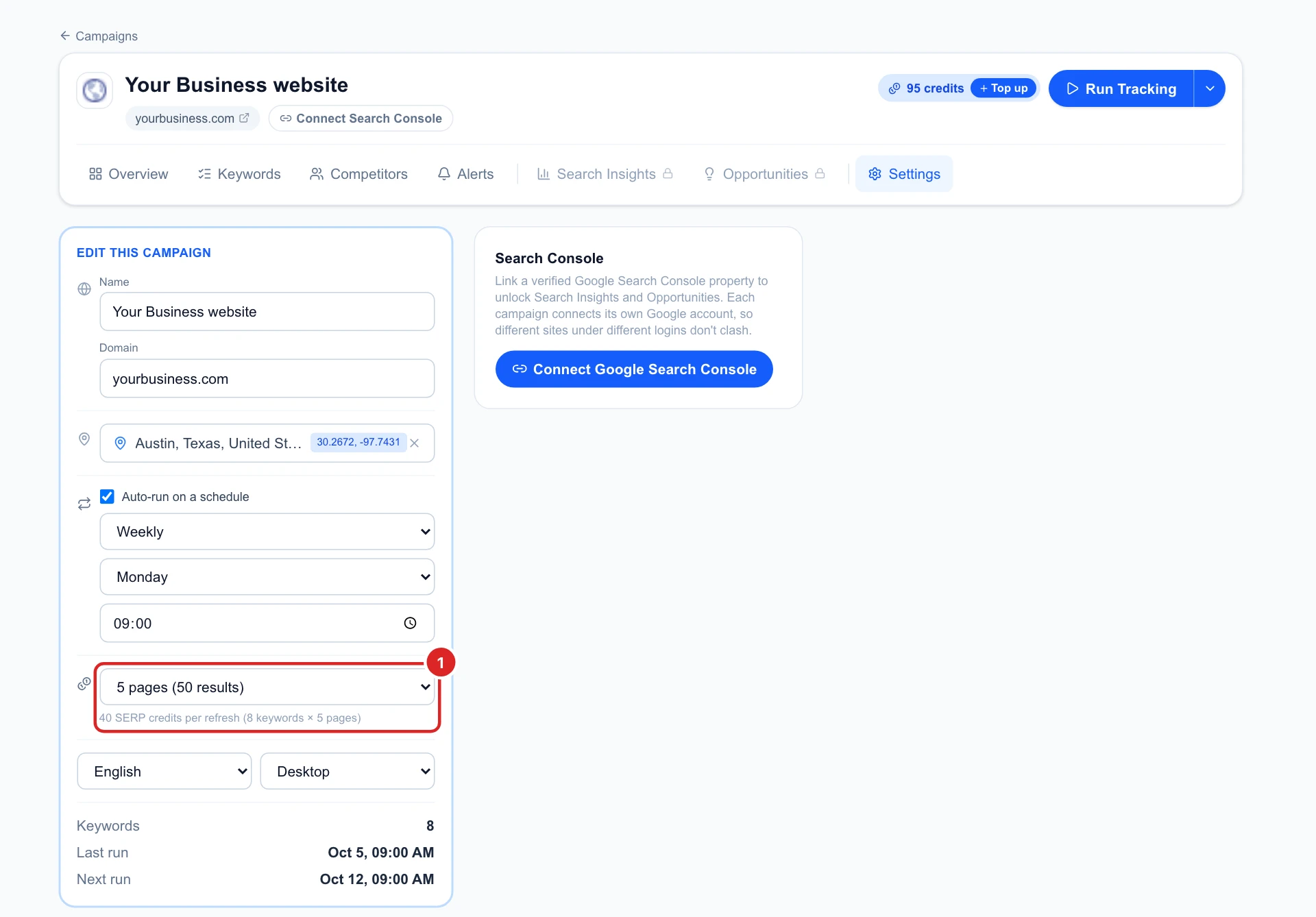
Every time a keyword is checked, it costs its search depth in SERP credits: 1 for the top 10 results, 5 for the top 50 and 10 for the top 100. A whole campaign costs that times its number of keywords. The campaign’s Settings tab shows the total for one run under the search depth: here 8 keywords × 5 pages = 40 SERP credits.
- Credits are spent on each scheduled run, and when you click Run Tracking or run selected keywords by hand.
- Everything else uses no credits: creating campaigns, adding keywords, opening Overview, Keywords and Competitors, and the Search Console tabs.
- Failed checks are refunded: if a run can’t finish, its credits go back to your balance.
See your balance on the campaign
The blue button next to Run Tracking shows how many SERP credits you have left, top-ups included. Click it for the details.

Check your monthly allowance
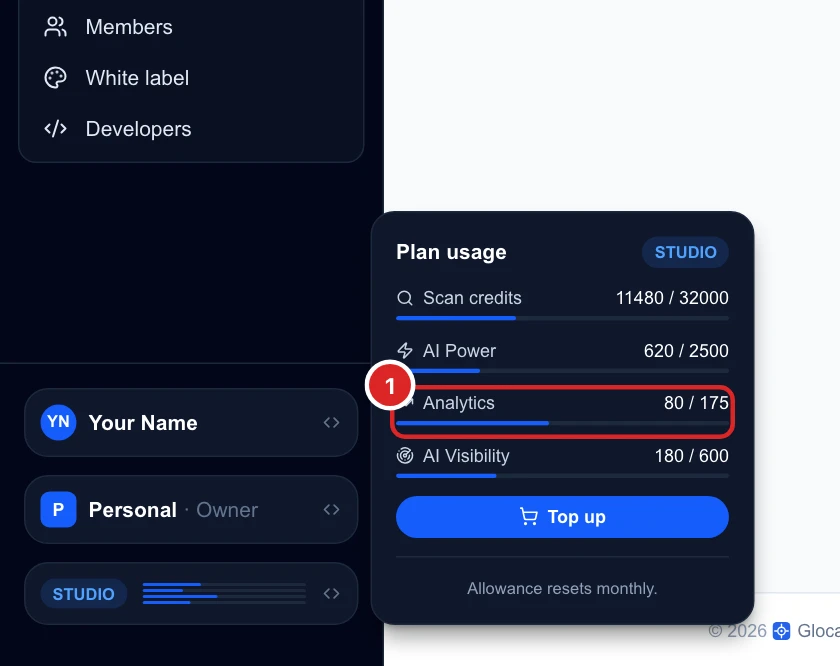
Click your plan badge at the bottom of the sidebar. Plan usage shows the SERP credits used this month out of your allowance, on the Analytics line. Here 80 of 175: two weekly runs of 40.
Every paid plan includes Analytics, with a monthly allowance of SERP credits:
- Starter: 2 campaigns, 40 SERP credits a month.
- Basic: 4 campaigns, 85 SERP credits a month.
- Studio: 8 campaigns, 175 SERP credits a month.
- Agency: 15 campaigns, 260 SERP credits a month.
Read the Analytics billing page
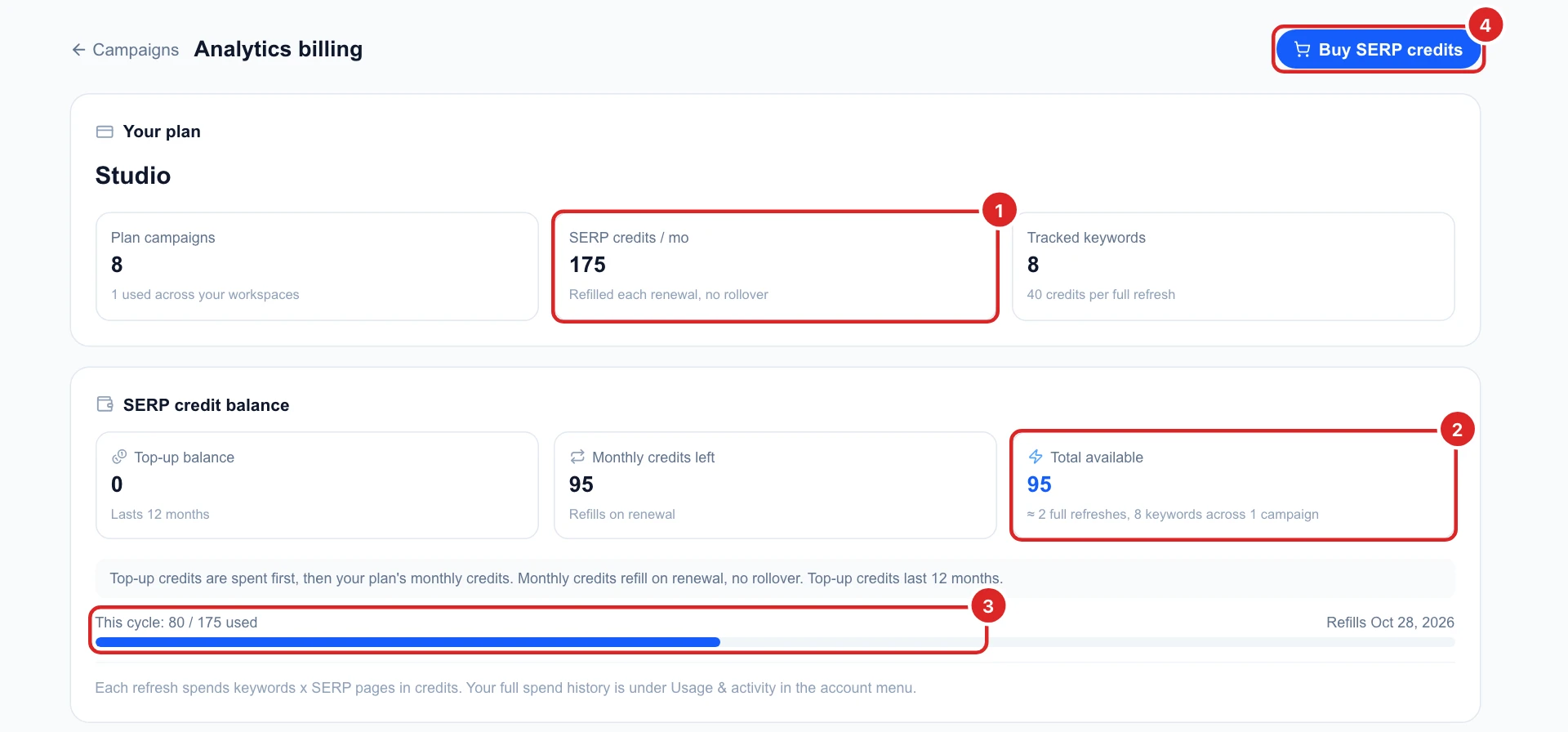
The credits button on a campaign opens Analytics billing, with everything in one place:
- SERP credits / mo: your plan’s allowance. It refills on your renewal date and unused credits don’t roll over.
- Total available: your top-up balance plus what’s left of this month, and roughly how many more full runs of all your campaigns that pays for.
- This cycle: how much you have used and the date it refills.
- Buy SERP credits takes you to the top-up packs.
Plan a campaign that fits your plan
Before you add keywords or pick a schedule, do the sum: credits per run × runs per month.
- 8 keywords × 5 pages, weekly: 40 a run, 160 to 200 a month (4 or 5 runs). Studio’s 175 covers most months.
- The same, daily: 40 a run, about 1,200 a month. That needs top-ups.
- 8 keywords × 1 page, weekly: 8 a run, 32 to 40 a month. That fits even Starter.
The cheapest lever is the search depth. If your site already ranks on the first page for most keywords, 1 page (top 10) is often enough. Keep 5 or 10 pages for new keywords you want to see climb from far down.
Buy more with a top-up
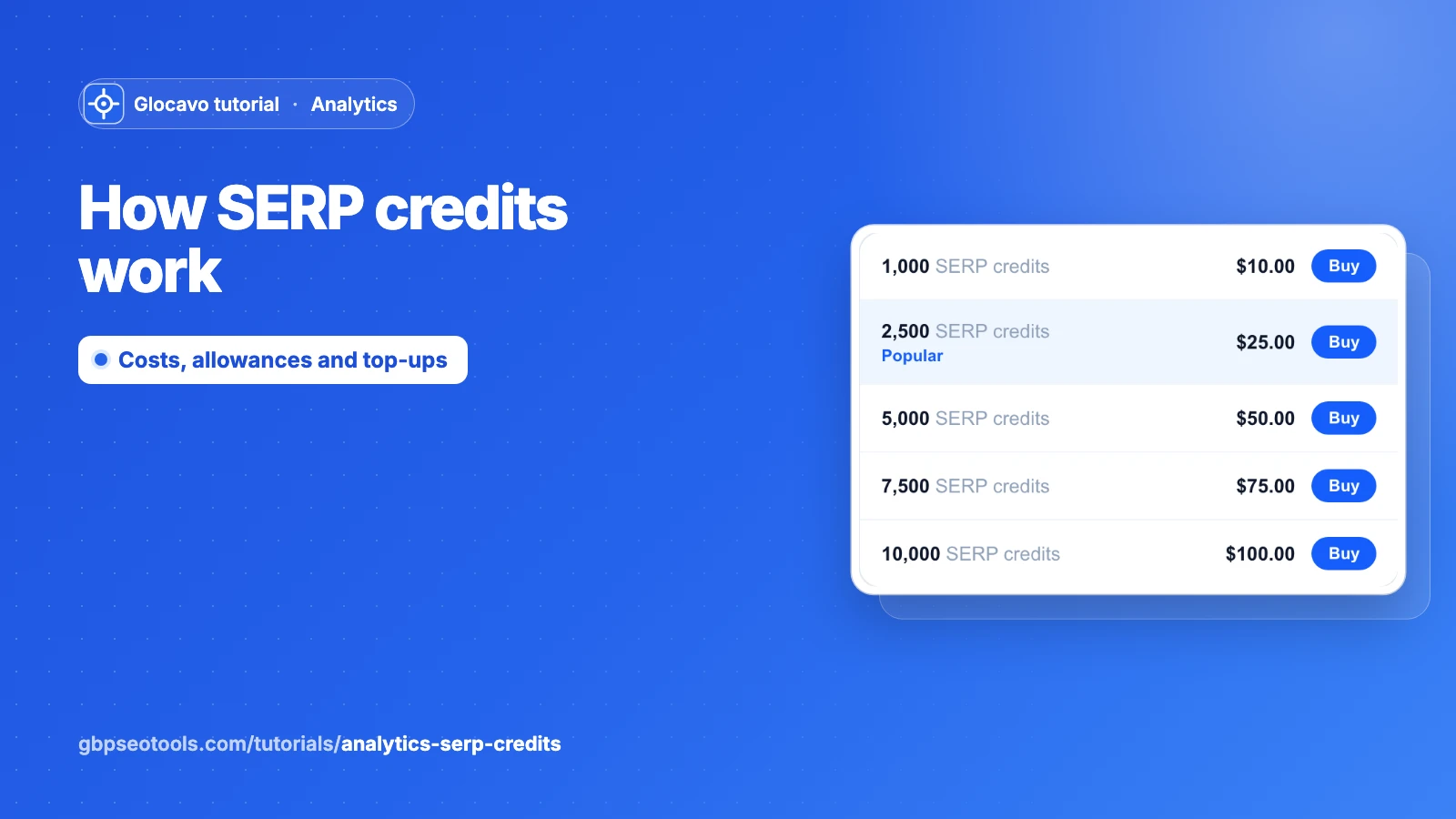
Go to Billing & plans, open the Top-ups tab and pick a pack under SERP credits top-ups: from 1,000 credits for $10 to 10,000 for $100.
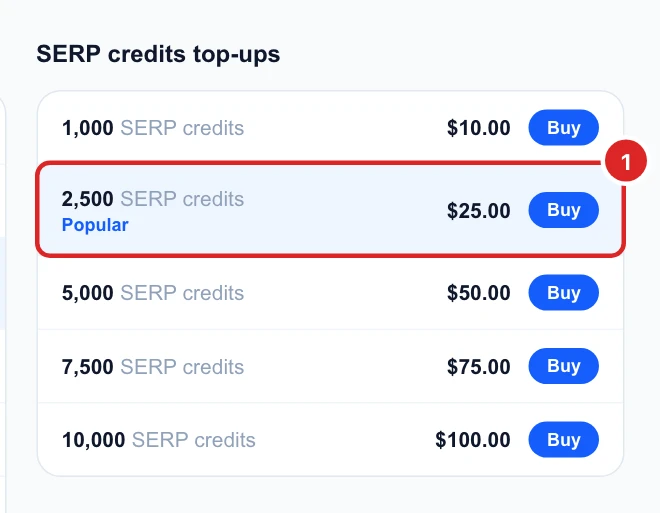
- Top-up credits are spent first, before your monthly allowance.
- They last 12 months from the day you buy them, across every month in between.
- Only the workspace owner can buy them.
Know what happens when you run out
- Scheduled runs are skipped until you have credits again, and the campaign moves on to its next date. Nothing is lost: your keywords and ranking history stay.
- Run Tracking shows You’ve used all your SERP credits for this billing period.
- Emails warn you first, when you have about 15% and again 5% left, so you can top up in time.
Moving to the Free plan locks your campaigns: they stop running but nothing is deleted, and upgrading again unlocks them exactly as they were.
See where your credits went
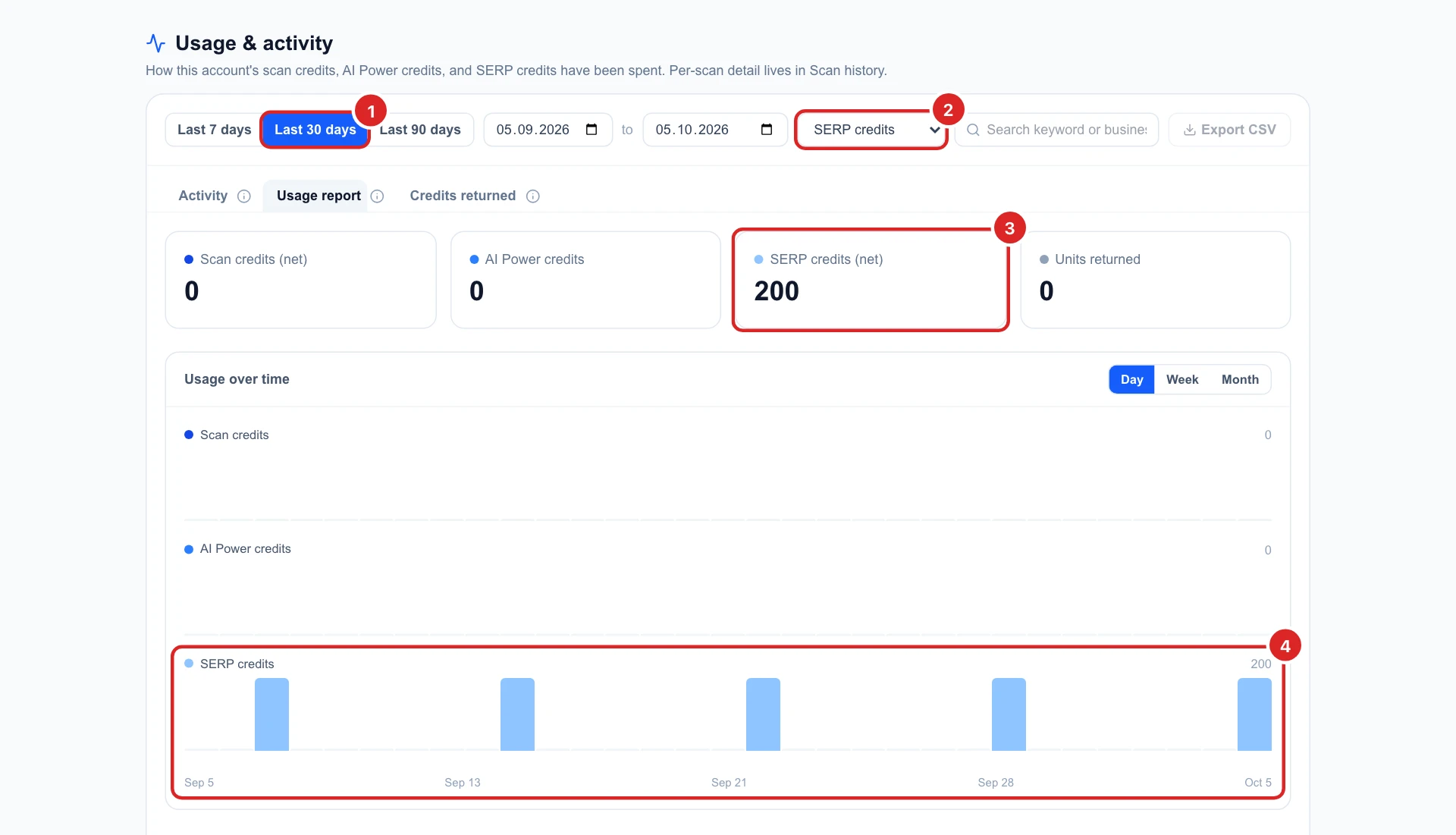
Open Usage & activity from the account menu, pick a period and choose SERP credits in the pool filter. The Usage report tab shows the total and a bar for each day with a run. The Activity tab splits it by website.
Decide what to do next
- Check Total available against the number of runs left before your renewal date.
- Lower the search depth or the schedule on campaigns that don’t need it, in their Settings.
- New to Analytics? Start with your first campaign.
- The Google Maps rank tracker has its own balance, see how scan credits work.